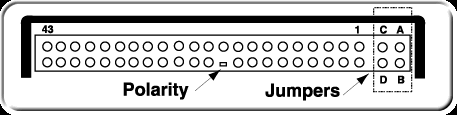
Toshiba’s 2.5″ hard disk drives can be configured as either master or slave units. Master configuration is used for all single drive applications, and master or slave configuration (only one of each per port) is used for two drive applications. Use the information in the following tables for information on how to set Master/Slave jumpers.
Jumper settings for Toshiba PATA drives
The following jumper information applies to Toshiba’s current line of Hard Disk Drives:
Master configuration is obtained by setting jumpers B, C & D open (no jumper). Slave configuration is obtained by setting jumpers C-D. When B-D jumper is installed, the drive is configured as cable select. If pin 28 = Low, the drive is master. If pin 28 = High, the drive is slave.
| Jumper | P28 | Drive |
| No Jumper | — | Master Drive |
| C-D Jumper | — | Slave Drive |
| B-D jumper | LOW | Master Drive |
| B-D Jumper | HIGH | Slave Drive |
| Prohibit A-B Jumper | — | — |
| Prohibit A-C Jumper | — | — |