
 There are 3 ways to check your BIOS version easily:
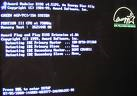
- Monitor Display:
Most PCs display the BIOS version upon initial boot up. Watch the monitor as the system boots up. The BIOS information is frequently one of the first things to appear. Press the Pause/Break key during this display to freeze the screen so that you can make note of the BIOS version number. - Motherboard Model Number:
Many vendors post lists of the BIOS version provided with various system models on their corporate web sites. - Software Utilities:
Use a software based reporting utility, such as Belarc Advisor or others.