
Reason 2: Incorrect jumper settings on the drive
Serial ATA: If you have a 3.0 Gbit/sec SATA drive that is not being detected by your 1.5 Gbit/sec SATA controller, or it causes your system to lock up when connected to a 1.5 Gbit/sec SATA controller, you may need to jumper your 3.0 Gbit/sec SATA drive to the slower speed of 1.5 Gbit/sec for the system to recognize it properly.
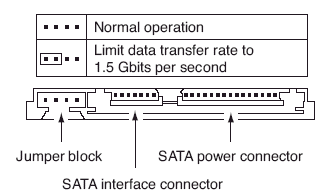
Jumper settings for Seagate SATA drives
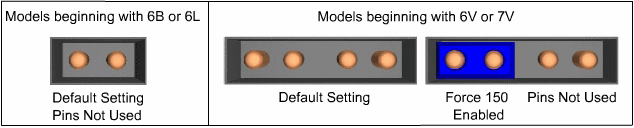
Jumper settings for Maxtor-brand SATA drives
ATA: It is recommended that all Seagate ATA hard discs supporting the Cable Select jumper option be configured as Cable Select. If your computer system was built prior to October 1998 and does not support UDMA 66 or greater you will be required to use the Master/Slave jumper settings.
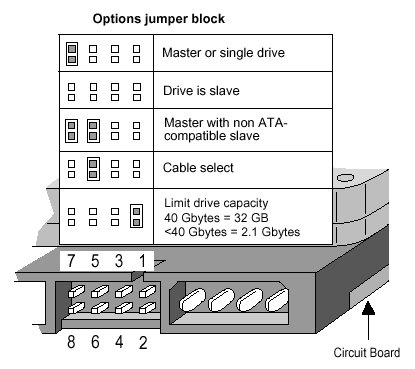
Jumper settings for Seagate ATA drives
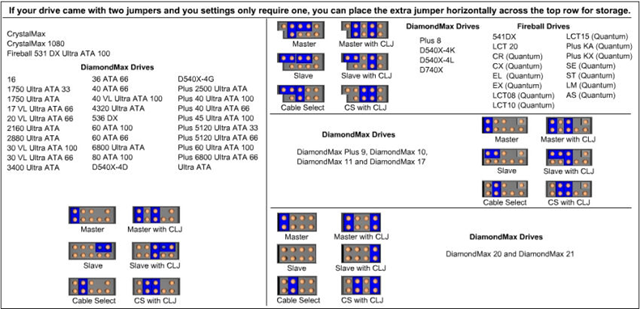
Jumper settings for Maxtor-brand ATA drives
When using Cable Select jumper settings on your ATA drive, all devices connected to the UDMA cable must also use the Cable Select setting. The cable decides master/slave device detection when the cable select jumper settings are used.