
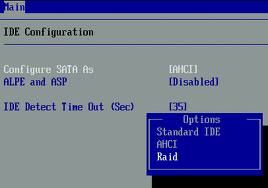
 AHCI (Advanced Host Controller Interface) is present on newer Intel chipsets. AHCI mode is enabled in the BIOS where 3 settings are commonly available: IDE, AHCI, and RAID. The last two (AHCI and RAID) require a floppy disk with the driver that can be introduced into the operating system installation through F6. Otherwise, the hard disks won’t be detected.
AHCI mode has 3 main advantages:
- Supports NCQ (Native Command Queuing) allowing SATA drives to accept more than one command at a time and dynamically reorder the commands for maximum efficiency.
- Supports hot plugging of devices.
- Supports staggered spin ups of multiple hard drives at boot time.
When it comes to performance, there really isn’t a big difference in using AHCI.
Note: If you installed Windows in IDE mode (which means that you didn’t use F6 and supply a driver disk), then simply changing the BIOS setting to AHCI mode and rebooting will cause Windows to fail and will require a repair install. Most people are advising to reinstall Windows if you want AHCI enabled. (More information on AHCI)

