Articles

Glossary of Western Digital Hard Disk Drive (Letter F)

FAT
Western Digital Hard Disk Drive File allocation table. A data table stored at the beginning of each partition on a disk and used by the operating system to determine which sectors are allocated to each file and in which sequence.

FAT32
A file allocation table system with a maximum file transfer of 4 GB and a maximum partition size of 32 GB.

FC
Fibre channel. The general name given to an integrated set of standards being developed by an ANSI-approved X3 group. This set of standards defines new protocols for flexible information transfer. Fibre channel supports three topologies: point-to-point, arbitrated loop, and fabric.

FC-AL
Fibre channel-arbitrated loop. A serial storage interface designed for high-end applications. A subset of FC network systems interconnection.

FDB
Fluid dynamic bearings. A design that incorporates a layer of lubricant instead of ball bearings in a hard drive spindle motor, thus providing increased storage capacity, non-operational shock resistance, speed control, robust shipping and handling, and improved acoustics.

FDISK
A software utility that partitions a hard drive.

Femto slider
Form factor in which the read/write head is mounted on the small, lightweight femto slider which allows the head to move more quickly from track to track on the disk.

fetch
The process of retrieving data.

FFS
Free-fall sensor. As an added layer of protection, if the drive (or the system it’s in) is dropped while in use, WD’s free-fall sensor detects that the drive is falling and, in less than 200 milliseconds, parks the head off the disks to help prevent damage and data loss.

FireWire 400
FireWire400 supports data transfer rates up to 400 Mb/s.

FireWire 800
FireWire 800 has a maximum data transfer rate of 800Mb/s. It is backward-compatible with FireWire 400 using an optional adapter.

FireWire®
This high-speed serial bus, also known as IEEE 1394, provides a non-proprietary, high-performance method of interconnecting digital devices.

firmware
Permanent instructions and data programmed directly into the circuitry of read-only memory for controlling computer operations.

FIT
Functional integrity testing. A suite of tests WD performs on all its drive products to ensure compatibility with different hosts, operating systems, adapters, application programs, and peripherals. This testing is performed before a product is released to manufacturing.

flash drive
Compact, portable device that works in a similar way to a hard drive.

flash memory
A special type of portable electronic storage device used for easy and fast information storage in such devices as external hard drives and digital cameras. Examples of flash memory include PCMCIA cards and memory cards for video game consoles.

FlexPower™
Connector technology that accepts power from both industry-standard and new SATA power supplies.

flow control
is the process of managing the rate of data transmission between two nodes to prevent a fast sender from outrunning a slow receiver.

form factor
An industry standard term for the physical and external dimensions of a device.

format
A process that prepares a hard drive to store data.

formatted capacity
The actual capacity available to store data in a mass storage device. The formatted capacity is the gross capacity minus the capacity used by overhead (formatting).

FTP
File Transfer Protocol. A network protocol used to transfer data from one computer to another through a network. FTP is a popular choice for exchanging files independent of the operating systems involved.

full-duplex
A communication protocol that permits simultaneous transmission in both directions.

Glossary of Western Digital Hard Disk Drive (Letter F) Read More »

Most Popular Internal Hard Drives on Amazon.com

Internal Hard Drives A hard disk drive (hard disk, hard drive, HDD) is a non-volatile storage device for digital data. It features one or more rotating rigid platters on a motor-driven spindle within a metal case. Data is encoded magnetically by read/write heads that float on a cushion of air above the platters.

Hard disk manufacturers quote disk capacity in SI-standard powers of 1000, wherein a terabyte is 1000 gigabytes and a gigabyte is 1000 megabytes. With file systems that measure capacity in powers of 1024, available space appears somewhat less than advertised capacity.

The first HDD was invented by IBM in 1956. They have fallen in cost and physical size over the years while dramatically increasing capacity. Hard disk drives have been dominant device for secondary storage of data in general purpose computers since the early 1960s. They have maintained this position because advances in their areal recording density have kept pace with the requirements for secondary storage. Form factors have also evolved over time from large standalone boxes to today’s desktop systems mainly with standardized 3.5″ form factor drives, and mobile systems mainly using 2.5″ drives. Today’s HDDs operate on high-speed serial interfaces, i.e., Serial ATA (SATA) or Serial attached SCSI (SAS).

The presentation of an HDD to its host is determined by its controller. This may differ substantially from the HDDs native interface particularly in mainframes or servers.

Popular Manufacturers: Western Digital, Seagate

Internal Hard DrivesWestern Digital 2 TB Caviar Green SATA Intellipower 64 MB Cache Bulk/OEM Desktop Hard Drive WD20EARSList Price: $159.99
Price on Amazon.com: $119.99
Shipping: Free Standard Shipping (3-5 days)
Model number: WD20EARS
Internal Hard DrivesSeagate Barracuda 7200 1.5 TB 7200RPM SATA 3Gb/s 32MB Cache 3.5 Inch Internal Hard Drive ST31500341AS-Bare DriveList Price: $199.99
Price on Amazon.com: $79.99
Shipping: FREE with Super Saver Shipping
Model number: ST31500341AS
Internal Hard DrivesWestern Digital Scorpio Blue 500 GB Bulk/OEM Hard Drive 2.5 Inch, 8 MB Cache, 5400 RPM SATA II WD5000BEVTList Price: $81.99
Price on Amazon.com: $54.99
Shipping: FREE with Super Saver Shipping
Model number: WD5000BEVT
Internal Hard DrivesWestern Digital Caviar Blue 500 GB Bulk/OEM Hard Drive 3.5 Inch, 16 MB Cache, 7200 RPM SATA II WD5000AAKSList Price: $122.93
Price on Amazon.com: $44.95
Shipping: FREE with Super Saver Shipping
Model number: WD5000AAKS
Internal Hard DrivesWestern Digital 2 TB Caviar Black SATA 7200 RPM 64 MB Cache Bulk/OEM Desktop Hard Drive WD2001FASSList Price: $320.99
Price on Amazon.com: $174.95
Shipping: FREE with Super Saver Shipping
Model number: WD2001FASS
Internal Hard DrivesWestern Digital Caviar Black 1 TB Desktop Hard Drive (WD1002FAEX)List Price: $119.99
Price on Amazon.com: $89.99
Shipping: Free Standard Shipping (3-5 days)
Model number: WD1002FAEX
Internal Hard DrivesWestern Digital 320 GB Scorpio Black SATA 7200 RPM 16 MB Cache Bulk/OEM Notebook Hard Drive WD3200BEKTList Price: $82.99
Price on Amazon.com: $59.99
Shipping: FREE with Super Saver Shipping
Model number: WD3200BEKT
Internal Hard DrivesWestern Digital 1 TB Caviar Green SATA Intellipower 64 MB Cache Bulk/OEM Desktop Hard Drive WD10EARSList Price: $90.99
Price on Amazon.com: $64.99
Shipping: FREE with Super Saver Shipping
Model number: WD10EARS
Internal Hard DrivesSeagate Barracuda 7200 1 TB 7200RPM SATA 3Gb/s 32MB Cache 3.5 Inch Internal Hard Drive ST31000528AS-Bare DriveList Price: $135.99
Price on Amazon.com: $69.95
Shipping: FREE with Super Saver Shipping
Model number: ST31000528AS

Most Popular Internal Hard Drives on Amazon.com Read More »

Deals of the Day: Hard Disk Drives

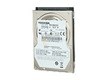
TOSHIBA MK3265GSX 320GB 5400 RPM 8MB Cache 2.5" SATA 3.0Gb/s Internal Notebook Hard Drive -Bare Drive 1. TOSHIBA MK3265GSX 320GB 5400 RPM 8MB Cache 2.5″ SATA 3.0Gb/s Internal Notebook Hard Drive -Bare Drive

Model: MK3265GSX
Shipping: Free
Price: $42.99

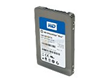
WD SiliconEdge Blue SSC-D0128SC-2100 2.5" 128GB SATA II MLC Internal Solid State Drive (SSD) – OEM 2. WD SiliconEdge Blue SSC-D0128SC-2100 2.5″ 128GB SATA II MLC Internal Solid State Drive (SSD) – OEM

Model: SSC-D0128SC-2100
Shipping: Free
Price: $199.99

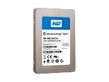
WD SiliconEdge Blue SSC-D0064SC-2100 2.5" 64GB SATA II MLC Internal Solid State Drive (SSD) – OEM 3. WD SiliconEdge Blue SSC-D0064SC-2100 2.5″ 64GB SATA II MLC Internal Solid State Drive (SSD) – OEM

Model: SSC-D0064SC-2100
Shipping: Free
Price: $124.99

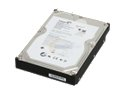
HITACHI HDS721050CLA362 (0F10381) 500GB 7200 RPM 16MB Cache SATA 3.0Gb/s 3.5" Internal Hard Drive -Bare Drive 4. HITACHI HDS721050CLA362 (0F10381) 500GB 7200 RPM 16MB Cache SATA 3.0Gb/s 3.5″ Internal Hard Drive -Bare Drive

Model: HDS721050CLA362 (0F10381)
Shipping: Free
Price: $39.99

Seagate Barracuda LP ST32000542AS 2TB 5900 RPM 32MB Cache SATA 3.0Gb/s 3.5" Hard Drive -Bare Drive 5. Seagate Barracuda LP ST32000542AS 2TB 5900 RPM 32MB Cache SATA 3.0Gb/s 3.5″ Hard Drive -Bare Drive

Model: ST32000542AS
Shipping: Free
Price: $109.99

Deals of the Day: Hard Disk Drives Read More »

Glossary of Western Digital Hard Disk Drive (Letter E)

EasyLink™
A WD utility that allows users to locate and set up a drive as a local drive from any computer quickly and easily.

ECC
Error correction code. A mathematical algorithm that detects and corrects data errors.

ECC on the fly
A hardware correction technique that corrects errors in the read buffer before host transfer and without any performance penalties. These error corrections are invisible to the host system because they do not require assistance from drive firmware.

EESA
Enterprise extensions S.M.A.R.T. accessed. An expanded command set that provides SCSI-like control for server environments, optimizing operation and performance when drives are used in vibration-prone multidrive systems such as rack-mounted servers.

EIDE
Enhanced Integrated Drive Electronics. See PATA

embedded servo control
A design that generates accurate feedback to the head position servo system without requiring a full data surface, because servo control data is stored on every surface (unlike dedicated servo control).

encoding
A process of modifying data patterns before writing them onto a disk surface.

enterprise
Series of computers employed largely in high-volume and multiuser environments such as servers or networking applications; may include single-user workstations required in demanding design, engineering, and audio/video applications.

error log
A record that contains error information.

error rate
The number of errors of a given type that occur when reading a specified number of bits.

ESD
Electrostatic Discharge. Rapid discharge of static electricity that can damage integrated circuits in computers and communications equipment. ESD prevention is aided by such items as ESD wrist straps and ESD hard drive bags.

Ethernet
A standard method of connecting computers to a Local Area Network (LAN) using coaxial cable, twisted pair, and fiber optic wiring standards.

extended partition
A partition on a disk where non-system files (other than DOS or operating system files) can be stored. Multiple partitions can be created on a hard disk: one primary partition and one or more extended partition(s). Operating system files must reside on the primary partition; logical drives can be created on an extended partition.

Glossary of Western Digital Hard Disk Drive (Letter E) Read More »

Glossary of Western Digital Hard Disk Drive (Letter D)

Data Lifeguard Tools™
A set of software utilities that work in conjunction with embedded Data Lifeguard features to make hard drive installation, drive management diagnostics, and repair simple and worry-free.

Data Lifeguard™
A WD-exclusive data reliability feature that automatically detects, isolates, and repairs problem areas on a hard drive and prevents data loss.

data synchronizer
An electronic circuit that uses a clock signal to synchronize data.

data transfer rate
The rate that digital data transfers from one point to another, expressed in bits per second or bytes per second. Data transfer rate to disk (internal disk transfer rate) is expressed in megabits per second (Mb/s). Data transfer rate from buffer to host (transfer of buffered data) is expressed in megabytes per second (MB/s).

database
A collection of data stored on a computer system medium, such as a hard drive, CD-ROM, etc., that can be used for more than one purpose.

dedicated landing zone
The designated radial zone of a disk, usually at the inner portion, where heads are stored to avoid contact with data cylinders when power to the drive is off.

defect free
A term to describe recording surfaces that have no detectable defects.

defect management
A general method of eliminating data errors on a recording surface by mapping out known media defects. Defective areas are rendered inaccessible, so that subsequent operations write data only to non-defective locations.

desktop
A personal computer sized to fit on or under your desktop. WD internal hard drives are designed to fit into a desktop PC.

DHCP
Dynamic host configuration protocol. A protocol for assigning IP addresses to devices on a network. With dynamic addressing, a device can have a different IP address each time it connects to the network. In some systems, the device’s IP address even changes while it is still connected. DHCP also supports a mix of static and dynamic IP addresses.

differential SCSI
An electrical signal configuration that uses pairs of lines for data transfer, primarily in applications requiring cable lengths up to 82 feet (25 meters).

disk
A rigid platter, usually constructed of aluminum or Mylar® and with a magnetic surface that allows the recording of data.

disk controller
A chip or circuit that controls data transfers between disk and buffer. See also disk drive controller and interface controller.

disk drive controller
Hard disk drive controller electronics, which include the disk controller and interface controller. See also disk controller and interface controller.

disk transfer rate
Speed at which data is transferred to/from disk (platter); a function of the recording frequency. Typical units are bits per second (b/s), or bytes per second (B/s). A hard drive disk transfer rate increases from the inner diameter to the outer diameter of the disk.

distribution channel
Electronics distributors and retail chains that deliver electronic goods to end users through value-added resellers and retail stores.

DLNA
Digital Living Network Alliance. The group of consumer electronics, computing industry, and mobile device companies that sets standards for product compatibility, thus enabling users to share content in their home.

DMA
Digital Media Adapter. A device that gives home entertainment devices the ability to transfer media such as music, photos, and videos to and from other devices over the network.

DMA
Direct memory access. A process that transfers data directly to/from main memory, without passing through a CPU. DMA improves speed and efficiency by allowing a system to continue CPU processing while transferring data to/from a hard drive.

DNS
Domain Name Service. A system that allows a network name server to translate text host names into numeric IP addresses used to uniquely identify any device connected to the Internet.

DOS
Disk Operating System. A 16-bit operating system developed by Microsoft that was formerly the standard operating system for IBM-compatible PCs. DOS does not support multiple users or multitasking.

DPP
Data Path Protection. A feature that prevents possible electronic failures by preventing corruption of data on the hard drive.

DSA
Dual Stage Actuator. DSA is an improvement to the overall capability of the Servo system. It provides a mechanical benefit to improve the response time (higher bandwidth capability) of moving and maintaining the head position over the media.

dual interface
An external storage device with two interfaces available for connection to the computer.

dual-option backup
The ability to back up a drive either manually (on demand) or automatically.

DuraStep Ramp™
WD technology that locks the heads of a data disk to provide additional shock protection.

duty cycle
The time a component, device, or system is actually operating as compared to the time it is powered on; can be expressed as a ratio or percentage.

DVR
Digital video recorder.

Glossary of Western Digital Hard Disk Drive (Letter D) Read More »

Too slow when copying files?

Too slow to copy files The problem is caused by either the user’s PC not supported a USB 2.0 port or
the product not being connected to a USB 2.0 port.

When connected to a USB 1.1, it has a transmission speed of about 1 MB/s which is
very slow.

To solve the problem:

  • Install a USB 2.0 driver
  • Connect to a different port
  • Purchase and use a separate port if the PC is not equipped with a USB 2.0 port.

Also the speed can be decreased when using a USB 1.1 cable that is not shielded.
Use the cable provided with the product or purchase a USB 2.0 cable.

Checking whether USB 2.0 is available

On Control Panel▶Administrative Tools▶Computer Management▶Device Manager click and expand the + sign of the ‘Universal Serial Bus Controller’ on the right window. If ‘USB2 Enhanced Host Controller’ is installed as shown below, USB 2.0 is available for use.

When it is not installed, either check or try following instruction:

1. Install Chipset Driver of Main Board.

2. Re-install the USB Mass Storage Device Driver.
Connect the external hard drive.Then on StartControl PanelSystemHardware▶Device Manager, right click the USB Mass Storage Device of Universal Serial Bus controllers and select ‘Properties’.

– When ‘USB Mass Storage Device Properties’ window opens, click Uninstall on Driver tab then click OK when the pop-up opens.

– Disconnect, then reconnect the external hard drive.
When ‘Found New Hardware’ window appears on the bottom right side, wait until the completion message is displayed. (It takes a while to automatically install the driver.)

– Check whether the Samsung External Hard Drive appears on the Disk Drivers of Device Manager.

– USB Drivers are installed separately on each port, so the above process should be repeated as many times as needed by connecting the external disk driver to each USB port.

3. Checking EHCI Mode of BIOS Setup
In case there is an item that sets EHCI mode in PC’s BIOS Setup, check whether the item is Enabled or not.

4. If the problem persists even after trying the above instruction, refer to the link in below or upgrade each OS to the latest version.

– USB 2.0 Support in Windows 2000
– USB 2.0 Support in Windows XP

Too slow when copying files? Read More »

Solutions to ‘Safety Remove Hardware’ related problems

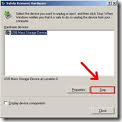
Safety Remove Hardware To prevent data loss or physical damage of the external hard drive, it’s better to perform ‘Safely Remove Hardware’.
When using the ‘Safe To Remove Hardware’, the icon may disappear or other errors could occur. Following are the solutions to those problems.

1. When ‘Safely Remove Hardware’ icon disappears

Windows 2000: The problem can be solved through the HotFix provided by Microsoft. Download and run the HotFix then re-boot.

Windows XP:
a) Restore Customize Notifications : Enables the icon display.

  1. Right click the ‘Start’ button then select Properties.
  2. After selecting Taskbar tab Notification area Hide inactive icons, click Customize.
  3. When ‘Customize Notifications’ window is displayed, either find ‘Safely Remove Hardware’ then select ‘Always show’ or click ‘Restore Defaults’ button on right bottom side then check.

b) Checking the USB Device Registration Information: ‘Safely Remove Hardware’ can be selected directly.

  1. On Start ▶ Control Panel ▶ System ▶ Hardware ▶ Device Manager, double click the ‘Disk Drive’.
  2. When ‘Properties’ window is displayed, click ‘Safely Remove Hardware’ in Optimize for Performance section in Policies tab then ‘Safely Remove Hardware’ window pops up.

Windows Vista: The problem occurs due to incorrect device driver setting and should be solved by updating to the latest Service Pack.

2. External Hard Drive is not visible when clicking the ‘Safely Remove Hardware’ icon.

Windows XP: When connected through a USB hub, the problem occurs because the OS recognizes the external hard drive as a non-portable device and also not as a device to remove.Thus it does not display the drive. The problem should be solved by shutting down the PC before removing the USB device. The problem should not occur when using the USB port of the system instead of using the USB hub.

3. ‘Safe To Remove Hardware’ message does not appear when clicking the ‘Safely Remove Hardware’ icon.

Windows XP: The problem should be solved by updating to the latest Service Pack.

4. Even after running the ‘Safely Remove Hardware’, the external hard drive does not stop operating.

Windows Vista: The problem could be related to the system feature of continually supplying power to the external hard drive. It can be solved by shutting down the system while the drive is being connected then disconnecting it after the shut down.

5. After right clicking the external hard drive in Windows Explorer then running the ‘Safely Remove Hardware’, data loss occurs.

Windows Vista: The above menu is not available in XP when right clicking the mouse. The problem could occur when using the NTFS file system and can be solved by updating to the latest Service Pack.

Note: If the external drive is connected by the eSATA interface, the icon may not
appear in the system tray.

Solutions to ‘Safety Remove Hardware’ related problems Read More »

How to restore the backup data using Samsung Auto Backup?

The restoration function of the Samsung Auto Backup is useful when original data is
damaged/lost due to system malfunction or reinstallation of OS or when copying the
same data to a new system.

Perform the restoration in the following order.

1. Running the AutoBackup Restore Setting Wizard (Download Now)

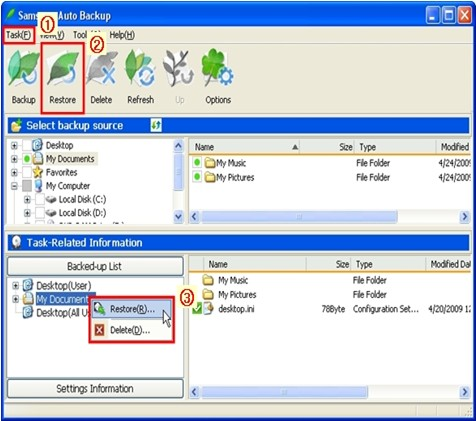
Click TaskRestore or the ‘Restore’ button or select folders or files to restore.
Right click the mouse as seen in the figure then select ‘Restore’ in the pop up menu displayed.

(After selecting folders or files to restore in the Backed-up List, the ‘Restore’ menu becomes activated.)

Samsung Auto Backup

2. On the displayed window, select the Restore location then click Next.

Select the ‘Original Location’ or ‘New Location’.

3. After setting the Restore time and process options of Restore duplicate files, click Next.

a) Set Restore time
Select ‘Most recent time of backup’ or ‘Time of backup most close to a specific time’.

b) Restore duplication files
Select ‘Restore only files that are different from source files’ or ‘Restore all files’.

4. After selecting the type of file to restore, click Complete.

Assign File grouping and Extension to either restore or exclude from the restoration.

When ‘Finish’ is clicked without any setting, all types of selected files are restored.

5. The restoration is complete.

(At the beginning of the restoration, the ‘Backup Engine’ window appears then
continues the  restoration. If the same files are in the folder to restore, they are
excluded from the restoration.)

How to restore the backup data using Samsung Auto Backup? Read More »

How to install a FireWire drive in Mac OS X

OS X supports WD FireWire drives without any special software.

FireWire drive If the drive has been working in a prior Mac OS:

  1. Boot the system.
  2. Turn the drive on, leaving the FireWire cable disconnected. Wait 20-30 seconds for the drive to spin up completely and then attach the FireWire cable to the back of the drive.
  3. The drive should mount on the desktop.
  4. To unmount the drive, drag the icon to the trashcan.

If the drive is new:

  1. Boot the system.
  2. Turn the drive on, leaving the FireWire cable disconnected. Wait 20-30 seconds for the drive to spin up completely and then attach the FireWire cable to the back of the drive.
  3. Use Disk Setup in the Disk Utilities folder.
  4. To find Disk Setup, access the Applications folder.
  5. Next, open the Utilities folder.
  6. Click on the Disk Utility icon.
  7. When Disk Utility opens up, you can choose Disk First Aid to test the drive, or select Drive Setup to partition and initialize the drive.

Note: OS 10.0 or 10.1 only supports Firewire hard drives up to 137Gb.

How to install a FireWire drive in Mac OS X Read More »

USB 3.0 adapter card does not show up in Windows after I install it

Problem:
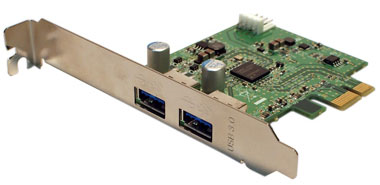
USB 3.0 Host Bus Adapter I installed a USB 3.0 Host Bus Adapter (HBA) card, but it doesn’t show up in Windows, or in the Device Manager.

Cause:
Unknown at this time, but it is likely that the PCI express slot configuration information is not updated unless the system has had it’s power completely removed from the AC source. Even if the system is “shut down”, many components in the system might still be powered and could cause unexpected behavior or damage to the card or system. The best way to ensure that the power is completely off is to unplug the computer from the wall outlet.

Solution:
The PCI express card should not be installed in the system while power is still applied. However, you can shut down the system and unplug it from AC power for 30 seconds, then reconnect the power and restart the system. It should now show up.

USB 3.0 adapter card does not show up in Windows after I install it Read More »

Scroll to Top