Articles

5 Tips for Choosing an External Hard Drive

External Hard Drive External hard drives are great way to back up your favourite photos, videos, music and work documents – especially as they can be stored separately, ensuring your important files remain safe should anything happen to your laptop or computer. If you’ve never bought an external hard drive before then there’s a few pointers here that may help to have on your shopping list before you go and make that final purchase.

1. Buy A Brand
Do yourself a huge favor and buy a brand name that you easily recognize. Sure these may cost a little more than brand but with computer accessories like this you really do get what you pay for. If a Western Digital 1TB external hard drive costs $90 and another brand ITB hard drive costs $70 why do you think that is? Because the company likes you? Because they like making smaller profits? No it’s because it’s a cheaper drive made with inferior parts that’s going to break a lot sooner than you might expect.

The other aspect of sticking with a brand is your warranty. For example Maxtor, Western Digital and Iomega are all reliable companies and well known for their external hard disks. If something goes wrong with your drive you can have it fixed. With brand you’ll probably not even be able to find an email address that you can contact the parent company on. Is saving a few dollars worth that risk?

2. Google It
Whatever brand or model you decide on make sure you do some research before purchasing. Always, always Google the exact brand and model of the drive you’re considering buying. Look for reviews and especially any feedback on how reliable a drive is. You’ll be very surprised to find that some companies have particularly bad reputations in terms of equipment reliability and what’s known as the “click of death” in the external hard drive industry. Spend time in Google checking out your prospective purchase. You’ll be glad that you did.

3. Connectivity
When it comes to external hard drives you’ll need to choose carefully when selecting your connection types. Your external hard drive will support either USB or Firewire. Firewire is the fastest option available at the moment but your computer may not support this. The vast majority of modern computers will, however, feature a USB port.

The next question now is what type of USB port do you have – USB 1.0 or 2.0? If your computer only has a USB 1.0 port then your external hard drive is going to transfer data VERY slowly. USB 2.0 is the minimum you should consider as connection options for both your computer and your external hard drive. If you don’t have a USB 2.0 port (also called HiSpeed USB) on your computer you may need to get a USB 2.0 card fitted.

4. Speed
Now of course we need to talk about speed. The faster your hard drive operates the faster data will get transferred to your computer and vice versa. Without boggling you with computer jargon there’s a couple of technical things you need to include on your shopping list.

Seek time – this needs to be 10ms (milliseconds) or less.
Buffer size – more is better. Get a drive with at least a 4MB buffer.
RPM – higher is better. 5400 RPM as a minimum. 7200 RPM being preferred.
Stick to the above basic pointers and you’ll do just fine.

5. Capacity
This is the simple part of the whole “buying an external hard drive” equation. Buy as much as you can afford. If you can afford 100GB then get it. However if you can afford 200GB then get it. Then again if you scraped together a few dollars more you could afford 300GB then do it.

This isn’t a sales pitch. Far from it. There is simply no such thing as having too much data storage space. The 160GB drive that I have here was filled up in a little under a month. Currently 1TB external hard drive sounds good for my future needs.

Always add 50% to your data storage requirements. Honestly. You’ll thanks yourself within the first 90 days of buying your external drive.

Hopefully now you’ll be better prepared for purchasing your new external hard drive. It’s one of the best purchases you’ll ever make.

5 Tips for Choosing an External Hard Drive Read More »

Glossary of Western Digital Hard Disk Drive (Letter N)

NAS
Network attached storage. Hard disk storage that is set up with its own network address rather than being attached to the computer that is serving network workstation users.

NAT
Network Address Translation. Used in gateway devices that form the boundary between the public Internet and the private LAN. As IP packets from the private LAN traverse the gateway, NAT translates a private IP address and port number to a public IP address and port number, tracking those translations to keep individual sessions intact.

NCQ
Native command queuing. A command protocol implemented only on native SATA hard drives. It allows multiple commands to be outstanding within a drive at the same time. Drives that support NCQ have an internal queue where outstanding commands can be rescheduled and re-ordered dynamically, along with necessary tracking mechanisms for outstanding and completed parts of the workload. NCQ also has a mechanism that allows the host to issue additional commands to the drive while the drive is seeking data for another command.

NetCenter™
Trade name for WD’s first generation external network hard drive.

network computer
A computer with limited data storage capacity that communicates with a central data storage facility such as a server or RAID system.

NFS
NT file system. A file system, designed for Windows® NT, that supports long filenames, security access control, recovery, and other features.

NTFS
NT file system. A file system, designed for Windows® NT, that supports long filenames, security access control, recovery, and other features.

Glossary of Western Digital Hard Disk Drive (Letter N) Read More »

Seagate File Recovery Software

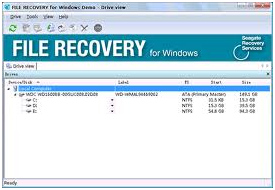
Seagate File Recovery Software Seagate File Recovery is an advanced, easy to use, data recovery and undelete software. It helps you to recover your lost files from local hard disks and other removable media.

Consider using Seagate File Recovery if:

  • You need a fast and affordable data recovery solution.
  • You have accidentally formatted your hard drive.
  • You have experienced data loss due to software malfunctions, viruses or have deleted important files or directories from your Recycle Bin or Trash Bin.

In most cases when files are lost due to crashes, viruses, or other system failures, they can be recovered without having to send your drive to a drive recovery lab. Run Seagate File Recovery as the first step in recovering your lost data.

Seagate File Recovery Main Features:

  • Free trial – try to recover your data before you pay
    You can preview your disc and file content in a simple hexadecimal viewer which tells you if a successful recovery is possible. You’ll know in advance exactly which files can be recovered before you make a purchase.
  • Available for PC and Mac
  • Supports file systems used by Windows and Mac OS (NTFS, FAT16, FAT32, HFS and HFS+)
  • Works on local hard disks and removable media (USB drive, flash memory, etc.)
  • Recovers compressed files
  • File preview (most graphic file types can be previewed to estimate recovery chances)

System Requirements:

Macintosh:

  • An Intel, PowerPC G5, or PowerPC G4 processor
  • Administrator’s rights to run the program
  • At least 512MB of RAM, a mouse, and enough disk space for recovered files, image files, etc.
  • Mac OS X 10.4 or greater

Windows:

  • An Intel or other PC processor
  • Administrator’s rights to run the program
  • At least 512MB of RAM, a mouse, and enough disk space for recovered files, image files, etc.
  • Windows 9x, ME, NT, 2000, XP, Vista, 7

Seagate File Recovery Free Download:

Mac users: Download Seagate File Recovery

Click the “Download Seagate File Recovery” link to download the .dmg file. When the window opens, double-click “Seagate File Recovery.pkg” and follow the installation instructions.

Windows users: Download Seagate File Recovery

Click the “Download Seagate File Recovery” link to download Seagate File Recovery. When the dialogue box pops up, choose “Run” and follow the installation instructions.

Seagate File Recovery Software Read More »

Glossary of Western Digital Hard Disk Drive (Letter M)

imageMagnetic flux
A pattern of magnetic pole directions of bits written on a disk.

Master
The primary drive in a dual-drive configuration. A Master drive by itself (with no Slave) is called a single drive.

MB
Megabyte. WD defines a megabyte as 1,000,000 (one million) bytes.

mechanical latency
A time period, including both seek time and rotational latency. Mechanical latencies are the main hindrance to higher performance in hard drives and are one hundred times greater than electronic (non-mechanical) latencies associated with data transfers. See also rotational latency and seek time.

media
In hard drives, the disks and their magnetic coatings. Sometimes refers only to the coating material.

memory
A device or system capable of storing and retrieving data.

MFM
Multiple frequency modulation. A method of encoding analog signals into magnetic pulses or bits.

MioNet®
WD’s remote computer access service. Adding MioNet to your home or work computer provides secure and instant access from any PC in the world back to your computer. You can use your applications and access and share files on your computer or storage device from anywhere.

mirroring
The process of generating an exact copy of saved data from one drive to another drive within a RAID 1 system. Each drive can be accessed and read separately. A mirrored drive can be removed from a system while the other drive(s) are still active. See also RAID 1.

MP3
MPEG-audio layer 3. A digital audio coding scheme for distributing music over the Internet.

MR head
Magnetoresistive head. MR heads were developed to increase areal density and improve drive performance. These heads use an inductive element for writing data and a separate magnetoresistive element for reading data, rather than traditional inductive thin-film, read/write heads. The read element has a magnetically sensitive material that detects data recorded on the magnetic disk surface. MR head construction results in a stronger signal than that produced by inductive thin-film, read/write heads, which allows reading higher areal density data.

MTBF
Mean time between failures. The average time (expressed in hours) that a component works without failure. This time is calculated by dividing the total number of operating hours observed by the total number of failures. Also, the length of time a user may reasonably expect a device or system to work before an incapacitating fault occurs.

MTTR
Mean time to repair. The average time it takes to repair a drive in the field. Only major subassemblies (the PCB, sealed housing, etc.) are changed in the field; component level repairs are not performed in the field.

multimedia
A simultaneous presentation of data in more than one form, such as by means of both video and audio.

multi-user
A system in information technology that enables more than one user to access data at the same time.

My Book 3.0
Trade name for WD’s initial line of USB 3.0 external hard drives.

My Book®
Trade name for WD external hard drives with a book-shaped enclosure.

My DVR Expander™ eSATA Edition™
WD external device that adds additional storage capacity to a DVR with an enabled eSATA port.

My DVR Expander™ USB Edition™
WD external device that adds additional storage capacity to a DVR with an enabled USB port.

Glossary of Western Digital Hard Disk Drive (Letter M) Read More »

Seagate And Samsung Announce Agreement To Jointly Develop Controller Technology For SSDs

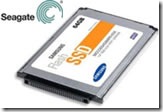
seagate samsung ssd August 12, 2010 – Seagate Technology and Samsung Electronics Co., Ltd., announced that they have entered into a joint development and licensing agreement.
Under the agreement, the two companies will jointly develop and cross-license related controller technologies for solid state drive (“SSD“) storage devices to attain the high levels of performance, reliability and endurance demanded by enterprise storage applications.

The joint development effort builds on the existing SSD capabilities of each company while combining Seagate’s leadership in enterprise storage technology with Samsung’s flash memory technology specific to 30 nanometer-class MLC NAND. The jointly developed controller will be utilized in Seagate’s enterprise-class SSDs.

“Seagate has long recognized that solid state technology has an important role to play in the comprehensive solutions the storage industry will deliver today and in the future, particularly in the enterprise market, today’s agreement with Samsung will help us bring a compelling set of SSD innovations to the enterprise storage market, with benefits that range from enhanced performance, endurance and reliability to cost and capacity improvements. Overall, this agreement with Samsung strengthens our SSD solutions strategy, and positions Seagate well as global demand for storage continues on its strong growth path.” – said Steve Luczo, Seagate chairman, president and CEO.

“We are pleased to be jointly developing a high-performance SSD controller with Seagate for the enterprise storage market, our green memory solution is designed to enable more energy-efficient server applications, which is expected to increase the use of NAND-based SSD storage in enterprise applications.” – said Dr. Changhyun Kim, senior vice president and Samsung Fellow, Memory product planning & application engineering, Semiconductor Business, Samsung Electronics.

Seagate And Samsung Announce Agreement To Jointly Develop Controller Technology For SSDs Read More »

Glossary of Western Digital Hard Disk Drive (Letter J,K,L)

jumper
An electrically-conductive component placed over pairs of pins extending from the circuit board on the hard drive jumper block to connect them electronically. Jumper placement is one method of designating a hard drive as Master or Slave.

KB
Kilobyte. Usually, this is a unit of 1000 bytes. In computer memory, which is partitioned into sizes that are a power of 2, a kilobyte is equal to 210 or 1024 bytes.

LAN
Local area network. A system in which computer users in the same company or organization are linked to each other and often to centrally-stored collections of data in LAN servers.

landing zone
A location on the inner part of a disk to which heads move when commanded or when powered off. User data is not stored in the landing zone.

laser textured media
A treatment that minimizes friction and wear on a hard drive. The precision and consistency of this process contributes to the robustness of WD drives.

latency
The period of time that read/write heads wait for a disk to rotate to the correct position for accessing requested data. For a disk rotating at 5200 RPM, average latency is 5.8 milliseconds (one-half the revolution period).

LBA
Logical block addressing. A method of addressing sectors on a drive as a single group of logical block numbers rather than cylinder, head, and sector addressing (CHS). LBA allows accessing larger drives than is normally possible with CHS addressing.

LED
Light Emitting Diode. An electronic device that lights up when electricity is passed through it.

logical address
A storage address, which may not describe the physical location, for requesting data retrieval. A controller converts a request from a logical to a physical address and is able to retrieve data.

logical drive
A section of a hard disk that appears to be a separate drive in a directory structure. Up to 23 logical drives can be created on an extended partition of a hard disk, using letters A-Z with three reserved: A and B for diskette drives, and C for the first primary DOS partition. Logical drives are commonly used for group directories and files.

low-level formatting
A process, also called initialization, that prepares a hard drive to store data. Low-level formatting sets up the locations of sectors so that user data can be stored in them. Low-level formatting is performed at the WD factory; users need not perform low-level formatting on a WD drive.

LUL
See Ramp Load/Unload

Glossary of Western Digital Hard Disk Drive (Letter J,K,L) Read More »

Data Recovery Training Courses

Data Recovery Training Cou Though the hard disk drive just crashed, the data might not be lost. Even though the Window’s explorer can’t find the file, most files remain on a computer until written over with new files. There are data recovery specialists who can recover lost data through a variety of mishaps. With a data recovery training course, you can become one of those experts.

Features
Data recovery training courses instruct students on how to revive dead hard drives and extract data from drives that are irreparable. These courses also instruct students on how to recover RAID arrays, flash drives, zip drives and exchange servers.

Time Frame
Data recovery is not an overwhelmingly difficult skill to acquire. Therefore, training courses only require that students attend 5-day training courses. These courses have regularly scheduled courses where students can have face-to-face hands-on training. Students also have access to online training at any time and companies can schedule data recovery training programs for their workers.

Skills Covered
Training courses teach students how to diagnose physical recovery needs, clicking noises and the data structures as analyzed using a Hex editor. These training courses give students skills such as file format recognition, actuator unlocking, single and multi-platter swaps, SMART values, damaged sector solutions, reverse scanning, SID protected folder capturing and password clearing. Students also learn how to replace the damaged hardware parts of the device on which the data was stored.

Classroom
Data recovery training courses are conducted like typical classrooms with lectures, training exercises and textbooks that are covered by the fee. Students are free to ask questions and receive data recovery software once the course is completed. Students also receive certifications for passing the data recovery exam.

Warning
Not everyone can attend a data recovery training course. Students are expected to have proficient knowledge of the Windows operating system and computer hardware, since these are not introductory courses. Students are also supposed to have positions in software or computer hardware companies.

Data Recovery Training Courses Read More »

Glossary of Western Digital Hard Disk Drive (Letter I)

I/O
Input/Output. An operation, program, or device that that transfers data to or from a computer or other device.

IcePack™
3.5-inch mounting frame with a built-in heat sink that keeps the 2.5-inch WD VelociRaptor extra cool when installed in a 3.5-inch drive bay.

IDE
Integrated drive electronics. A technology in which interface controller electronics are incorporated into the design of the hard drive rather than into a separate controller. See also PATA.

index pulse signal
A digital pulse signal indicating the beginning of a disk revolution. An embedded servo pattern or other prerecorded information is present on the disk following the index.

initialization
See low-level formatting.

initiator
A device in control of a SCSI bus that sends commands to a target. Most SCSI devices have a fixed role as either initiator or target; however, some devices can assume both roles.

input
Incoming data that a computer processes, such as user-issued commands.

IntelliPark™
Delivers lower power consumption by automatically unloading the heads during idle to reduce aerodynamic drag.

IntelliPower™
A fine-tuned balance of spin speed, transfer rate, and caching algorithms designed to deliver both significant power savings and solid performance.

IntelliSeek™
WD AV feature that optimizes seek speeds to lower power consumption, noise, and vibration.

interface
A hardware or software protocol to manage the exchange of data between a device and a computer; the most common ones are PATA (also known as EIDE), SATA, and SCSI.

interface controller
A chip or circuit that translates computer data and commands into a form usable by a hard drive and that controls data transfers between buffer and host. See also disk controller and disk drive controller.

interleave
The arrangement of sectors on a track.

interrupt
A signal sent by a subsystem to the CPU when a process either was completed or could not be completed.

IP
Internet Protocol. A system that controls how data messages are separated into packets, routed from the sender, and reassembled at the destination.

IP address
A 32-bit, binary number that uniquely identifies a computer connected to the Internet.

ISA
Industry Standard Architecture. The standard 16-bit AT bus for the PC/AT system. ISA was the only industry standard bus for PCs until the recent release of Peripheral Component Interconnect (PCI).

Glossary of Western Digital Hard Disk Drive (Letter I) Read More »

Glossary of Western Digital Hard Disk Drive (Letter H)

half-duplex
Western Digital Hard Disk Drive A communication protocol that permits transmission in both directions but in only one direction at a time.

hard drive
An electromechanical device for information storage and retrieval, incorporating one or more rotating disks on which data is magnetically recorded, stored, and read. The principal products of WD.

hard error
An error that is repeated every time the same area on a disk is accessed.

hard sectored
A technique that uses a digital signal to indicate the beginning of a sector on a track.

HDA
Head disk assembly. The mechanical components of a hard drive, including disks, heads, spindle motor, and actuator.

head
Also known as a read/write head. An electromagnetic coil and metal pole that read/write magnetic patterns on a disk. A drive with several disk surfaces or platters has a separate head for each data surface. See also MR head.

head actuator
A motor that moves the head stack assembly in a hard drive to align read/write heads with magnetic tracks on the disks.

head crash
The damage incurred to a read/write head when the head comes into contact with a disk surface. A head crash may be caused by severe shock, dust, fingerprints, or smoke, and may damage the disk surface and/or head.

head loading zone
The area on a disk reserved for heads to take off or land when power to the drive is turned on or off. No data is stored in the head loading zone.

head stack assembly
An electromechanical component containing read/write heads and their supporting devices.

headerless format
The lack of headers or ID fields (track format). This format enables greater efficiency and increased user capacity.

HFS
Hierarchical File System. File system developed by Apple Computer for use on computers running Mac OS.

high-level formatting
Formatting that erases all information on a hard drive and sets up the system for storing and retrieving files.

host
The computer to which other computers and peripherals connect. See also initiator.

host adapter
A plug-in board that acts as an interface between a computer system bus and a hard drive.

host interface
The point at which a host and a drive are connected to each other.

host transfer rate
The speed at which a host computer can transfer data across an interface.

hot plug
Act of swapping out a hard drive without having to power down the system or reboot. Hot plugging capability promotes system design flexibility, data availability, and serviceability.

hot swap
See hot plug.

HTTP
Hypertext Transfer Protocol. Protocol used by the World Wide Web to transfer information between servers and browsers.

HTTPS
HTTPS (HTTP over SSL) is the use of Secure Socket Layer (SSL) or Transport Layer Security (TLS) as a sub-layer under regular HTTP application layering. HTTPS encrypts and decrypts user page requests as well as the pages that are returned by the Web server.

hub
A multiple port connection point for network devices, often used to connect segments of a LAN.

Glossary of Western Digital Hard Disk Drive (Letter H) Read More »

Glossary of Western Digital Hard Disk Drive (Letter G)

GB
Gigabyte. WD defines a gigabyte as 1,000,000,000 (one billion) bytes or 1000 (one thousand) megabytes.

GMR
Giant magnetoresistive. An advanced form of head technology.

GPL
General Public License. Free software license which grants recipients rights to modify and redistribute the software which would otherwise be prohibited by copyright law.

GPS
Global positioning system. Provides specially coded satellite signals which can be processed in a GPS receiver to compute position, speed, and time.

Glossary of Western Digital Hard Disk Drive (Letter G) Read More »

Scroll to Top