Articles

Computer Forensics Defined

“Computer Forensics deals with the preservation, identification, extraction and documentation of computer evidence.”*

“Computer forensics has also been described as the autopsy of a computer hard disk drive because specialized software tools and techniques are required to analyze the various levels at which computer data is stored after the fact.”*

Recovering Information the naked eye can no longer see.

Computer Forensics Defined Read More »

Fundamentals of searching for malfunctions

The description above should demonstrate that a HDD is a sophisticated software and hardware device combining electronic and mechanical parts and utilizing the most recent achievements of microelectronics, micromechanics, automatic control theory, magnetic recording theory, and coding theory. HDD repair is impossible without specialized knowledge, special equipment, instruments and tools, and without a specifically equipped location (clean room). However, an expert in computer hardware can perform primary diagnostics of HDD and repair simple failures, perform operations over BAD sectors using software offered by HDD manufacturers.

In the absence of special diagnostic equipment and software HDD diagnostics should begin with connection to an individual PC power supply unit. Operator’s hearing is the diagnostic tool in that case. At power-up a HDD spins up the spindle motor, sound level increases for 4 – 7 sec., then a click follows (heads are moved from the parking zone) and very specific recalibration crackling noise that lasts 1-2 sec. It is easy to get used to such drive behaviour by connecting a known good HDD to a power supply unit.

Recalibration procedure performed by a drive demonstrates at least operability of the reset circuit, its clock, microcontroller, spindle motor control circuit and positioning system, data conversion channel, normal status of magnetic heads (at least one of them, the one used for the initialization process) and drive firmware data.

For further diagnostics a HDD has to be connected to the Secondary IDE port and automatically detected in BIOS through the SetUp procedure. If the model of the HDD being checked is recognized, the operating system loads and computer starts diagnostic software. OS can be started from a working HDD connected to Primary IDE port or from a floppy disk. The easiest diagnostics would be an attempt to create a partition on the drive being checked using FDISK procedure and subsequent formatting procedure with Format d:/u command. Formatting in DOS or Windows OS does not accomplish the actual “formatting”, instead the OS performs surface verification, creating in the end a file system structure selected for the partition. If formatting (verification) reveals any defects, they will be displayed on-screen as BAD sectors. Of course, such diagnostics is primitive and aimed rather towards checking HDD operability than discovery of malfunction causes or, moreover, their elimination. More detailed diagnostics can be performed using utilities recommended by manufacturers and available from their web pages.

Thus, for Fujitsu drives we can recommend a whole section devoted to diagnostic software:

http://www.fel.fujitsu.com/home/drivers.asp?L=en&CID=1

For Western Digital drives:

http://support.wdc.com/ru/download/

For Samsung drives:

http://www.samsung.com/Products/HardDiskDrive/utilities/index.htm

For Seagate drives:

http://www.seagate.com/support/software/

For Maxtor drives:

http://www.maxtor.com/en/support/downloads/powermax.htm

For IBM drives offered under a new HGST brand:

http://www.hgst.com/hdd/support/download.htm

All the above utilities perform testing in regular user mode and do not switch drives to factory mode; therefore their features are rather limited. Specialized diagnostic utilities are not offered for free; instead they are distributed to special service centers and dealers of drive manufacturers.

Let us show an example of searching for malfunction in the spindle motor control circuit of a Caviar HDD manufactured by Western Digital.

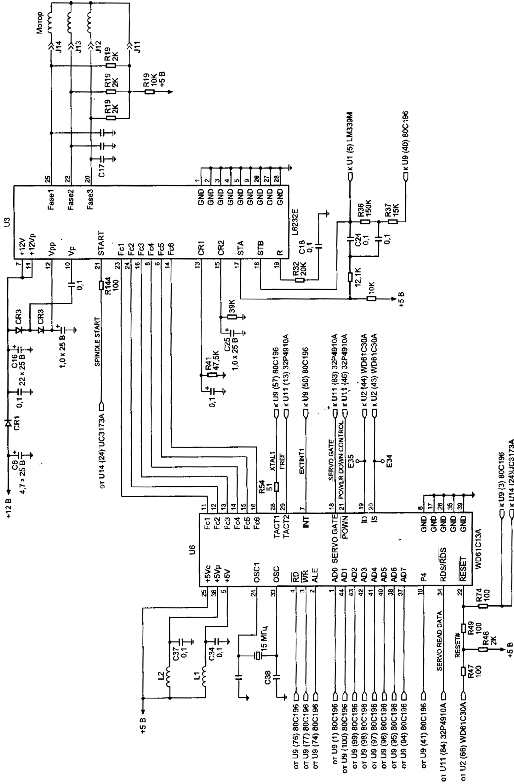
The layout scheme below is used in WDAC32500 and WDAC33100 drive families and takes into account all ratings and serial numbers of components, but it is also applicable for repair of WDAC2340, WDAC2420, WDAC2540, WDAC2700, WDAC2850, WDAC33100, WDAC31200, WDAC21200, and WDAC31600 drive families if you ignore serial numbers of components and assume that some ratings differ from the values shown in the layout scheme (Figure 5).

If at HDD power-up its spindle motor does not start you should first make sure that the HDA is operational by connecting it to a known good PCB. If there is no such opportunity you should check the resistance of coils (phases) of the spindle motor, it should correspond to ~ 2 Ohm relatively to middle output; then continue to look for the malfunction on the PCB. (Inability to start a spindle motor frequently results from sticking of magnetic heads to disks).

In order to check a PCB for failed components, you should remove it from the HDA, connect to an external power supply and position it on the worktable with electronic components facing up. Further operations will require an oscilloscope with sweep frequency up to 50 MHz.

First of all, you should switch on power and check the feed +5 V and +12V voltages at outputs from the U3 and U6 chips (see layout scheme), check excitation of quartz resonator at outputs 24 and 33 from U6 chip. Then check for presence of clock pulses supplied to the U9 control microprocessor and U11 reading channel to 57 and 13 outputs respectively. After that make sure that there is no RESET signal (active level О). If all the requirements are met then the control microprocessor will start and perform the initialization procedure programming all chips connected to the internal data bus. You can check microprocessor operability indirectly judging by the presence of control pulses: ALE, RD#, WR#, data bus pulses, etc.

To check the spindle motor control circuit you should trigger 10 ms/div oscilloscope sweep with 2V/div amplification (it is advisable to use 1:10 multiplier). After power-up check for presence of motor start pulses with 11 – 12 V amplitude for three phases (connections J14, J13, J12). The control circuit will try to start the motor for 1 – 2 min., then it will discontinue the attempts. After that you should switch power off/on or send a RESET command by short-circuit of lines 1 and 2 in IDE interface connector using tweezers. If voltage is lower than 10 V for any phase, then U3 chip is malfunctioning. As a result of such failure the spindle motor most likely spins up but remains unable to gain rated rotational speed and, consequently, magnetic heads cannot be shifted from the parking zone. Rotational speed of spindle motor can be controlled using the INDEX pulses at the Е35 control point (if a PCB is connected to the HDA). The frequency of INDEX pulses is ~12 ms, width of INDEX pulses is – 140 nanoseconds. U3 chip is controlled by the U6 synchronization controller chip and the SPINDLE START signal of the spindle motor. For motor start SPINDLE START = 1, for motor stop it is = 0.

Phase distribution is controlled by the U6 chip through its Fc1 – Fc6 outputs; it uses TTL range of control signals. Feedback of rotational speed is accomplished through the 32Р4910А U11 reading channel chip using the SERVO READ DATA line. In its turn, the U6 synchronization controller chip generates the signal for servo field search (SERVO GATE) for U11 chip.

Servo signals and numbers of control points are indicated in the figure 6 and 7. The signals can be viewed more conveniently using oscilloscope with 100 MHz or greater sweep range since INDEX pulses and servo marker last for about ~140 nanoseconds (it is also advisable to use 1:10 multiplier). Monitoring should be performed using two sources, synchronizing the oscilloscope by INDEX or by servo marker. It may be interesting to watch not only servo signals at the Е37 control point but also data reading signals in general at the Е13 and Е7 control points, where one can see all synchronization fields, sectors, etc. (See figure 8).


Details on functioning of control microprocessor, data reading channel and spindle motor control chip are available at web sites of Intel, Silicon Systems Incorporation and SGS-Thomson respectively: www.intel.com and www.st.com.

Fundamentals of searching for malfunctions Read More »

Technologies used for maintaining HDD reliability

With all the complications HDD manufacturers are constantly trying to make user data storage more reliable. To accomplish that they use various methods and technologies in their drives.

Figure 5. Control circuit of spindel of HDD (family WDAC 32500 and WDAC 33100)
S.M.A.R.T. (abbreviated Self-Monitoring, Analysis, and Reporting Technology) is intended to inform hard drive users about the status of its main parameters. Many motherboard BIOSes support analysis of those parameters at computer power-up and if some critical parameter exceeds its emergency limit an informational message is displayed during computer start-up. Of course, it does not mean that the drive will stop functioning, but the user should take some steps in that situation, for example, prepare a backup copy of valuable data. If computer BIOS does not contain an analyzer of S.M.A.R.T. attributes you can use an external diagnostic utility launched from within the operating system. The list of such utilities includes, for instance, SMART Vision available from http://www.acelab.ru/products/pc/traning.html.

For greater reliability practically all drives use a technology, which allows hiding and relocation of occurring defects immediately during operation. Some peculiarities of its implementation may vary with different drive models; however, they are all based upon the same principle. If the operating system attempts to access a sector, which cannot be read or written to, then the drive will replace it if possible (if there is sufficient reserved space) with a sector from the reserved zone (assign). The table of thus substituted sectors is stored in drive firmware zone and the drive loads it to controller ROM at power-up.

Impact sensors found in all drives also belong to technologies used for protection against malfunctions. It is a piezoelectric sensor producing an electric pulse at mechanical shock. Filtering of sensor pulses allows identification of obvious impacts. When a drive detects shock action, it parks magnetic heads. One peculiarity of impact sensor installation is the angle of its mounting relative to front case line. It is equal to 45O.

In recent models manufacturers have began to use widely temperature sensors in PCB and heads’ block. Temperature information is monitored by drive processor and the drive stops operation if the allowed value is exceeded. In some drive models temperature is output as S.M.A.R.T. attribute value and there are programs (usually available from the web pages of HDD manufacturers) which allow viewing it.

Technologies used for maintaining HDD reliability Read More »

Computer Forensic Tool: Encase Forensic

encase-forensicEnCase Forensic is the industry standard in computer forensic investigation technology. With an intuitive GUI, superior analytics, enhanced email/Internet support and a powerful scripting engine, EnCase provides investigators with a single tool, capable of conducting large-scale and complex investigations from beginning to end. Law enforcement officers, government/corporate investigators and consultants around the world benefit from the power of EnCase Forensic in a way that far exceeds any other forensic solution.

-Acquire data in a forensically sound manner using software with an unparalleled record in courts worldwide.

-Investigate and analyze multiple platforms — Windows, Linux, AIX, OS X, Solaris and more — using a single tool.

-Save days, if not weeks, of analysis time by automating complex and routine tasks with prebuilt EnScript® modules, such as Initialized Case and Event Log analysis.

-Find information despite efforts to hide, cloak or delete.

-Easily manage large volumes of computer evidence, viewing all relevant files, including “deleted” files, file slack and unallocated space.

-Transfer evidence files directly to law enforcement or legal representatives as necessary.

-Review options allow non-investigators, such as attorneys, to review evidence with ease.

-Reporting options enable quick report preparation.

Computer Forensic Tool: Encase Forensic Read More »

HDD malfunctions

 “Nothing is eternal” – that expression applies also to hard disk drives. No matter how reliable a HDD is still it is degraded with time by destructive processes.

 First, a drive is a mechanical and electronic device but all mechanical parts gradually wear out. With time connections between mechanical parts become slack. Numerous ascensions and descents of magnetic heads which occur during each start and stop of magnetic disk rotation destroy the protective layer coating the heads. However, modern manufacturing technology guarantees rather long life for hard drives. Thus, according to the information from the technical manual for operation of Western Digital drives (Caviar BB/JB family) the minimum number of contacts between magnetic heads and disk surface during start/stop (Contact Start/Stop Cycles – CSS) is at least 50000 cycles, while unrecoverable reading errors (Error Rate – Unrecoverable) appear less frequently than once per 10 bytes raised to the 14th power. If we translate those figures into generally understandable terms we receive the following: minimum time before any deterioration in the quality of heads or surfaces because of their contacts provided that the drive is switched on and off ten times daily will be 14 years; and one error will occur during reading of more than 32 TB of data (that approximately corresponds to viewing movies in MP4 format non-stop for 7 – 10 years).

Still, in real life we frequently face a totally different situation when a brand new drive purchased recently goes out of order after a few months of operation. Numerous drives even do not endure the warranty period defined by their manufacturing factory. We have to note that all manufacturers except for Samsung have decreased that period from 3 years to one. What are the reasons of such situation?

Normal HDD ageing malfunctions
 During correct operation of a properly assembled drive performed in conformity to all requirements of its Technical Reference Manual with time you can observe normal ageing process. It tells most badly on magnetic disks. First, with time the magnetization of minimum magnetic “prints” – dibits – decreases and a drive has to re-read some portions of disks, which used to read flawlessly, or they even begin to produce reading errors. In the second place, the magnetic layer on disks also deteriorates gathering scratches, chippings, cracks, etc. All of the above cause appearance of BAD sectors.

The process of normal drive ageing is quite long and usually it takes 3-5 years. We have to note that for a HDD non-stop mode of operation is even more favourable than a mode, when a drive starts and stops frequently. Thus drives function quite long in dedicated servers operating round-the-clock and located in a separate premise or a box with obligatory normal climate control.

Malfunctions resulting from incorrect mode of operation
 The most frequent cause of HDD malfunctions has to deal exactly with incorrect manner of their operation, its main destructive factors include: overheating, mechanical impacts and voltage jumps of HDD power supply.

Overheating is caused by insufficient cooling of drive case and PCB. According to the technical reference manual for Western Digital drives (Caviar BB/JB family) the allowed operational drive temperature ranges from 5 С to 550 С provided that air circulates around all the time. The latter condition is determined by the fact that some chips on the control board become much warmer than the above temperature (motor controllers, etc.) and heat dissipation must be arranged for them. Now let us imagine that it is summer time, temperature inside may reach 30 С, within computer case it will grow to the extreme values – by another 20 – 250 С – while there is no normal air circulation because there is only one blow-out fan in the power supply clogged with dust, flat cables inside form a tight knot and the drive is blocked from both sides between a CD drive and FDD. An open computer case at that does not remedy the situation because it does not facilitate air flow around HDD.

Another important temperature value is its gradient, which should not exceed 200 С per hour during operation and 300 С during downtime. When the latter is exceeded, it is very dangerous for drive mechanics; that phenomenon is called thermal shock. Thus if you bring a HDD during winter time from a store or from a friend (where you had to read some necessary data) and it is frosty outside and 200 С inside, then if you power-up the drive immediately it causes sudden local heating of separate mechanical HDA parts, which may cause micro deformations of precise drive mechanics. Such a drastic temperature drop is very harmful for electronic components, too.

The same holds true regarding mechanical influence over HDA, i.e. impacts which are also very dangerous for precise mechanical parts of a drive. During operation as described in the previous article, spring-loaded magnetic heads fly at a low height above disks rotating at a rather high speed. An impact against HDA in that situation will cause inevitable vibration of heads which will produce a series of hits against disks, which in turn are sure to cause chipping both on disk surface and on the surface of magnetic heads.

Very serious danger for HDD electronics is manifested by power supply units powering the whole PC and the drive respectively. In order to make their price lower manufacturers frequently do not install filtering circuitry both in the primary 220 V chain and in secondary circuit. Very frequently rated power does not correspond to the actual values and stabilized voltage turns out to be not so stable although those parameters are strictly regulated for disk drives. Thus, according to the technical reference manual for Western Digital drives (Caviar BB/JB family) allowed power supply voltage is +5 V +- 5% and +12 V +- 10%, allowed fluctuation is 100 mV in +5V circuits and 200 mV in 12 V circuits. Most specialists servicing computer equipment use only voltage meters while testing power supply units, but one should keep in mind that voltage fluctuations, which are an important parameter can be checked with an oscilloscope only.

Construction-related malfunctions
 Quality of HDDs has decreased lately; that fact is confirmed by reduction of warranty period by many manufacturers. To some extent it is caused by stiff competition between them and the resulting race for production of cheap drives. It is also connected with growing technological standards, a sort of a race for density increase and achievement of higher capacity per disk. As a consequence vendors frequently use in their HDDs solutions, materials and technologies, which have not been thoroughly tested and verified; thus imperfect products appear in the market and then in possession of end users. After some time manufacturers analyze malfunctions of drives returned during their warranty period and attempt to eliminate drawbacks in their construction, but those attempts are not always successful.

Theoretically such approach to drive design and production may cause problems with any drive part. We can single out the most frequent troubles:

Bad contact in pin connector between PCB and preamplifier chip connected to magnetic heads’ assembly. The consequences of a poor contact may be quite numerous. First of all, it causes appearance of bad sectors. But those sectors differ from common defects caused by poor surface quality. The difference manifests itself in the fact that the surface remains intact but bad contact causes recording of invalid data to service bytes of some sectors, e.g. to the field containing CRC code of the sector. The problem may also lead to corruption of firmware data, which cannot be restored by the drive itself during the next power-up; besides, there is no user mode for such restoration. Firmware data of a drive can be restored in the factory mode only.

Poor quality of chips’ soldering at the factory. Such workmanship flaw becomes obvious as a rule approximately after a year of drive operation. It is usually manifested in lack of contact, i.e. after some period of normal operation a drive either switches off and does not start again (“hangs”) or begins to produce knocking sounds with its heads; the latter situation may result in damage to its mechanical parts. Just like the previous flow it may also cause firmware corruption.

Insufficient quality of chips becoming defective even at heating values, which do not exceed allowed limits. The fault can be repaired by replacing the defective chip with an identical operational one.
Imperfect construction of fluid dynamic bearings, which causes accumulation of scrap particles in the grease resulting in spindle motor seizure.

There are also cases when disks are not fixed on a spindle properly, as a result disk beating grows increasingly and causes bearing destruction in spindle motor. Considerable noise begins to accompany drive operation and after some time defective sectors appear because disk beating leads to incorrect reading of some tracks.

Poor quality of Flash ROM chips, which may lose the firmware code stored therein because of charge leakage when heated. ROM can be overwritten either in a special ROM chip programmer or using the drive itself in the factory mode.

Errors in drive firmware microcode. Manufacturers do not make public the information about the nature of such errors keeping it secret. However, firmware updates are issued quite regularly. It would be a mistake to believe that the errors do not influence drive’s operability in any way because in some cases they may result in damage to drive mechanics.

HDD malfunctions Read More »

Logical structure of disk space

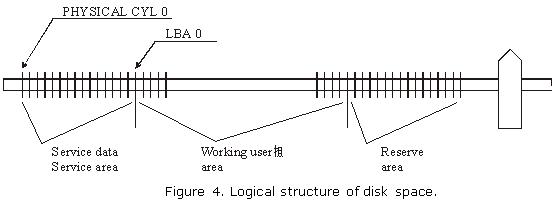
Considerable part of disk space in modern drives is hidden from users; it contains service data and an area reserved for substitution instead of defective sectors in a HDD. In normal operation mode it is accessible by drive microcontroller only. Users may access the working area frequently called logical disk space and it is exactly the same capacity as the value indicated in the characteristics of a certain model. Access to the working area represented by a continuous chain of logical sectors is performed in LBA notation from 0 to N. Connection between the logical disk space and physical disk format is established through a special program, i.e. a translator, which takes into account physical format, zone allocation as well as defective sectors and tracks to be skipped during operation.

 Access to firmware zone is possible only in a special drive operation mode, i.e. factory mode. A drive is switched into that mode by a key command opening access to an additional set of factory commands. Those commands are used for such operations as reading/writing of firmware zone sectors, obtaining a map with locations of modules and tables in firmware zone, access to zone allocation table, conversion of LBA into PCHS and vice versa, launch of low-level format, reading/writing to/from Flash ROM and some other actions.

 In the process of HDD design developers define firmware data required for drive operation as well as the number of cylinders occupied by firmware; therefore zero logical cylinder is the first free cylinder following the last cylinder occupied by firmware area. (See figure 4.) The structure of disk space may vary with different HDD models.

 Figure 4. Logical structure of disk space.

Logical structure of disk space Read More »

Two mechanisms of defect relocation

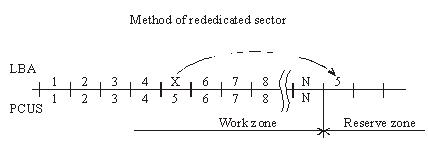
When the substitution (Assign) mechanism is used in a drive the latter records to the ID field of a BAD sector the flag of the relocated sector and writes to the data field the number of the reserved sector, i.e. the one, which should be accessed for data recording or reading. As a rule, it is the first available sector after user data area. (figure 2.).

Figure 2. Method of rededicated sector.
During data read/write operations accessing the defective sector drive controller will read the flag and assigned address and reposition the heads to the reserved zone in order to perform reading/writing from/to a good sector. Defective sectors in that case will disappear, but the drive will perform positioning to the reserved area each time it has to address a defective sector. The procedure is accompanied with clicking sounds and slight slow-down. The “Assign” procedure allows relocation only for defects in data fields. Errors pertaining to corruption of ID fields or servo fields cannot be relocated using the “Assign” method.

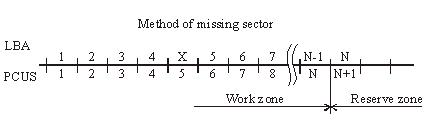
Another mechanism used for hiding defective sectors at manufacturing factories is skipping of defective sectors. When that method is used, the defective sector is skipped, its number is assigned to the following sector (and so on), and the last sector is shifted to the reserved zone. (figure 3.).

Figure 3. Method of missing sector.
Such method of sector hiding disrupts the continuous integrity of low-level format; the system of LBA conversion to PCHS should also take into account BAD sectors while skipping them. Therefore the method requires obligatory recalculation of translator tables and low-level formatting making it impossible to preserve user data if the method is employed. Exactly for that reason the said method of relocation is applied only in special factory mode of drive operation. It is used in the FUJFMT.EXE utility designed for relocation of defects in FUJITSU drives.

Two mechanisms of defect relocation Read More »

Firmware data (service information)

Firmware data is necessary for functioning of internal HDD circuits and as a rule it remains hidden from users.

Firmware data can be subdivided into the following types:
 

Servo information or servo fields;
 Low-level format;
 Resident firmware microcode (operational programs);
 Configuration tables and settings;
 Tables of defects.

 
Servo fields are necessary for operation of a servo system used by the driving assembly of magnetic heads in a HDD; they serve for heads’ positioning and keeping them precisely over a defined track. Servo fields are recorded during the manufacturing process to an already assembled HDA through special service openings in its case. The openings are subsequently closed with sticky labels that read: Warning! DO NOT OPEN. The recording is actually performed using drive’s own heads in a special high-precision instrument – servo writer.  Relocation of heads’ positioner is achieved through a motion of a special pusher of the servo writer using steady steps much smaller than the intervals between tracks.

 Firmware (microcode) of the control microprocessor is a collection of programs required for operation of HDD components. Here belong the programs used for initial diagnostics, control of spindle motor rotation, data exchange with disk controller, buffer RAM, etc. In most HDD models firmware microcode is stored within internal microcontroller ROM; some models employ external Flash ROM. In some HDD models a part of firmware programs is recorded to magnetic disk in a special firmware zone while ROM contains the programs used for initialization, and positioning together with primary loader reading the firmware data from magnetic disk to RAM. Since actual firmware modules are first loaded to RAM before execution they have been called resident modules.

 Manufacturers of hard drives record some firmware portions on disk surface not only for purposes of ROM space saving, but also to enable its easy replacement if the manufacturing process or drive operation reveal any errors in a microcode. Internet pages of most manufacturers contain links to utilities used for such updates. Overwriting disk firmware is much easier than unsoldering of hard-programmed microcontrollers. We can remember how Western Digital had to recall a large number of its drives back to factory several years ago…

 Low-level format. Track beginning is identified by an index pulse. Each track is subdivided into data sectors and servo fields. Format of each sector consists of an ID field, data field, synchronization zones and spaces. The beginning of each sector contains a synchronization zone used for phasing and synchronization of data strobe. ID field contains an address marker, physical sector address, flag byte and CRC bytes.

 Format without identifiers has become popular recently. When manufacturers employ such method of data placement along a track ID fields are not used at all (thus increasing available drive capacity). Instead they use a system of servo fields directing to physical sectors on a track. At that reading/writing of all sectors on a track is performed simultaneously (in one disk revolution) to/from RAM containing an image of the read/written track. Thus for reading just one sector a drive copies a whole track to RAM and reading of all subsequent sectors (if necessary) is performed from drive RAM instead of disk surface. Identical operations are performed during recording. During sector recording a drive reads a track, modifies it in RAM and writes the whole track back to disk.

 Configuration tables and settings of hard drives contain information about logical and physical structure of disk space. Those tables enable PCBs, which are identical for the whole drive family, to self-adjust for a certain drive model. As a matter of fact, during design of a certain model like, for example, a 80 Gb drive based on two disks it allows to produce automatically a “half-size” model with 40 Gb capacity based on one disk and “quarter-size” model with 20 Gb capacity based on one side only. Thus a manufacturer can offer a greater number of models with varied capacity for the market without considerable R&D expenses. Besides, junior models can use disks, which for some reasons are unsuitable for full-size models. E.g. “half-size” models can successfully use magnetic disks with defects on one of their surfaces, etc.

 Tables of defects. Modern technology of magnetic disks production does not allow their defect-free manufacture. Heterogeneity of media material, polishing defects, admixtures during magnetic layer application, etc. result in appearance of areas, where data recording or reading end in errors.

 Earlier drives with ST506/412 interface displayed the table of defective tracks as a label on HDA case and any drive had some reserved space, e.g. HDD ST225 (20 Mb) had actual capacity of 21,5 Mb, i.e. 1,5 Mb extra were allocated for defective sectors and tracks. Modern HDDs also have extra capacity, but it is hidden from users and only drive microcontroller can access it. A portion of that extra space is allocated to HDD firmware, configuration tables, S.M.A.R.T. counters, factory information about a HDD, tables of defects, etc. The remaining part is held in reserve for substitution of defective sectors with the reserved ones.

 Tables of defects are filled by the manufacturer during internal factory testing. Numbers of all discovered BAD sectors are added into a table. Such procedure is called updating (relocation) of defects (UPDATE DEFECT). After that if a defective sector is addressed during work with a HDD, the drive itself will redirect the request to a reserved sector. Therefore all modern drives newly arriving from the manufacturing factories have no defective sectors.

 Most HDD models have two tables of defects: Primary or P-List and Grown or G-List. Primary table is filled at the factory during internal testing – SELFSCAN (intelligent burn-in). Grown list is not filled at the factory; it is designed for addition of defects which appear during drive operation. To enable that functionality, the list of user commands practically in all HDDs contains the “assign” command replacing a defective sector with a reserved one. The command is used by numerous test utilities including those recommended by the manufacturers for operations over drives with BAD sectors. Western Digital drives have a Data Lifeguard system, which performs automatic substitution of defective sectors while a drive is idle. In order to perform the procedure, a drive self-tests its surfaces and transfers user data to a reserved sector marking at that defective sector as BAD; the mechanism of defect relocation is identical to the “assign” command. Manufacturers of Fujitsu, Quantum, Maxtor, and IBM drives implemented a mechanism of automatic defect relocation during the recording process. Thus if data is recorded to a defective sector, a drive itself will redirect such request to the reserved zone marking at that the defective sector as BAD and adding its number to G-List. Among specialized utilities used for relocation of BAD sectors we can note FUJFMT.EXE for Fujitsu drive, WDDIAG.EXE for Western Digital drives, ShDiag.exe offered by Samsung, etc.

Firmware data (service information) Read More »

Modern Hard disk drive

Introduction
Brief architecture description, the main problems of modern hard disk drives, methods of HDD servicing and repair of simple malfunctions, SMART, passwords. The article is intended for data recovery specialists, technicians servicing computer equipment, network administrators and experienced users.

Drive construction
 A drive consists of a mechanical part – head-and-disk assembly (HDA) and a printed circuit board (PCB). HDA acts as a case for all mechanical parts of a hard drive and contains one more chip performing the functions of a preamplifier/commutator. A PCB consists of several chips which control the mechanical parts, encode/decode data on magnetic surfaces and transfer the data through an external interface. PCBs are located outside HDA, in its lower part as a rule. In some hard drives, like the well-known Seagate Barracuda series, the controller has an additional metal cover protecting the electronic components from damage.

Mechanics
 The whole construction is based on the drive case protecting sensitive mechanical parts from environmental influence. Inside it is filled with dust-free air though the air is not specifically purified; instead the assembly of the mechanical part is performed in a special workshop where air contains less than one hundred dust particles per cubic meter, i.e. in the so-called “class 100 clean room”.

 HDA case has an opening blocked by a tight air filter. It is used to align air pressure inside the HDD and outside. Unfortunately, if a drive falls into water, the latter penetrates the inner space through that opening.  Rotation of disks creates air flow circulating inside the case and constantly passes through one more filter separating dust if it somehow appears inside.

 Drive case accommodates a pack of magnetic disks driven by a spindle motor, magnetic heads with their positioning system and a preamplifier/commutator enhancing the signal from the heads and switching between them.

 A magnetic disk is a circular aluminum (rarely ceramic or made of special glass) plate with surface polished in accordance with the highest  precision class for the sole exception of the parking zone, if it is present. In fact, high precision of disk surfaces and the heads causes them to “stick” to each other because of molecular attraction forces. To prevent that effect, manufacturers use special laser serrations in the zone of contact between drive heads and disks.

 The disks demonstrate specific magnetic properties owing to their chrome oxide based coating (magnetically active substance) or cobalt layer applied using vacuum deposition. Such coating is characterized by high hardness and much greater wear resistance compared to previous models coated with a layer of soft varnish based on ferric oxides which could be easily damaged unlike modern coatings.

 The disks are rotated by a special 3-phase electric motor. The stationary part contains three windings connected according to the “star” scheme, with a tap in the middle, and the rotating part is a permanent sectional magnet made of rare-earth metals. The requirement of beat reduction and high rotational speed values force the manufacturers to use special bearings in the spindle motor; these can be either ball bearings or improved fluid bearings (using special oil dampening impact loads and thus increasing motor durability). Fluid bearings are characterized by a lower noise level and produce practically no heat during operation. The number of revolutions per minute in modern IDE drives is equal to 5400 RPM or 7200 RPM; for modern SCSI drives it is 10000 RPM or 15000 RPM.

 A magnetic head is also a sophisticated construction composed of numerous details. Those details are so small that they are manufactured using photolithography method just like chips. Working surface of the head’s ceramic case is polished with the same precision as the disk itself. Heads’ actuator is a flat solenoid coil of copper wire suspended between the poles of a permanent magnet and fixed at one end of a lever rotating around a bearing. The other end of the lever is connected to a bracket carrying magnetic heads. The bracket is spring-loaded with a certain effort which allows the heads to “fly” at a definite height above the disk surface; the said height is usually equal to tenths of micron.

 The whole transport system moving the heads’ pack has been called Voice Coil by analogy with a loud-speaker cone. Its functional principle is similar to that of a common dynamic loud-speaker (i.e. copper coil in static magnetic field). Positioner’s coil is surrounded by a stator acting as a permanent magnet. When electric current of certain voltage and polarity appears in the coil the positioner starts turning to the corresponding side with respective acceleration; thus dynamic modification of current properties in coil allows positioning of magnetic heads to any location above disk surface.

 Drive heads are fixed when a drive is powered-off (in the parking zone) with special latches. Magnetic and pneumatic latches are two most widely used types. A magnetic latch is a small permanent magnet fixed within drive case and attracting ferrous lug on the voice coil in the heads’ parking position. Pneumatic latch (or air lock) also fixes a positioner in the parking zone preventing its further movement. When the magnetic disks begin rotation the air flow thus generated deflects the “sail” of an air latch and unblocks the positioning system.

 The electronic components inside HDA are limited to the preamplifier/commutator for the signal received from drive heads. It is located closer to the heads to minimize interference of external noise, right over the flexible cable from the heads to drive’s electronics. The same cable is connected to the voice coil and, sometimes, to the spindle motor; however, in most cases power supply of the spindle motor is implemented via a separate cable.

 A HDA is usually linked to the PCB with two connectors. One of them is a three-phase center-tapped connector for the spindle motor while the other delivers signals from the preamplifier/commutator and voice coil.

Printed circuit board
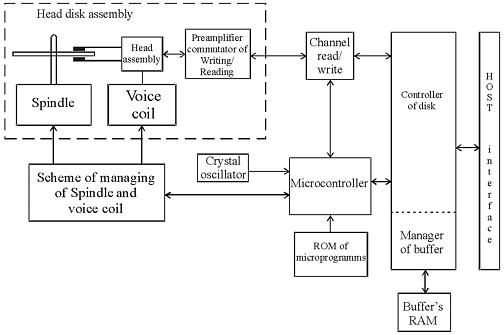
 The circuit design of modern drives is characterized by the use of a few highly-integrated chips; their block diagram is represented in figure 1.
 
 Figure1. Circuit design of modern drives

 As one can see in the picture, the whole layout is based upon four chips:
system controller chip including the read/write channel, disk controller and RISC control processor (microcontroller);
Flash ROM chip containing drive firmware;
chip controlling the spindle motor and voice coil;
ROM chip used as a cache buffer.

 Further increase of integration is impossible due to some basic differences in the operational modes of the above functional parts.

 The first system controller used in hard drives was a chip manufactured by Cirrus Logic. Its obvious breakthrough was manifested in the read/write channel, processor and disk controller integrated within one chip; however insufficiently developed methods of using such a microcircuit caused frequent malfunctions of  Fujitsu drives belonging to series  MPF3xxxAT and MPG.

 A microcontroller has RISC architecture. As soon as power supply is switched on after the /RESET interface signal the drive reset circuit sends a RESET signal to microcontroller which executes its program from ROM running self-diagnostics, cleaning the working data area in memory and programming disk controller and all programmable chips connected to the internal data bus of an HDD. Then microcontroller polls internal signals used during drive operation and if it detects no emergency alerts, it starts the spindle motor. The next stage of firmware operation is internal testing of an HDD checking data buffer RAM, disk microcontroller and the status of microcontroller signals input from its port. Then the microcontroller begins analyzing the frequency of pulses waiting until the spindle motor reaches defined rotational speed. As soon as the necessary speed is reached, the controller begins to manipulate the positioning circuit and disk controller moving the magnetic heads to the area containing recorded firmware data and transfers it to buffer RAM for further operation. Then the microcontroller switches to readiness and awaits commands from HOST. In that mode a command received from the central processor initiates a whole chain of actions performed by all the electronic components in a HDD.

 HDD read/write channel consists of a preamplifier/commutator (located inside HDA), read circuit, write circuit and a synchronizing clock.

 Drive preamplifier has several channels, each being connected to its respective head. The channels are switched by signals from the drive’s microprocessor. Preamplifier also contains a recording current switch and recording error sensor, which emits an error signal if a short circuit or break occurs in a magnetic head.

 Integrated reading/writing channel operating in the recording mode receives data from disk controller simultaneously with the recording clock frequency, performs data encoding, precompensation and transfers the data to preamplifier for writing to a disk. In the reading mode signal from preamplifier/commutator is transmitted to the automatic control circuit and then passes a programmable filter, adaptive compensatory circuit and pulse detector while being converted into data pulses sent to the disk controller for decoding and transfer through an external interface.
 Disk controller is the most complicated drive component which determines the speed of data exchange between a HDD and HOST.

 Disk controller has four ports used for connection to a HOST, microcontroller, buffer RAM and data exchange channel between it and HDD. Disk controller is an automatic device driven by microcontroller; from HOST side only standard registers of task file are accessible. Disk controller is programmed at the initialization stage by microcontroller, during the procedure it sets up the data encoding methods, selects the polynomial method of error correction, defines flexible or hard partitioning into sectors, etc.

 Buffer manager is a functional part of disk controller governing the operations of buffer RAM. The capacity of the latter ranges in modern HDDs from 512 Kb to 8 Mb. Buffer manager splits the whole buffer RAM into separate sectioned buffers. Special registers accessible from microcontroller contain the initial addresses of those sectioned buffers. When HOST exchanges data with one of the buffers the read/write channel can exchange data with another buffer sector. Thus the system achieves multisequencing for the processes of data reading/writing from/to disk and data exchange with HOST.

 Spindle motor controller regulates the motion of a 3-phase motor. It is programmed by the drive microcontroller. There are three control modes of spindle motor operation: the start mode, acceleration mode and stable rotation mode. Let us review the start mode. At power-up a reset signal is sent to the control microprocessor which performs initialization programming internal registers of spindle motor controller for a start. Drive controller generates phase switching signals; the spindle motor at that rotates at low speed generating self-induced electromotive force. Drive controller detects EMF and notifies the microprocessor which uses that signal for rotation control. In the acceleration mode microprocessor speeds-up phase switching and measures the rotational speed of the spindle motor until the speed reaches its rated value. As soon as the rated rotational speed is reached the controller introduces stable rotational mode. In that mode microprocessor calculates the time required for one revolution of the spindle motor based on the phase signal and adjusts the rotational speed accordingly. After relocation of magnetic heads from the parking zone the drive electronics begins tracking the stability of rotation using servo marks.

 Voice coil controller generates the control current moving drive positioner and stabilizing it over a defined track. Current value is calculated by microcontroller on the basis of digital error signal for head position relatively to a track (Position Error Signal or PES).  Current value in digital form is transmitted to CPU, the analogous signal thus received is enhanced and supplied to the voice coil.

Modern Hard disk drive Read More »

Hard Disk Details(11)

Random Notes and Ideas For Data Recovery

    1. Drive goes to sleep, replace the board live
    2. Partitions start on Cylinder Boundaries
    3. Hard Drives have a Safe Mode
    4. You can fix LaCie problems with a Mac mounting them in the system
    5. Drives that you plug in that cause windows to Crash – Use Ubuntu to Read Files
    6. When problems with MFT then retry smaller blocks
    7. If drive parts are good then rewriting the SA area is the part that needs repairing
    8. SA Code can be replaced to do data destruction or encryption
    9. If you are thinking of a hard drive as 0’s 1’s then you are wrong. The equipment interprets signals to make the representation of 0s or 1s. Designers have taken into account the signal distortion and interface problems to make the work
    10. Remove a chip from the PCB and re-solder the chip onto a good board to fix specific problems with chips that are burned, cracked, etc
    11. Soft resets on SATA also need to do a hard reset the controller as it cannot be reset any other way like the bus is reset in a PCI or ATA
    12. ATA-3 Spec – hard drive read without retry was disabled and now is internal on the drive
    13. Seagate Drives use a serial interface of which you can find online. It will show you stats on the drive. If you see FFFF mask FFFF mask it is a head error
    14. If a drive is read with a standard read then it does not need to be read again but it might be good to use ECC to compare in a later pass
    15. Force the drive to use PIO mode instead of DMA/UDMA modes. Some hard drive failures cause the drive to fail reading UDMA but might still work in PIO
    16. Powers on good drive, while board is still in use move it to a new drive. Wrong defect tables and can be cleared
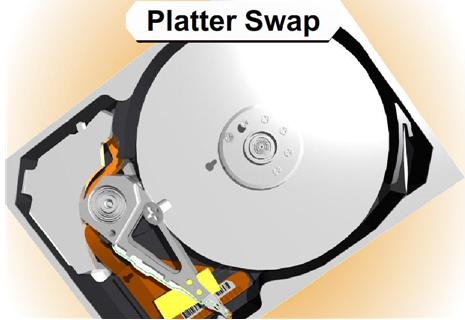
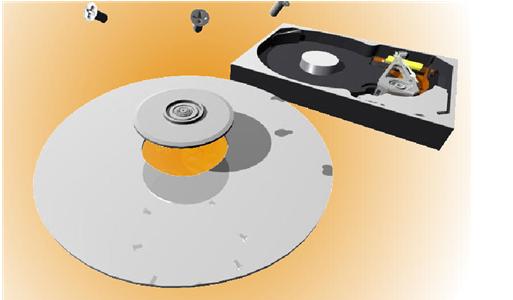
    17. If the platters are misaligned you can write data over the servo wedge and thereby destroying any chance that you can ever read the data
    18. As the thermal heat increases stability of the bits drop rapidly and with the addition of Areal density – degradation is much higher. There are fewer atoms in each bit to retain the bit orientation. Currently the drive will test for decay and if detected will automatically rewrite the data it detects
    19. Hard drives stored in heat for long term storage is extremely bad
    20. Adaptec ATA Raid 1200A Controller in combination with MHDD is great for recovery software.
    21. To determine if there is an HPA – Look at the LBA Maximum and if it is equal to Maximum Native LBA then there is no HPA
    22. Partitions created using standard disk partitioning tools, fdisk, Windows Disk Management, Partition Magic, will all be cylinder aligned. You only have to scan cylinder boundaries for partitions. Dynamic disks do not use partition tables, they use LDM which is at the end of the disk and needs to be done backwards. It uses one single partition occupying the entire disk minus one cylinder. When volumes are added or deleted the partition table is not updated. There are only 4 partitions possible with the standard Windows tools
    23. All partition table signatures end in 55 AA – if this is gone the OS will regard this as not existing. 80 is active 0B fat32 0F extended
    24. Everything in NTFS is a file – $boot
    25. Sector is the smallest addressable unit on the disk. You can read more than one sector but you cannot read less
    26. If doing a head replacement try straws for head stack replacements around the heads to keep them protected. Cut off a small piece of a drinking straw and place it over the head area of each and every head
    27. Even when the lower part of a head stack does not have heads they are still numbered.
    28. Increasing numbers of drive have no chance for parts replacement due to changes in the hardware
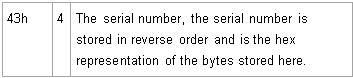
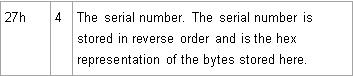
    29. Some drives store the lists in the NV Ram on the PCB. The table on one drive will not match the table on another drive and are unique. That might cause the same logical blocks to be mapped to different physical blocks on different hard drives. It is possible to have a swapped board cause a space on the hard drive to be overwritten due to the mapping problem.

Hard Disk Details(11) Read More »

Scroll to Top