Articles

IBM malfunctions

Manufacturer: IBM, drive families: DJNA, DPTA, DTLA, AVER, AVVA
Malfunction signs: A drive spins up the spindle motor, recalibrates itself, reports on readiness, BIOS identifies it correctly but at a reading attempt the drive produces “scratching” sounds and reveals numerous BAD sectors on its surfaces.

That malfunction is connected with a mismatch between the cyclical redundancy check code in the data fields and the information recorded in the sector service field. Such a situation appears when recording to a sector is unfinished. That may result from lack of contact at the connector between the PCB and HDA. That connector consists of needle-like pins touching tinned pads on the PCB (please see figure 11). With time soft solder becomes perforated and contact quality deteriorates.

Figure 11. Pin contacts of magnetic heads’ assembly connector in IBM drives (view from behind the PCB)

In order to repair that malfunction you should remove the control board, clean the old solder off the contact pads and cover them again using silver-based solder, then carefully wash the soldered location. Install the board back to HDA. Then you will have to clear the whole disk surface overwriting it with any code using freely available software (please see part 4); that will accomplish recording of correct CRC codes.

IBM malfunctions Read More »

Fujitsu malfunctions

Fujitsu, M1638TAU drive family
Malfunction signs: The spindle motor does not start
The connection scheme of VCM (Voice Coil Motor) & SPM (Spindle Motor) controller is practically identical for the following drive families: M1614TAU, M1638TAU, MPA30xxAT, MPB30xxAT and MPC30xxAT.

VCM&SPM controller regulates 3-phase motor; it is programmed by the MB9004 processor produced by Fujitsu. There are three modes of spindle motor control: start mode, acceleration mode and stable rotation mode. In the start mode at power-up Power Monitor (MP3771) sends a “reset” signal to the microprocessor (MB9004) and the VCM & SPM controller. Microprocessor uses a serial channel to program internal registers of VCM & SPM controller for a start and charges the pump capacitor of the controller using the “Charge pump” signal. Charge volume determines the current which will flow to the spindle motor. As soon as the start-up capacitor is charged sufficiently the microprocessor programs SPM controller for a start mode, then ~ 1,3А current flows to the spindle motor. Controller generates phase switching signals. The spindle motor at that begins rotation generating self-induced EMF. The controller detects EMF and notifies the microprocessor about that; the latter uses the signal for rotation control. In the acceleration mode the microprocessor speeds up phase switching and measures spindle motor rotational speed until it reaches 5400 RPM. When the speed is reached the controller switches to stable rotation. In that mode microprocessor calculates the time required for one spindle motor revolution on the basis of the phase signal and adjusts the rotational speed charging or discharging the pump capacitor. Adjustment control (charge/discharge) is performed every 1/6 spindle revolution.

The complexity of diagnostics is determined by the fact that SPM controller monitors EMF generated during spindle rotation and at an attempt of spindle spin-up it makes just 2 – 3 phase switches which are difficult to track using oscilloscope. If the spindle does not begin rotation (for whatever reason) the controller, as a rule, either switches off or retries its attempt after some time. Thus, if you use a regular oscilloscope, you can see only presence of pulses falling within a certain range, which is insufficient for complete diagnostics. In an ideal case we would recommend using 3-channel oscilloscope with memory function operating in the automatic recorder mode. Probably such device is not really commonplace. Therefore it is possible just to check the presence of pulses for motor phases.

VCM & SPM controller is a quite reliable microchip and it rarely goes out of order. More frequently a spindle motor does not start because of other malfunctions. Still, if the chip fails such failure is usually caused by overheating with clearly visible traces on chip case. During repair of the start circuit you should check the Stop Spindle signal from the MB3771 chip. The signal forces parking of magnetic heads and stops the spindle motor with keys Q8 and Q9. Active level of that signal in the parking mode is “1”, in the operational drive mode it is “0”. If a spindle motor begins to spin up you can check the operation of output keys of HA13525A chip controlling phase signal with oscilloscope. To do so select 10 ms/div sweep with 2V/div amplification (it is advisable to use the 1:10 multiplier). A phase may be diverted by a disrupted Q8 or Q9 key. HA13525A and HA13525B chips are compatible from top downward, i.e. in models belonging to the M1638TAU and MPA drive families both of those chips can be used. In MPB and MPC drive families only HA13525B is allowed.

Manufacturer: Fujitsu, drive families: MPB, MPC
Malfunction signs: A drive begins to detect a higher own capacity than the actual rated value, the so-called “megalomania”.

That malfunction is quite frequent in the above-mentioned drive families; it is caused by corruption of firmware in Flash ROM chip on the control board of the drive. Those drive families employ Flash ROM chips using 64К structure based on 16-bit words, programming voltage is 5 or 12 V, package type is PLCC44.

Elimination of that malfunction requires just reprogramming of Flash chip by recording a known good firmware of the corresponding version. Version number in Fujitsu drives is indicated in the lower right corner of the label over HDA below bar code and it looks like: xyy-zzzz, where x –means the month when the drive was manufactured in hexadecimal notation, yy – means version prefix and zzzz – means the actual firmware version, e.g.: С02-2009. For version compatibility in MPB and MPC drive families just the actual version match is sufficient, the prefix and month of manufacture are not important.

Manufacturer: Fujitsu, MPG3xxxAT/AH drive family
Malfunction signs: Quite unexpectedly for user and user data a drive is no longer identified in PC BIOS.

We should note that this very drive model has broken all records of failures, which happen in most cases after a year of operation, just after completion of the warranty period. The main cause of the malfunction was in the Cirrus Logic CL-SH8671-450E chip. It can hardly be replaced with a working chip because those microcircuits were produced for a special Fujitsu order and the manufacture of that drive family was discontinued long ago. However, there is a method of “revival” and “revitalizing” a malfunctioning chip which allows extending HDD life a little. However, if you ignore drive “hangings” and do not take due steps (at least backup valuable data) the table of S.M.A.R.T. logs in firmware zone will be gradually overfilled and the drive will additionally corrupt its modules in firmware zone, which cannot be restored without specialized software.

One of the versions explaining the cause of problems with those chips is the use of a new polymer compound during production of chip case. The compound decomposes under the influence of increased temperature in humid conditions producing phosphoric acid. But it is just a version; we may never learn whether it is so or not. However, one thing is known for sure: if you unsolder that chip, remove old solder from its pins and contact pads on the board, flush the location for the chip and then solder it back the drive will begin to work properly.

Fujitsu malfunctions Read More »

Quantum malfunctions (Fireball drive families)

Manufacturer: Quantum, Quantum Fireball drive families: EL, EX, CR, CX, lct08, lct10, lct15

Malfunction signs: A drive operates normally for some time (from15 minutes to several hours), then it begins to hit its positioner against the limiting stop.

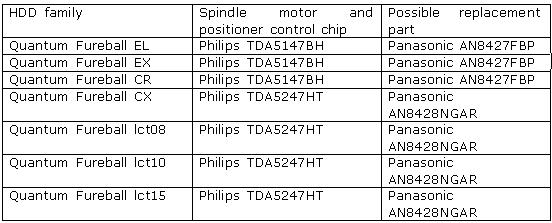
It is a very frequent malfunction in those drive families, it is caused by the chip controlling the spindle motor and positioner; the chip has poor quality of factory soldering (please see the table), overheats because of that and stops to function normally.

One peculiarity of the TDA5247HT (AN8428NGAR) microchip is the availability of space for soldering in the lower part of its case acting, by the way, as its heatsink. It accomplishes heat abstraction from the chip and its dissipation along the board. Thus mounting and removal of that chip should be performed using a thermal air unit.

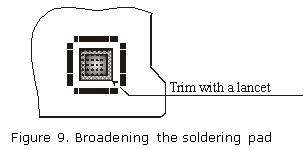
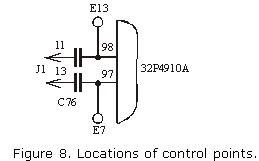
To repair that malfunction, you should unsolder the chip, broaden the soldering pad as shown in the figure 9 (that work can be performed using a lancet for removal of a portion of protective layer), blanch it and the lower part of the chip and solder the latter back pressing its case gently during soldering in such a manner that solder shows through board openings on the other side. Then you should carefully flush the soldered location because that chip has high-resistance analog outputs and fusing agent residue may disturb its normal operation.

That method undoubtedly improves the thermal conditions of the chip but it does not yield positive results always. If a chip used to be overheated for a long time, its resoldering does not remedy the situation. In that case the chip should be replaced. It is advisable to replace it with an identical model offered by Panasonic and having better thermal characteristics. Such chips can be purchased at stores selling electronic components. Its price may vary from 5 to 10$.

Quantum malfunctions (Fireball drive families) Read More »

What Does It Take to Do Forensics?

Hardware
1. Become familiar with the inside of the computer
2. Understand hard drives and their settings
3. Motherboards
4. Power connections
5. Memory

Knowledge of Operating Systems and Software

Operating Systems
–Microsoft Products
–Linux RedHat
–UNIX

Software
–Forensic Software
–HTML
–Microsoft Office
–Quick View Plus

Training
1. New Technologies (NTI) in Gresham, OregonGuidance Software (Encase)Access
DataHTCIA Annual Conference
2. PatienceOne needs the ability to be able to sit in front of the computer
and analyze the data for what could be an extensive amount of time.”No such
thing as point and click forensics.”

What Does It Take to Do Forensics? Read More »

Where Should Computer Forensics Begin?

Analysis Areas
–Email
–Temp Files
–Recycle Bin
–Info File Fragments
–Recent Link Files
–Spool (printed) files
–Internet History (index.dat)
–Registry
–Unallocated Space-free space on the hard drive
–File Slack-free space between the end of the logical file and the end of physical file (cluster)
–RAM Slack-free space between the end of the logical file and the end of the containing sector
•Sector-the smallest group that can be accessed on the disk. A group of disk sectors as assigned by the operating system are known as clusters

Where Should Computer Forensics Begin? Read More »

Some typical malfunctions of hard drives and methods of their repair

Always to make repairing hard drive it is necessary to use special complicated eqipments, but sometimes you need desoldering station and programmator only. In the last part of our descriptive survey we would like to address some typical malfunctions of hard drives and methods of their repair.

 As we have mentioned in our previous articles devoted to problems with hard disk drives, a drive consists of 2 main parts: a mechanical part (heads-and-disk assembly) and electronics (control printed circuit board). Those two components are supplemented with internal firmware, which is partially stored in ROM on PCB and partially resides within firmware zone of a drive (that latter portion is loaded to RAM of HDD microcontroller during its initialization). Those three components interact very closely and normal HDD operation is possible only when all of them function properly. Consequently a drive malfunction may result with equal probability from failure of any of the mentioned components, and that can be observed in real life. Moreover, in various HDD models from different manufacturers the frequency and degree of damage to different components is not the same. When a HDD has to be repaired in conditions offered by a regular (not specialized) laboratory we have to decline some repair orders. In the first place, it pertains to the repair of HDD mechanics – HDA, secondly – to the service data in the firmware area of a drive.

 The difficulty of HDA repair is connected, first of all, with exceptional purity of air contained under normal pressure inside the case (no more than 100 dust particles per 1 cubic meter of air). Opening a case in usual premises or in common laboratory conditions will inevitably lead to dust penetration inside (in usual rooms 1 cubic meter of air contains approximately 600 dust particles) and that is sure to cause damage to precise mechanics. Few companies, which perform repair of drive mechanics use in their work special clean rooms or clean worktables (tables equipped with a special “aquarium” with sleeves inside for performance of necessary work). Besides, a whole set of specialized tools is required including T type screwdrivers (from T9 to T3), hex screwdrivers, mounting supports that allow hard fixing of a HDA for work on it as well as various lifters for heads’ blocks in HDDs of different types. We should add to the above list requirements to engineering personnel who have to perform such jobs. The people should be accurate, move precisely and certainly they should have experience. One incorrect motion with a tool or a finger touch to magnetic disks will render drive repair impossible at once or will make it more complicated at least by order of magnitude. It is because of those pitfalls that most companies possessing specialized equipment for HDD repair do not undertake to perform works related to their mechanical parts.

 The simplest drive repair consists in restoration of software modules in its firmware zone. Corruption of modules is one of three possible HDD malfunctions rendering a drive inoperable although all mechanical and electronic parts remain completely intact. As a rule, a drive with such defect is not visible in computer BIOS and any attempt to access it ends with an ABRT error (the command cannot be executed). Repair of such malfunctions requires just overwriting of the corrupted module; the drive will become operational again. The procedure takes 5-10 minutes on the average. However, that seeming simplicity of the solution hides its complicated implementation. As a matter of fact, module recording is possible only in a special factory mode of drive operation. A drive is switched into that mode by special commands (the so-called key) which differ not only with various manufacturers, but also for different drive families of one manufacturer and those commands are kept secret. Firmware structure may also be very different. Modules can be overwritten with copies obtained from identical models and taking into account firmware version and module type. We should also mention that incorrect module overwriting or recording of an incompatible module version may damage a drive once and for all. Thus, for example, erroneous recording of a configuration module with information about the number of magnetic heads may result in firmware attempt to address a non-existent head during initialization at drive power-up. The drive at that will begin to knock endlessly hitting its positioner against the limiting stop and at last it will damage its magnetic surfaces if it is not switched off in time. But after the next power-up the problem will recur. Therefore operations over firmware zone should be as careful and accurate as actions over drive mechanics, i.e. HDA. That is why drive manufacturers password-protect and keep secret access to it. Thus, with all the simplicity of repair for drives with damaged firmware data, such procedures are not possible without special software and frequently even without a whole hardware and software complex. In addition to the actual technological utilities a host of which may be included into such complex (an individual utility exists for each drive family) users need documentation – clear methodology of testing and restoration for failing firmware zone, which is also individual for each drive. High cost of such equipment does not allow everyone to purchase it, so we shall describe the methods of HDD repair, which do not require specialized tools, devices and software.

 One of the basic principles for any repair reads “do not make it any worse”, that is why it is important to perform accurate diagnostics of malfunction and, probably, refuse to repair that drive and send the customer to a specialized service centre, if the malfunction is caused by the HDD mechanics or corrupted firmware data. As an example we shall discuss the analysis of a very widely spread malfunction – “HDD knocking”.

 If at power-up a drive produces periodic knocking sounds (hitting its positioner against the limiting stop), it means that the drive is unable to read servo information from disks’ surfaces. There may be a lot of reasons for that:

  • malfunctioning magnetic heads;
  • malfunctioning preamplifier/commutator located inside HDA in the immediate vicinity of the heads;
  • malfunctioning PCB, namely:
  •  – reading/data conversion channel;
     – positioner controller microchip;
     – supply circuits (stabilizers, filters, generators of negative voltages).

     In addition to the above list, such malfunction may be caused by incorrect recording of firmware modules, when a non-existent head is selected and, as a result, the stream of servo data is missing. Precise diagnostics of that malfunction is complicated and difficult even for an experienced specialist in HDD repair, but still there are a few tricks that can simplify the task a little. First of all, you will need to identify where the cause of malfunction is located – is it in HDA or control board. To do so, remove the drive’s PCB and replace it with a known good board from the same model with an identical firmware version. We should note that it is not possible for all models, recent Seagate models and Fujitsu MPG3xxxAT drives keep in ROM unique adaptive parameters and during PCB swap the original ROM should also be swapped. If knocking stops and the drive reports on readiness, then you should check the board for the cause of malfunctions. If the drive keeps knocking with a known good board, the cause of malfunction is inside HDA and in that case it is time to give up repair. Under no circumstances should you open the HDA just to see what has happened inside. Most likely you will not see any visible faults but the damage from opening will be considerable. Thus, of all the possible types of HDD malfunctions only repair of electronics board can be recommended for a regular laboratory without special equipment.

    Some typical malfunctions of hard drives and methods of their repair Read More »

    Acquiring Electronic Evidence from Hard Drive

    Forensic Image of the hard drive means to take an exact copy of a hard drive including deleted files and areas of the hard drive that a normal backup would not copy;
    Never boot off of the hard drive;
    Use write protection software to protect the original evidence;
    Make a copy of the original evidence and do all work off of the copy;
    Document all aspects of the hard drive;
    Tag and store original evidence;
    Best evidence is original evidence;

    Acquiring Electronic Evidence from Hard Drive Read More »

    How to Secure the Computer as Evidence?

    Photograph and log room, position of computer and status of computer;
    If the computer is “OFF,” Do Not Turn “ON”;
    If the computer is “ON,” Do Not Turn “OFF”;
    Place Evidence tape over each drive slot;
    Photograph and label back of computer components while they are plugged in;
    Label all connection ends to allow reassembly if needed;
    If transporting, treat all components as fragile;
    Collect all devices such as cables, keyboards and monitors;
    Collect instruction manuals, documentation, and notes;
    User notes may contain passwords;

    How to Secure the Computer as Evidence? Read More »

    Computer Forensic Example

    Recovery of over 1000 E-Mails off of a hard drive;
    A year and half after the individual left the company;
    After the hard drive had been formatted;
    After the machine was in use by another user for that year and a half;
    Best way to remove e-mail from a hard drive is to hit with a sledge hammer and throw it into a furnace;

    Computer Forensic Example Read More »

    Scroll to Top