
Data recovery on vintage hard drives like the Hitachi HTE721060G9AT00 starts with identifying the failure type – electronic, firmware, or mechanical. Each requires a different approach, and misdiagnosis can make things worse. Here’s a quick guide to help you assess your situation and decide on the next step.
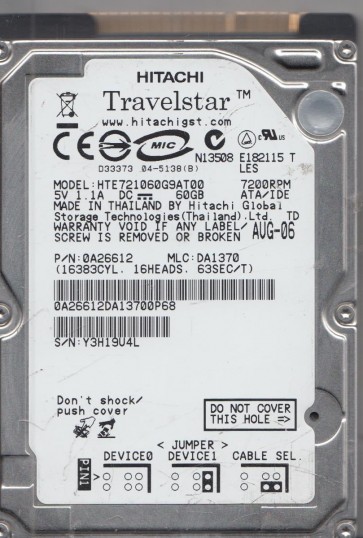
The Hitachi HTE721060G9AT00 is a 60GB, 2.5-inch PATA/IDE hard drive from the Travelstar 7K100 family. It operates at 7200 RPM with an 8MB cache and uses a single-platter, two-head design. This is an older drive from the mid-2000s, characteristic of the PATA era. Its age makes it susceptible to specific failure modes, particularly stiction, firmware corruption, and PCB failure.
Common Failure Types
1. Stiction (Head Sticktion)
Symptoms: Drive fails to spin up, makes a quiet buzzing or tapping sound, or is completely silent when powered on.
Cause: The read/write heads become stuck to the platter surface, preventing the motor from rotating the disk. This is a common failure in older drives.
2. Firmware Corruption
Symptoms: Drive not recognized, frequent disconnections, clicking sounds, or incorrect capacity display.
Cause: Power fluctuations or logical errors in the Service Area modules.
3. Mechanical Failure (Head Crash)
Symptoms: Loud clicking, scraping, or grinding noises; drive not spinning; no power response.
Cause: Physical damage from drops, shock, or wear over time causes the read/write heads to contact the platter surface.
4. Logic Board (PCB) Failure
Symptoms: Drive completely dead (no spin, no detection). Burn marks or damaged components visible on the circuit board.
Cause: Power surge, static discharge, or component aging.
5. Bad Sectors / Media Degradation
Symptoms: Slow read/write speeds, missing files, system freezes, SMART errors.
Cause: Physical damage to the magnetic coating on the platters from age or head contact.
Potential Recovery Paths
DIY Methods (For Low-Risk Situations Only)
For logical damage: Use tools like ddrescue or HDDSuperClone with a PATA adapter. After imaging, use file recovery software like R-Studio or UFS Explorer. Avoid running chkdsk or fsck on the failing source drive.
For PCB failure: Match the exact PCB number and perform a ROM swap. The ROM chip must be moved to the donor board using a hot air rework station.
For stiction: Some users attempt the freezer trick, but this is risky and often causes condensation damage. It is not recommended.
Professional Services (For Critical or High-Risk Cases)
For head crashes, stiction, or grinding noises: Professional cleanroom service is required to replace the read/write heads or unstick the actuator. This is a two-head drive.
For firmware corruption: Professional tools like PC-3000 or MRT are needed to access the System Area and repair corrupt modules.
What Not to Do
1. Do not open the drive’s sealed enclosure.
2. Do not use chkdsk /f, fsck, or reformat on a drive making unusual noises or with bad sectors.
3. Do not shock, shake, tap, or freeze the drive.
4. Do not attempt a generic PCB swap without transferring the firmware chip.
5. Do not repeatedly power cycle the drive if it is stuck or making noises.
Summary
The Hitachi HTE721060G9AT00 is an older 60GB PATA drive with a single platter and two heads. It is prone to stiction, firmware corruption, and PCB failure. For logical issues, DIY imaging is possible if the drive is healthy. For any clicking, grinding, or dead drive issues, professional cleanroom recovery is required. Professional costs typically range from $300 to $1000+.