
Data recovery on vintage hard drives like the Hitachi HUS724020ALE640 starts with identifying the failure type – electronic, firmware, or mechanical. Each requires a different approach, and misdiagnosis can make things worse. Here’s a quick guide to help you assess your situation and decide on the next step.
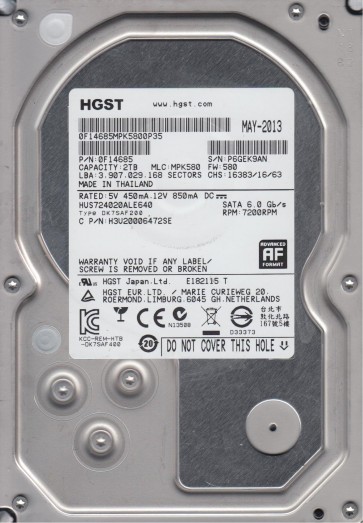
The Hitachi HUS724020ALE640 is a 2TB Enterprise-class 3.5-inch SATA hard drive (model number HUS724020ALE640, part of the Ultrastar 7K4000 series). It features a rotational speed of 7200 RPM, a 64MB cache, and uses Perpendicular Magnetic Recording (PMR) technology with 4 platters and 8 heads. These drives are designed for 24/7 operation in server and NAS environments, offering high reliability ratings (up to 2 million hours MTBF). However, the high-density platters and complex head-stack assembly (HSA) make them susceptible to specific failure modes, particularly head crashes and firmware corruption. The drive uses a Marvell integrated controller and a sealed helium-free chassis (air-filled), making it sensitive to particle contamination.
Identifying Common Failure Types
1. Head Crash / Media Damage
Symptoms include loud clicking or scratching noises, repeated spin-up/spin-down cycles, and the drive being detected with abnormal capacity (e.g., 0GB or partial capacity). This is often caused by physical shock, wear over time, or power surges. Users may hear a “click of death” from the actuator arm attempting to reposition heads onto damaged platters. This failure is physical and requires cleanroom intervention.
2. Firmware Corruption
The drive may power on, spin up normally, but fail to be recognized by the operating system or show as a RAW partition with unreadable sectors. The drive may also get stuck in a “busy” state (BSY LED condition). On Hitachi Ultrastar drives, firmware modules stored on the system tracks (negative tracks) can become corrupted due to unstable power or aging NAND. The drive may respond to SATA commands but report a “SMART STATUS BAD” with reallocated sectors increasing rapidly.
3. Stiction / Bearing Failure
The drive spins up but does not reach full operating speed, emitting a high-pitched whine or a grinding noise. This indicates a seized spindle motor or failed fluid-dynamic bearing. Stiction (head parking motor failure) is less common but can occur after a sudden drop. In both cases, the platters may be rotating at incorrect RPM, leading to servo errors and read failures.
Potential Recovery Paths
Professional Recovery Services
For physical failures (head crash, stiction, grinding noises), professional recovery is mandatory. A certified data recovery lab with Class 100 cleanroom capabilities can perform head-stack replacement (matching donor parts exactly, including firmware regions), platter transplant, and advanced firmware repair using PC-3000 or DeepSpar equipment. Expect costs ranging from $700 to $3000+ depending on severity and required donor parts. For Hitachi drives, labs must have a supply of compatible donor units (same model, firmware revision, and date code). The recovery process may involve reading magnetic force microscopy (MFM) images if platters are damaged.
DIY Recovery (Software Only)
Only attempt this if the drive is fully detected, makes no abnormal sounds, and you have verified the failure is purely logical (e.g., accidental deletion, partition loss). Use tools like R-Studio or GetDataBack to perform a sector-by-sector clone onto a healthy drive using a write-blocker. For firmware corruption without physical damage, advanced users may try Hitachi specific tools like MRT or PC-3000 with a specialized UDMA cable to reflash the system tracks. Caution: incorrect firmware operations can permanently disable the drive. Never use chkdsk or format commands on a failing drive.
What Not to Do
- Never open the drive’s cover or try to repair a clicking head yourself:introducing dust or particles will destroy the platters beyond recovery.
- Do not apply freezer, shock, or heat treatments. These are myths that often cause catastrophic platter warping or thermal stress fractures.
- Avoid running any software like CHKDSK /F or surface scans on a physically failing drive:this forces the heads to repeatedly scrape over damaged areas, causing additional failure.
- Do not attempt to swap the PCB (printed circuit board) from a donor drive unless you have a firmware-aware tool (like PC-3000) to transfer the unique adaptive parameters stored on the system tracks. Generic PCB swapping will not work on modern Hitachi drives and may corrupt firmware.
- Do not repeatedly power-cycle the drive hoping it will work:this can exacerbate bearing damage or cause head-to-platter adhesion.
Summary
The Hitachi HUS724020ALE640 is a robust enterprise drive, but its complex firmware and high-density platters make it vulnerable to head crashes, firmware faults, and bearing failure. For physical failure symptoms (noises, unrecognized drive), professional cleanroom recovery is the only safe path. For logical or firmware issues, software cloning or advanced firmware repair tools may succeed, but only if the drive spins quietly and is detected. Always avoid DIY hardware tampering, as it drastically reduces recovery success rates. Prioritize immediate backup on healthy drives and monitor SMART data (particularly Reallocated Sectors, Raw Read Error Rate, and Spin Retry Count) to anticipate failures.