
Data recovery on vintage hard drives like the Maxtor 90432D2 starts with identifying the failure type – electronic, firmware, or mechanical. Each requires a different approach, and misdiagnosis can make things worse. Here’s a quick guide to help you assess your situation and decide on the next step.
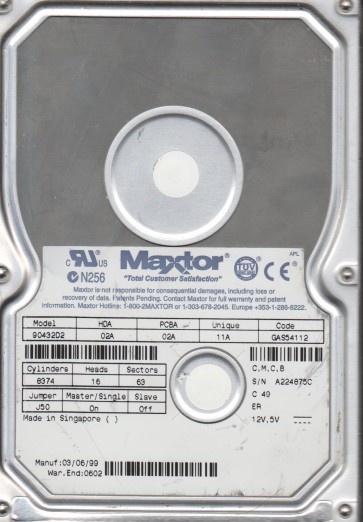
The Maxtor 90432D2 is a legacy 3.5-inch Parallel ATA (IDE) hard drive from the early 2000s, typically with a formatted capacity of 4.3 GB and a rotational speed of 5400 RPM. It belongs to the DiamondMax family and utilizes a standard ATA-5 interface. These drives are known for mechanical wear over time, particularly due to aging spindle motors and failing read/write heads. Due to its age, the controller board is also susceptible to component degradation, such as leaky electrolytic capacitors. Understanding that this drive lacks modern features like S.M.A.R.T. command improvements and advanced error correction is critical for recovery planning.
Identifying Common Failure Types
1. Mechanical Head Crash
Symptoms: Loud clicking, grinding, or scraping sounds. The drive may spin up but fail to be detected, or it may be detected with a severely reduced capacity. Causes: Physical shock, contamination from internal dust, or aging lubricant failure on the actuator arm. This is a hardware failure requiring a cleanroom environment for head replacement.
2. Spindle Motor Seizure
Symptoms: The drive does not spin up at all. No audible rotation; only a faint electrical hum or complete silence. The platters are stuck. Causes: Dried-out bearing lubricant, a locked rotor due to a failed motor controller IC, or physical damage. This is a hardware failure. DIY repair is extremely risky; the motor must be carefully unstuck or the platters moved to a donor drive.
3. Firmware Corruption (Logical Failure)
Symptoms: The drive spins up normally but is not detected by the BIOS, or it reports an incorrect capacity (e.g., 0 MB or 16 GB). The drive may also make repetitive seeking sounds but never lock onto the platters. Causes: Bad sectors on the system area, a corrupted translator module, or a failed controller ROM. This is a logical failure, though underlying physical media degradation may be present. Professional tools like PC-3000 or similar are often required for firmware repair.
4. Electronic Component Failure
Symptoms: Drive spins up for a second then stops, or does not power on at all. Visible damage like bulging or leaking capacitors on the PCB is common. The drive may also emit a burning smell. Causes: Aging electrolytic capacitors failing, blown TVS diodes from power surges, or damaged controller IC. This is a hardware failure. If only the PCB is faulty, a replacement board (with identical firmware revision) may work, but original ROM transplantation is often necessary.
Potential Recovery Paths
Professional Data Recovery Services
For any mechanical failure (head crash, seized motor, severe clicking) or complex firmware issues, professional service is strongly recommended. These facilities have Class 100 cleanrooms for head replacement, specialized tools for firmware repair, and donor drives for parts. Cost typically ranges from $500 to $3000+ depending on the failure complexity and required donor parts. Service level: complete. Data is recovered to a new external drive or returned via download. Warning: Opening the drive’s sealed chamber outside a cleanroom will destroy any chance of recovery.
DIY Recovery Paths (With High Risk)
For Electronic Failure (PCB only): If the drive is silent or only has a burned smell, a PCB swap may work. Obtain an exact replacement PCB (same model and firmware revision). After swapping, you may need to transfer the original BIOS chip (8-pin SOIC) from the old board to the new one using a hot air station or soldering iron. Warning: A mismatched firmware will cause the drive to not spin or be detected.
For Logical Failure (Accidental Deletion / Format): Do not write any new data to the drive. Use a write-blocker and connect via a USB-to-IDE adapter. Use imaging tools like DDRescue or HDD Raw Copy Tool to create a sector-by-sector image to a healthy drive. Then, use file recovery software (e.g., R-Studio, ReclaiMe File Recovery) to scan the image for deleted files. This method works if the media is physically healthy.
For Firmware Corruption: Advanced users with MRT or PC-3000 hardware can attempt to repair the firmware modules, but this requires deep technical knowledge and is usually not reliable for this specific model due to age and undocumented register sets.
What Not to Do
- NEVER open the drive’s sealed platter chamber. Even a single particle of dust can scratch the platters, causing permanent data loss. This includes removing the top cover to “inspect” the heads.
- DO NOT apply force to the drive’s platters or attempt to rotate them manually if the spindle is seized. This can rip the heads off the sliders while simultaneously damaging the magnetic media.
- DO NOT run recovery software directly on a failing drive that makes unusual noises (clicking, grinding). This will cause further head or media damage. Power it off immediately.
- DO NOT use a standard USB bridge cable without a write-blocker for logical recovery. Any software writes can corrupt the data structure.
- DO NOT attempt to freeze the drive. This is a myth that can cause condensation and corrosion, damaging the platters and heads permanently.
- DO NOT swap circuit boards without verifying the firmware revision or transferring the ROM. The wrong board can short out components or write incorrect commands to the heads.
Summary
The Maxtor 90432D2 is an aging IDE drive prone to mechanical failure (head crash, seized spindle), electronic degradation (bad capacitors), and firmware corruption. For any physical (mechanical or electronic) failure that produces abnormal sounds or prevents spin-up, immediate consultation with a professional recovery service is the only safe option. For logical problems (deleted files, formatted partition) where the drive spins quietly and is detected, a careful DIY approach using a write-blocker and imaging software is possible, but a robust backup strategy is always preferred. The single most critical rule: never open the drive enclosure, as this guarantees unrecoverable data loss in most cases.