
Data recovery on vintage hard drives like the Maxtor STM3250820A starts with identifying the failure type – electronic, firmware, or mechanical. Each requires a different approach, and misdiagnosis can make things worse. Here’s a quick guide to help you assess your situation and decide on the next step.
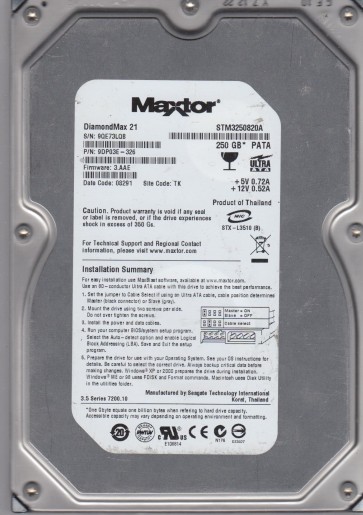
The Maxtor STM3250820A is a vintage Parallel ATA (PATA) hard drive from the early 2000s era, typically featuring a 250GB capacity and a 7200 RPM spindle speed. It is widely recognized as a rebranded Maxtor DiamondMax 10 series drive, built using older technology that includes susceptible components like Freescale/Motorola-based processors and single-stage voice coil actuators. Understanding its age limits and known weaknesses is critical before attempting any recovery.
Common Failure Types
1. Mechanical (Failed Read/Write Heads or Spindle Motor): Symptoms include loud clicking noises (click of death), grinding sounds, or the drive spinning up and then stopping. Causes include head crashes due to power loss or dust, or natural wear of the bearing over decades. Modern high-density platters of this generation are especially prone to surface contamination.
2. Firmware Corruption (ATA/S.M.A.R.T. Errors): Symptoms include the drive being detected with a wrong model number, capacity reading as 0MB, or becoming completely unresponsive. S.M.A.R.T. attributes may show impending failure. The STM3250820A commonly suffers from corrupted firmware modules after a power spike or improper shutdown, often requiring a tool to reset or transplant new firmware.
3. Logical Damage (File System Corruption or Bad Sectors): Symptoms include the OS showing drive is not formatted errors, slow performance, or files that cannot be opened. The causes range from improper ejection, random bad blocks developing from media wear, or abrupt power loss while writing to the File Allocation Table (FAT/MFT).
4. Electronic Failure (PCB-Board Level): Symptoms include the drive not spinning up, no audible signs of life, or a smell of burnt components. The older STMicroelectronics PCB often fails due to blown diodes, burned pre-amp ICs, or motor driver chips, often from power surges or faulty power supplies.
5. Sticking Head Park Ramp / Stiction: Symptoms include the drive sparingly spinning up but making a few light tapping noises while the head cannot seek to the ramp out of damaged area. Older Maxtor drives are susceptible to lubricant migration on this critical ramp, causing the heads to get stuck midway.
Potential Recovery Paths
DIY Methods (For Logical Only Faults): Read actions: Use a disk cloning tool (like ddrescue via a PATA-to-USB adapter) to image all recoverable sectors onto a new drive. Treat any I/O errors with lower speed retries. Avoid scanning damaged filesystem directly; create a bit-for-bit copy first then extract data from the image. Disconnect immediately if noises change to mechanical.
Professional Services (For Hardware Failure): For clicking stuck heads or burnt PCB: Send to cleanroom workshop. Engineers will replace failed heads with matched donor set from a donor drive with same firmware version, clean platter surfaces, or perform a firmware transplant via specialized PC-3000 gear. A complete failure of spindle motor bearing requires teardown and platter transfer to a new drive motor assembly. This is not feasible outside a class 100 cleanroom.
Advanced DIY (PCB Component Swap): For burnt board, find an exact donor PCB with identical main controller and marking options. Transfer the original firmware chip (usually located in an 8-pin SOIC serial flash) to the new board using a soldering station before powering on. Simply swapping boards alone will fail due to paired firmware. Use multimeter to check input voltages and TVS diodes first.
What Not to Do
1. Do NOT open the drive case outside a cleanroom; even a single particle will cause surface damage and total data loss.
2. Do NOT repeatedly apply power to a clicking drive; each attempt further damages the platter surfaces as heads continue to contact.
3. Do NOT run file checking or formatting tools (CHKDSK/fsck) on crashed drives; they modify filesystem structures and overwrite critical data.
4. Do NOT freeze the drive; the idea of contracting to allow freeing is dangerously misguided; condensation will instantly short out electrical parts.
5. Do NOT use products with shaker or hammer software designs to spin damaged drives; mechanical shock will catalytic crash the head into the platter.
Summary
The Maxtor STM3250820A has a high failure probability in 2025 due to aged mechanics and known PATA-era head/firmware weakness. Any clicking or unrecognized status indicates severe hardware problems. A bit-for-bit cloning is possible only when logical corruption or degraded media is detected. For all mechanical, electronic, or stuck-head failures, immediate turn-off and professional cleanroom intervention is essential. Never attempt self-repair on opened or clicking drives, as recovery chances drop quickly with each misstep.