
Data recovery on vintage hard drives like the Samsung HD153WI starts with identifying the failure type – electronic, firmware, or mechanical. Each requires a different approach, and misdiagnosis can make things worse. Here’s a quick guide to help you assess your situation and decide on the next step.
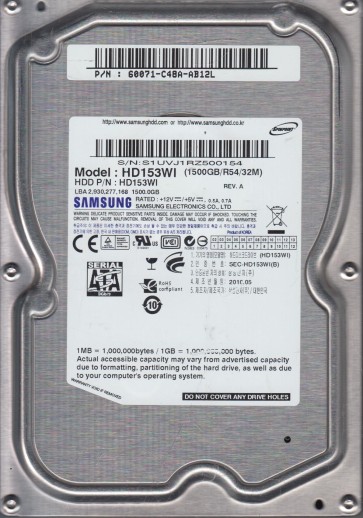
The Samsung HD153WI is a 1.5TB 3.5-inch SATA hard drive, part of Samsung’s EcoGreen line. It features 5400 RPM spindle speed, perpendicular magnetic recording (PMR) technology, and a 32MB cache buffer. This drive is known for its quiet operation and low power consumption, but like all mechanical drives, it is susceptible to failure. It uses a proprietary Marvell controller and a single read/write head assembly. Understanding its design is crucial for diagnosing issues, as the controller board (PCB) and head assembly are common failure points. The drive relies on a stable power supply and proper thermal management; overheating can degrade the spindle motor bearings over time.
Identifying Common Failure Types
1. Logical / Firmware Corruption
The HD153WI can suffer from firmware issues, such as ‘BSY’ (busy) state or ‘UNKN’ (unknown) model detection. Symptoms include the drive spinning up and being recognized by BIOS but not reading data, showing as uninitialized, or clicking a few times then going idle. This is often triggered by bad sectors in the firmware zone or power surges corrupting the module data. This is a software-level problem.
2. Mechanical Head Crash or Stiction
A head crash occurs when the read/write head touches the platter surface, causing physical damage and screeching or grinding noises. Stiction is when the head sticks to the platter surface after power-down, preventing spin-up. The drive may emit a single click or not spin at all. This is a hardware failure. The HD153WI’s head assembly is delicate; even minor shock can cause misalignment.
3. Electronic / PCB Failure
The drive’s printed circuit board (PCB) contains voltage regulators, the main controller, and a preamplifier. Common failures include burnt TVS diodes (transient voltage suppression) from power surges, damaged controller chips, or failed motor driver ICs. Symptoms: drive appears dead (no spin, no sound), or spins up but does not initialize. This is a hardware failure. Note: a simple PCB swap may not work due to firmware adaptation (NVRAM tuning data unique to each drive).
4. Bad Sectors & Surface Degradation
Over time, the magnetic coating on the platters can degrade, leading to weak sectors. The HD153WI, being a high-density PMR drive, is prone to slow-growing bad sector issues. Symptoms include slow read speeds, file corruption, and operating system freezing when accessing certain files. This can be a symptom of both logical and early physical failure.
Potential Recovery Paths
Professional Recovery Services
For mechanical failures (head crashes, stiction), professional cleanroom intervention is required. A specialist will open the drive in a Class 100 cleanroom, replace the head assembly with a donor from an identical HD153WI, and then use specialized tools (e.g., PC-3000, DeepSpar) to image the platters. For firmware corruption, professional tools can repair the module tables without physical intervention. This is the safest option for high-value data. Expect costs from $500 to $2000+.
DIY Recovery Options
For Logical Issues (e.g., accidental deletion, virus, simple bad sectors): Use data recovery software like R-Studio, DMDE, or ReclaiMe. Image the drive first to a healthy drive using a tool like ddrescue (Linux) to skip bad sectors. Avoid scanning the original drive directly. For PCB failure (if no burnt components): A donor PCB may work but requires transferring the original NVRAM (8-pin serial flash chip) to the new board. This requires a hot air soldering station. For firmare ‘BSY’ state: Advanced users can attempt to short specific PCB test points (e.g., near the SATA connector) to force the drive into a safe mode for firmware recovery. Warning: This requires precise knowledge; wrong shorts can permanently destroy the drive.
What Not to Do
- Do not open the drive enclosure in a non-cleanroom environment. Even a single dust particle can cause a head crash. Only professionals with cleanroom facilities should open it.
- Do not apply power to a drive that makes mechanical noises (clicking, grinding) more than once. This can shatter the heads and damage platters further.
- Do not attempt to freeze the drive. This myth can cause condensation and irreparable damage to the platters and bearings.
- Do not use file system repair tools like chkdsk /f or fsck on a failing drive. These can corrupt directory structures and overwrite data.
- Do not swap PCBs without transferring the NVRAM. Using a plain donor board will likely cause the drive to not spin up or corrupt the firmware zone.
- Do not assume software recovery tools can fix hardware problems. If the drive is not detected or makes abnormal noises, it is primarily a hardware problem.
Summary
The Samsung HD153WI is a reliable but aging drive with known vulnerabilities: firmware issues, PCB fried components, and head assembly failures. Accurately diagnosing the failure type:logical, electronic, or mechanical:is the first step. For logical corruption, software imaging is safe. For PCB issues, a component-level repair or NVRAM-swapped donor board may help. For any mechanical noise, immediately stop all DIY attempts and seek a professional cleanroom service. Data recovery success depends on avoiding further damage; never power-cycle a clicking drive or open its shell. Always prioritize creating a full sector-by-sector image onto a known-good drive before attempting any file recovery operations.