
Data recovery on vintage hard drives like the Samsung SP0411N starts with identifying the failure type – electronic, firmware, or mechanical. Each requires a different approach, and misdiagnosis can make things worse. Here’s a quick guide to help you assess your situation and decide on the next step.
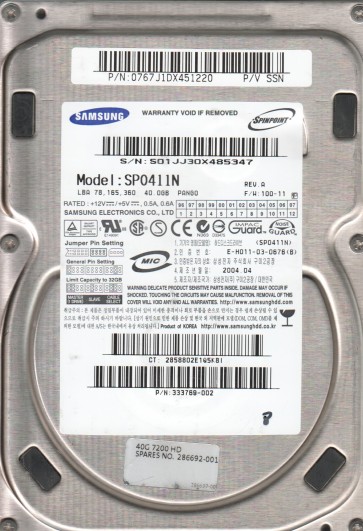
The Samsung SP0411N is a 40GB 3.5-inch Parallel ATA (PATA) hard drive manufactured in the early 2000s. It features a spin speed of 7200 RPM and a single-platter design. This drive utilizes a Samsung proprietary controller and a voice coil motor actuator. Due to its age, it is susceptible to specific failure modes related to mechanical wear, electronic component degradation, and firmware corruption. Understanding its internals is crucial for selecting the correct recovery path.
Identifying Common Failure Types
1. Mechanical Head Crash or Stiction
Symptoms include loud clicking, grinding, or scraping noises. The drive may spin up but fail to be detected. Alternatively, it may spin down immediately after start due to head stiction where the read/write heads stick to the platter surface. This is a physical failure involving damage to the platter media or the head assembly itself.
2. Electronic Component Failure (PCB / SMD Component)
The drive may be completely dead (no spin, no sound) or exhibit intermittent operation. This is often caused by a failed TVS diode or damaged driver chip on the printed circuit board (PCB). A visual inspection may reveal burnt or bulging components. The firmware on the PCB is also vulnerable to corruption from power surges.
3. Firmware Corruption (Samsung-specific)
The drive may spin up normally but not be recognized by the BIOS or operating system. It might report a wrong capacity (e.g., 0GB or LBA0) or produce errors like “SMART status bad.” This is a logical failure where the drive’s internal firmware modules, such as the translator module or adaptives, have become corrupted. This is common on this model due to age-related NAND degradation on the PCB.
4. Bad Sector Degradation
The drive may be detected but operates extremely slowly, with frequent pauses and system hangs. This is caused by a growing number of weak or failed sectors on the platter surface. The drive’s firmware is struggling to reallocate or read these areas. Over time, surface degradation can lead to a complete head crash if left unattended.
Potential Recovery Paths
Professional Service (Recommended for physical damage or firmware corruption)
For mechanical failures (clicking, grinding) or severe firmware issues, professional intervention is essential. A recovery lab will perform a cleanroom head swap (finding a matching donor drive) or use specialized tools like PC-3000 to rebuild firmware modules. This is the only safe method for heads that have crashed or for platter damage. Expect costs from $300 to $1500+ depending on severity. For the SP0411N, a donor drive with the exact same PCB revision and firmware version is critical.
DIY Options (Only for simple electronic or logical issues)
PCB Swap (Electronic Failure): If the drive is dead with no spin and you are certain the heads are intact, you may attempt a PCB swap. You must find an identical donor PCB. However, an important step is to transfer the original drive’s 8-pin serial ROM (U12) from the old board to the donor board. Simply swapping the board without transferring the ROM will result in a non-functional drive (wrong firmware). This is a delicate soldering task requiring a hot air rework station.
Software Recovery (Bad Sectors / Logical Errors): If the drive spins quietly and is detected but slow, you may try a file-level recovery tool (e.g., R-Studio, DMDE) on a cloned image. First, create a forensic image using ddrescue on Linux, which can bypass bad sectors and map them. Do not attempt to chkdsk or format. The clone must be done sector-by-sector.
What Not to Do
Do not open the drive enclosure. The SP0411N’s platters are sensitive to dust. Opening it outside a cleanroom will introduce particles that can cause a head crash. Do not apply power to a clicking drive. Continued operation can grind the heads into the platter, causing irreversible data loss. Do not use file recovery software directly on the failing drive for mechanical issues; this can cause further stress. Do not attempt to freeze the drive. This outdated method can cause condensation and permanent bearing damage. Do not attempt to replace the PCB without transferring the ROM chip as this will render the drive inoperable.
Summary
The Samsung SP0411N is an aging PATA drive with failure modes ranging from mechanical head crashes to electronic component death and firmware corruption. For mechanical or complex firmware issues, the only safe path is a professional recovery service specializing in Samsung drives and the PC-3000 toolset. For simple electronic failures (no spin) with no other symptoms, a DIY PCB swap with ROM transfer is possible but requires technical skill. For logical issues or bad sectors, a careful sector-by-sector clone using ddrescue is recommended before any file recovery attempt. Never power a damaged drive without a diagnosis, and never disassemble it yourself. The key to success is correct diagnosis first, followed by the appropriate, risk-adjusted action.