
Data recovery on vintage hard drives like the Seagate ST2000VX000 starts with identifying the failure type – electronic, firmware, or mechanical. Each requires a different approach, and misdiagnosis can make things worse. Here’s a quick guide to help you assess your situation and decide on the next step.
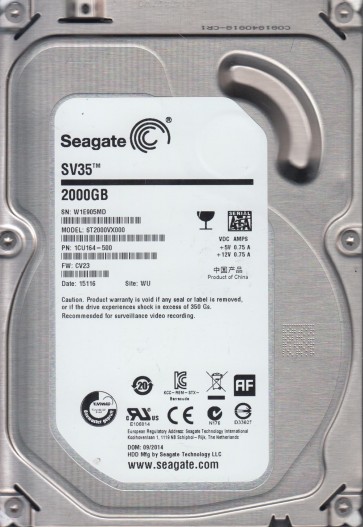
The Seagate ST2000VX000 is a 2TB 3.5-inch SATA hard drive belonging to the Video 3.5 HDD series designed for surveillance DVR and NVR systems . It features a 5900 RPM spindle speed , 64MB cache , and uses conventional perpendicular magnetic recording ( PMR ) technology . This drive is known for its reliability in 24/7 continuous write workloads but can suffer from specific failure modes due to thermal stress , power fluctuations , and mechanical wear in high-write environments . The controller board is typically a sealed unit with no exposed user-serviceable components other than the SATA power and data connectors .
Identifying Common Failure Types
1 . Mechanical Failure ( Head Crash or Stiction ) : Symptoms include clicking , ticking , or grinding noises from the drive . The drive may spin up but repeatedly fails to initialize or is detected intermittently . This often results from a head crash where the read/write head contacts the platter surface , or stiction where the heads stick to the platter causing the motor to fail to spin up . A distinct ” chirp ” sound followed by silence often indicates severe stiction .
2 . Firmware Corruption : The drive may spin up normally but appear as an uninitialized device , show incorrect capacity ( e.g. , 0 bytes or 16MB ) , or fail to respond to system commands . The ST2000VX000 uses a proprietary firmware that can become corrupted due to sudden power loss , overheating , or manufacturing defects . The drive may enter a ” busy ” state where it is detected but inaccessible .
3 . Bad Sectors and Media Errors : Gradual degradation of the magnetic platter surface leads to read / write errors , slow performance , and clicking during access attempts . The drive may repeatedly try to read a sector and eventually mark it as bad , causing system hangs or I/O errors in the operating system . SMART attributes like Reallocated Sectors Count or Current Pending Sectors will show elevated values .
4 . Logical File System Damage : The drive spins up , is detected correctly , but the partition is shown as RAW , unallocated , or prompts ” The disk is not formatted “. This is often due to a corrupted Master Boot Record ( MBR ) , GPT header , or file system structures ( NTFS , FAT32 , etc. ) caused by improper shutdowns , virus attacks , or software crashes .
Potential Recovery Paths
Professional Data Recovery Services : Required for mechanical failure , severe firmware corruption , or when DIY attempts have failed . The process involves :
- Cleanroom disassembly to replace the read/write head assembly or platter transplant .
- Specialized tools like PC-3000 or DeepSpar Disk Imager to bypass firmware defects and create a raw image .
- Firmware repair by rewriting corrupted modules or loading donor firmware .
- Cost : Typically $300 to $1500+ depending on severity . Service includes evaluation , non-invasive imaging , and file extraction .
DIY Recovery Methods :
- For file system damage : Use software like R-Studio , DMDE , or GetDataBack for NTFS . Create a disk image first using a tool like HDDSuperClone or ddrescue on Linux . Never write to the original drive . Recover files by rebuilding the partition table or scanning for lost partitions .
- For bad sectors ( media errors ) : Use ddrescue with a low retry count ( -r1 ) to skip problematic areas and obtain a partial image . Then use data recovery software on the image . Severely degraded drives may require professional intervention .
- Power cycling : For transient detection issues , try connecting the drive via a different SATA port , a USB adapter with external power , or a different PC . Do not repeatedly spin the drive if it is making abnormal noises .
What Not to Do
- Do not open the drive enclosure outside a cleanroom . The platters are extremely sensitive to dust and microscopic scratches will destroy data .
- Do not apply excessive power ( e.g. , freezing , tapping , or dropping the drive ) . These ” tricks ” are myths that cause further mechanical damage .
- Do not attempt to write new firmware or flash the drive without professional tools . Incorrect firmware can permanently brick the drive .
- Do not keep trying to read bad sectors repeatedly . This heats the heads and can spread damage across the platter surface .
- Do not format or run CHKDSK on a drive with file system corruption . This overwrites critical structures and reduces recovery chances .
Summary
The Seagate ST2000VX000 is a robust surveillance drive but susceptible to head crashes , firmware glitches , and bad sectors from continuous operation . Quickly identify the failure type by listening for noises ( mechanical ) , checking SMART values ( media ) , or observing detection behavior ( firmware or logical ) . For physical damage , professional recovery is mandatory . For logical or mild media issues , DIY imaging with ddrescue followed by file extraction software is viable . Always prioritize creating a block-level image before attempting any repair . Avoid all DIY hardware tampering and never write to the original drive . The most critical step is to stop using the drive immediately upon noticing failure to maximize the chance of complete recovery .