
Data recovery on vintage hard drives like the Seagate ST3250823NS starts with identifying the failure type – electronic, firmware, or mechanical. Each requires a different approach, and misdiagnosis can make things worse. Here’s a quick guide to help you assess your situation and decide on the next step.
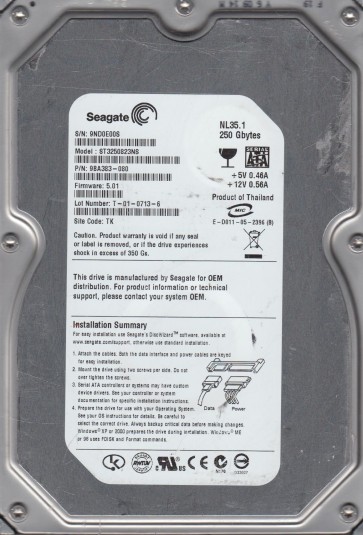
The Seagate ST3250823NS is a 250GB 3.5-inch SATA hard drive from the Barracuda ES series, designed for enterprise-class nearline storage. It operates at 7200 RPM with a 16MB cache and utilizes a perpendicular recording technology. This model is known for its robust NCQ (Native Command Queuing) support and is often found in NAS or RAID environments. Key components include the main PCB (Printed Circuit Board) with a Marvell or LSI controller, the spindle motor, read/write heads on an actuator arm, and the system area (SA) stored on the platters. Understanding these parts is critical for accurate failure diagnosis.
Identifying Common Failure Types
1. Mechanical Head Crash
Symptoms include clicking, grinding, or scraping noises from the drive. The drive may spin up but fail to be recognized. A head crash occurs when the read/write head physically contacts the platter surface, damaging the magnetic media. In the ST3250823NS, this is often caused by sudden shock or contamination from particles inside the enclosure. Data is not recoverable via standard DIY software.
2. Firmware Corruption
The drive may spin up normally, appear in BIOS or Device Manager with an incorrect capacity (e.g., 0GB or 250MB), or show as “uninitialized” in Disk Management. This model is prone to system area (SA) corruption due to power surges or degraded platter surface. The drive’s internal ROM and firmware modules become unreadable, preventing access to user data. In many cases, the drive may still spin but present no logical structure.
3. Electronic (PCB) Failure
The drive may be completely dead with no signs of life (no spin, no sound). This is typically caused by a damaged controller chip, burned-out TVS (transient voltage suppression) diode, or faulty motor controller. The ST3250823NS uses a specific PCB (often labeled with a model number like 100535704). Power surges or reverse polarity in a RAID enclosure are common triggers. The platters and motor remain healthy if the heads are parked.
4. Bad Sectors and Degradation
The drive may operate but with increasing slowness, freezing during file access, or generating read errors. This is a gradual physical degradation of the platter surface. The drive’s firmware attempts to reallocate sectors, but once the G-list is full, severe failures occur. This model’s enterprise nature means it often suffers from excessive vibration in multi-drive enclosures, accelerating surface wear.
Potential Recovery Paths
DIY Recovery (Only for Software Issues)
Warning: DIY attempts on hardware failures (clicking, grinding, no spin) will almost certainly cause permanent data loss. Only proceed if the drive is logically or electrically intact.
For Bad Sectors / Corruption: Use a read-only cloning tool like ddrescue (Linux / Hiren’s Boot CD) or HDDSuperClone. Set the tool to skip errors and create a sector-by-sector image to a healthy drive. Do not attempt to format or run chkdsk. Clone from the device directly: ddrescue -d -r3 /dev/sdb /mnt/recovery/sdb.img /mnt/recovery/sdb.log. Then scan the image with recovery software (e.g., R-Studio, ReclaiMe).
For Firmware Corruption (Selective Cases): Some minor cases may be resolved by using a utility like MHDD or Victoria to issue a soft reset or attempt to read the system area. However, this is risky and requires precise knowledge of the drive’s commands. For the ST3250823NS, firmware repair often needs specialized tools (PC-3000, MRT) that are not available to consumers.
For Electronic Failure (No Spin): If the PCB is damaged (e.g., burnt diode), you may attempt a PCB swap. This requires an exact donor board with the same PCB part number and firmware revision. However, the ST3250823NS normally uses adaptive algorithms stored in the ROM chip on the PCB. You must desolder and transplant the original ROM (8-pin SOIC) to the donor board. Simply swapping boards without ROM transfer will cause the drive to misidentify parameters or fail to initialize. This is a delicate micro-soldering task and is not recommended without proper tools (hot air station, flux).
Professional Recovery Services
When to Call: For all mechanical failures (clicking, grinding), severe electronic damage (burnt ICs, board breakage), firmware corruption beyond simple fixes, or if data is critical.
Process: A professional lab (e.g., DriveSavers, Ontrack, or a local cleanroom-equipped shop) will open the drive in a Class 10 ISO 5 cleanroom to replace heads or repair platter damage. For firmware issues, they use tools like PC-3000 or DeepSpar to access the SA directly. They can also perform ultrasonic cleaning of heads or transplant platters to a donor frame. Cost typically ranges from $300 to $2000+, depending on the severity and required turnaround time.
For ST3250823NS Specific: This drive has a history of head stiction (heads sticking to platters) after long idle periods. Professionals can apply controlled rotation and optical alignment to free the heads without scratching the media.
What Not to Do
- Do not apply power to a drive making clicking or grinding noises. This causes platter scarring.
- Do not open the drive cover yourself. Even a single dust particle can render data unrecoverable.
- Do not run chkdsk, fsck, or any repair utility on a drive with bad sectors or firmware issues. These commands often rewrite data and corrupt the file system further.
- Do not freeze the drive. This is a myth that can kill the heads and introduce moisture, leading to corrosion.
- Do not try to swap the PCB without transferring the ROM chip. The ST3250823NS relies on unique PCB calibration data stored in ROM. A simple board swap will not work.
- Do not use data recovery software on a failing drive directly. Always clone first to avoid further degradation.
- Do not try to reconnect or hammer the drive to force it to spin. This will destroy the motor bearing.
Summary
The Seagate ST3250823NS is a reliable enterprise drive but is susceptible to head crashes, firmware corruption (system area errors), and PCB failures driven by power issues. For any audible physical symptoms (clicking, grinding), immediate professional help is necessary:DIY attempts will permanently destroy the data. For silent but unrecognized drives, a shallow diagnosis of the PCB and firmware may be possible with advanced tools, but the safest route is to use a read-only cloning tool (like ddrescue) for logical issues. Always prioritize a cloned image; never work on the original drive. The key rule: if the drive is not spinning or making unusual sounds, stop, unplug, and consult a specialist. The cost of professional recovery is far less than the loss of irreplaceable data.