
Data recovery on vintage hard drives like the Seagate ST3360320AS starts with identifying the failure type – electronic, firmware, or mechanical. Each requires a different approach, and misdiagnosis can make things worse. Here’s a quick guide to help you assess your situation and decide on the next step.
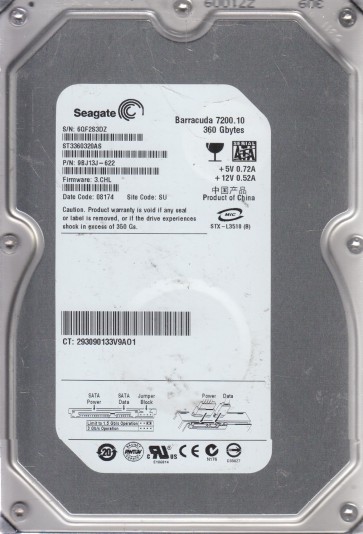
The Seagate ST3360320AS is a 3.5-inch 360GB hard disk drive from the Barracuda 7200.10 family, utilizing a Parallel ATA (PATA/IDE) interface and spinning at 7200 RPM. It employs perpendicular recording technology. Key components include the printed circuit board (PCB) with a Marvell controller chip, the voice coil motor (VCM) and spindle motor, the read/write heads, and the firmware stored on both the PCB and the platter’s system area. This model is known for specific firmware issues and mechanical weaknesses, particularly related to head stiction and controller degradation over time. Understanding its age and technology is critical for accurate recovery planning.
Identifying Common Failure Types
1. Firmware Corruption (Firmware Bricks)
This drive is notorious for firmware corruption, often caused by sudden power loss, aging NAND flash on the PCB, or internal microcode errors. Symptoms include: the drive spins up but is not recognized by the BIOS, makes clicking sounds (but not a head crash pattern), or reports an incorrect capacity (e.g., 0GB or LBA0). Accessing the system area via terminal commands (e.g., using MRT or PC-3000) often reveals corrupted modules like the translator or defect lists. This is a logical failure, not physical head damage.
2. Head Stiction and Mechanical Failure
Due to its age, the lubricant on the platters can degrade or the heads can stick to the media surface (stiction). Symptoms: the drive spins up briefly, then stops or spins with a repetitive tick sound. The motor may fail to accelerate properly. A variant is the “spindle motor locked” condition, where the platters do not rotate at all. This is a hard physical failure requiring cleanroom intervention. Left unattended, attempting to force rotation can scratch the platters.
3. PCB Electronics Failure
The PCB’s power management components, particularly the TVS diodes and the motor controller chip (often the Smooth LSI or Marvell), can fail due to power surges or age. Symptoms: drive shows no sign of life, no spin, no sound, and appears completely dead. The PCB may have visible burn marks or bulging components. Swapping the PCB with a donor board of the exact same model and firmware revision is a common DIY starting point, but requires transferring the original drive’s ROM (8-pin serial flash) to the donor board for correct LBA access.
4. Bad Sector and Media Degradation
Over years of use, the magnetic coating can degrade, leading to read/write errors and bad sectors. Symptoms: the drive is recognized but becomes very slow, repeatedly retries reading, and generates S.M.A.R.T. errors (e.g., Reallocated Sector Count, Current Pending Sector). The system may freeze or blue-screen when accessing certain files. This is a progressive software and physical issue. Continued use with pending sectors can lead to further degradation and data loss.
Potential Recovery Paths
Professional Data Recovery Services
For firmware corruption, mechanical head stiction, or severe bad sectors, a professional lab is recommended. They use specialized tools like PC-3000, DeepSpar Disk Imager, and cleanroom facilities (Class 10 or better). Typical services include: firmware repair by refloating translator modules, head stack replacement from a matching donor drive (exact model and firmware), and direct platter extraction for imaging. Costs range from $300 to $2500+ depending on the severity. Seagate ST3360320AS drives often require complex firmware adaptations; professionals have the experience to handle these without causing irreversible damage.
DIY Recovery Attempts (For Technical Users Only)
For PCB failure only: If the drive is completely dead (no spin), you can attempt a PCB swap. You need an exact donor drive (same model and PCB revision). Desolder the 8-pin Serial Flash (ROM) from the original PCB and solder it onto the donor board. This transfers the unique drive ID and firmware. Without this ROM swap, the drive will not work correctly. Tools required: soldering iron, hot air station, and multimeter. Warning: This is high-risk. Desoldering can damage the PCB. Use ESD protection.
For bad sectors (software issues): Use disk imaging tools like ddrescue (Linux) or HDDSuperClone. Clone the drive in read-only mode, head-by-head, to a known-good target drive. Pause the process if the drive becomes hot or makes unusual noises. Do NOT use Windows chkdsk or ScanDisk on a failing drive; they can cause more damage. For firmware corruption (clicking but not head crash): Do not attempt to spin the drive repeatedly. Some DIY users use terminal access (e.g., TTL adapter) to manually reload modules. This is extremely technical and often leads to permanent bricking if incorrect commands are used. Professional tools are strongly advised.
What Not to Do
- Never open the drive enclosure outside a cleanroom. The platters are extremely sensitive to dust and fingerprints. Exposing them to air will almost certainly cause unrecoverable damage.
- Do not apply power to a drive that smells burnt or has visible damage on the PCB. This can short-circuit and destroy the preamplifier and heads.
- Avoid using chkdsk /f or any repair tool on a drive with clicking sounds or bad sectors. The read/write operations can physically damage the heads or scrape the platters.
- Do not freeze the drive (a common myth). Freezing can cause condensation that leads to short circuits and rust on the platters, making recovery impossible.
- Never shake or drop the drive, even if it appears stuck. Shock can misalign the heads and cause platter contact.
- Do not attempt head stiction release by tapping or twisting the drive. This can permanently damage the spindle motor.
Summary
The Seagate ST3360320AS is a legacy PATA drive prone to firmware corruption, head stiction, PCB failure, and media degradation. Proper diagnosis is essential: listen for clicks (firmware vs head crash), check for spin (electric vs mechanical), and assess S.M.A.R.T. data if possible. For firmware and logical issues, professional PC-3000 recovery is the most reliable path. For hardware failures (heads, motor), a cleanroom lab is mandatory. DIY attempts are limited to PCB swaps with ROM transfer (for dead boards) and controlled imaging with ddrescue (for bad sectors). Avoid any destructive actions like opening the drive, freezing it, or running repair tools. If data is critical, stop all self-attempts immediately and consult a professional service. The cost of professional recovery is often justified by the irreplaceable nature of the data.