
Data recovery on vintage hard drives like the Seagate ST3450857SS starts with identifying the failure type – electronic, firmware, or mechanical. Each requires a different approach, and misdiagnosis can make things worse. Here’s a quick guide to help you assess your situation and decide on the next step.
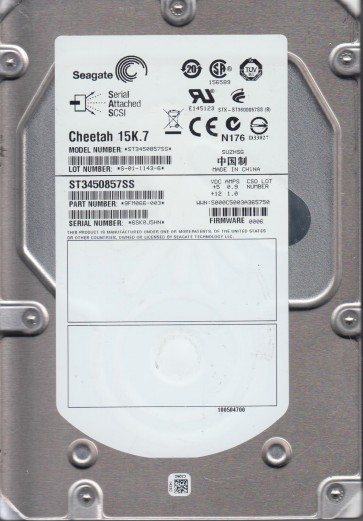
The Seagate ST3450857SS is a 450GB 15K.6 enterprise-class SAS hard disk drive (HDD) with a 3.5-inch form factor. It utilizes perpendicular magnetic recording technology and a Serial Attached SCSI (SAS) interface operating at 3.0 Gbps. This model is commonly deployed in enterprise servers, RAID arrays, and network-attached storage (NAS) environments due to its high rotational speed (15,000 RPM) and reliability-focused firmware. The drive features a dual-processor design and advanced servo control to access data at high speeds. It spins on fluid dynamic bearings (FDB) for quieter operation and reduced vibration. The mechanical construction includes a single platter or two platters (depending on the exact revision) and a rotary voice coil actuator. Understanding that this is an enterprise drive is critical as its failure modes often differ from consumer HDDs, particularly regarding mechanical stress from sustained operation and potential logical corruption from RAID controller interactions.
Identifying Common Failure Types
1. Mechanical Failure (Head Crash or Spindle Motor Seizure): This is a physical failure where the read/write heads touch the platters due to shock, bearing wear, or actuator arm fatigue. Symptoms include loud clicking (often called “death click”), grinding noises, or complete silence if the spindle motor fails to spin. The drive may also emit a repetitive beep or chirp, indicating the voice coil is unable to park the heads. After a head crash, data on the affected platter surface becomes permanently damaged at the point of contact. The ST3450857SS, with its 15K RPM, is particularly susceptible to spindle bearing failure if its operating temperature exceeds 60¡ãC for prolonged periods.
2. Electronic Failure (PCB / Controller Board Failure): The drive’s printed circuit board (PCB) can fail due to power surges, component aging, or physical damage. Common failures include blown TVS diodes, burned out preamplifier chips (typically from overcurrent), or a failed SAS interface controller. Symptoms include the drive not spinning, being detected with incorrect capacity (e.g., 0GB or 1.5GB), or producing no activity despite receiving power. Visual inspection may reveal burnt components, capacitor leakage, or a cracked PCB. Unlike some consumer drives, the ST3450857SS has a unique firmware adaptation stored on the PCB’s ROM chip, so simply swapping the PCB from a donor drive without transferring the original ROM data will not work.
3. Logical Failure (Firmware Corruption or Bad Sector Mapping): This occurs when the drive’s internal firmware becomes corrupt, often due to unexpected power loss, improper disconnection from a SAS controller, or aging NAND flash memory storing the firmware modules. Symptoms include the drive being detected but showing an unresponsive state, spinning but not being recognized by the system, or exhibiting extremely slow performance with “I/O errors” in the operating system logs. The drive may also report an incorrect SMART status (e.g., “Drive OK” with 0 bad sectors while actually having many pending reallocations). A related software issue is file system corruption, where the partition table or file allocation table becomes damaged, making data appear lost while the underlying platters remain intact.
4. Surface Degradation (Too Many Bad Sectors): Over time, the magnetic coating on the platters can weaken, develop weak magnetic domains, or suffer from non-repetitive runout (NRRO). This leads to an increasing number of bad (unreadable) sectors. The drive’s firmware will attempt to remap these sectors to spare areas, but when the spare pool is exhausted, the drive may become unstable. Symptoms include recurring “Unrecoverable Read Error” messages, slow scanning speeds, and the hard drive spontaneously entering a “busy” state while trying to read a damaged sector. On the ST3450857SS, this is often accelerated by excessive vibration in the server chassis or sustained write-heavy workloads.
Potential Recovery Paths
Professional Data Recovery Services: For mechanical or any failure involving physical damage (e.g., clicking, no spin, burnt component), immediate professional intervention is strongly recommended. A service like DriveSavers or a Seagate-certified lab can perform head stack replacements in a cleanroom (Class 10 or better), transplant the original ROM to a donor PCB, or use specialized tools like PC-3000 for SAS drives or DeepSpar Disk Imager to extract data from damaged platters. For the ST3450857SS, professionals will use firmware-specific tools to read the SA (System Area) and rebuild translation tables. Expect costs between $500 and $3,000 depending on complexity and parts availability. Service Level Agreements (SLAs) range from 72-hour standard to 24-hour emergency.
DIY Software Recovery (For Logical Failures Only): If the drive spins normally, makes no unusual noises, and is detected by the system, you can attempt software-based recovery for file system corruption or accidental deletion. Use a data recovery application with SAS support (e.g., R-Studio Technician, GetDataBack for RAID, or ReclaiMe File Recovery). Never install the software on the failing drive. Connect the drive via a reliable SAS HBA (e.g., LSI 9211-8i) and create a sector-by-sector disk image (a raw DD image) to an external healthy drive. Then, scan the image file, not the source drive. For drives with bad sectors, use tools like ddrescue or HDDSuperClone in their safe mode, which will skip problematic areas and continue imaging the rest. After imaging, repair file system metadata (e.g., using chkdsk on the image only) if necessary. For firmware issues like a locked drive or inaccessible system area, DIY tools like MRT or PC-3000 require deep technical knowledge and are not recommended for first-timers due to the risk of permanently bricking the drive.
Emergency DIY for Electronics (PCB Swap with ROM Transfer): Only if the drive exhibits no mechanical noise but does not spin or power on, you can attempt a PCB swap. Obtain an exact donor board (same model number, same date code). The critical step: On the ST3450857SS, the firmware adaptation data is stored in an 8-pin Serial Flash (usually a 25Q16) on the PCB. You must desolder this chip from the original PCB and solder it onto the donor board, or use a programmer to read and write the contents. Simply swapping the boards without ROM transfer will cause the drive to not initialize because it lacks the unique defect map and calibration data. After transferring the ROM, the donor PCB should make the drive spin up and be detected. This requires soldering skills and a hot air station:improper handling can destroy the chip or short contacts.
What Not to Do
- Never open the drive enclosure. The ST3450857SS platters are extremely sensitive to airborne contaminants (dust, smoke particles, skin oils). An open platter in an uncontrolled environment will result in head crashes and permanent data loss within minutes.
- Do not apply power repeatedly if the drive clicks or grinds. Each spin-up attempt can cause the heads to damage more sectors on the platters, expanding the bad area.
- Avoid using chkdsk, fsck, or any disk repair tool directly on a failing drive. These tools will attempt to recover bad sectors by forcing the drive to wait for reads, which can cause the actuator arm to overheat and fail, or will overwrite data that is still intact.
- Do not freeze the drive. This is a myth for modern HDDs. Condensation will form inside the sealed chamber, causing corrosion and head stiction, making recovery impossible.
- Never spin a drive that has visible liquid damage (e.g., from a flood or cooling leak). Short circuits on the PCB can be exacerbated by powering up. Remove and dry the PCB first.
- Do not attempt to reflow the board or heat the head preamplifier. This is unlikely to fix modern SAS drives and can permanently damage the sensitive components.
- Avoid using recovery software that claims to “fix” the drive. Always image the drive first. Writing to the drive during recovery overwrites potential recoverable data.
- Never connect a failing SAS drive to a consumer SATA controller without proper termination. This can cause bus contention and potential electrical damage.
Summary
The Seagate ST3450857SS is a robust enterprise SAS drive but is vulnerable to mechanical (head crash, spindle seizure), electronic (PCB failure), logical (firmware corruption), and surface degradation failures. For physical faults (clicking, no spin, burnt electronics), professional recovery is the only safe path due to cleanroom requirements and the need for donor parts. For logical or file system issues where the drive spins normally and is detected, DIY software recovery using imaging tools (ddrescue, R-Studio) on a separate healthy drive is feasible, but must avoid any write operations to the source. A PCB swap with ROM transfer is possible for electronic-only failures but requires advanced soldering expertise. The golden rule: immediately stop using the drive at the first sign of trouble, create a bit-for-bit image before any recovery attempt, and always prioritize data safety over cost savings. If you are not confident in any DIY step, stop and consult a professional data recovery lab to avoid permanent data loss.