
Data recovery on vintage hard drives like the Seagate ST9146802SS starts with identifying the failure type – electronic, firmware, or mechanical. Each requires a different approach, and misdiagnosis can make things worse. Here’s a quick guide to help you assess your situation and decide on the next step.
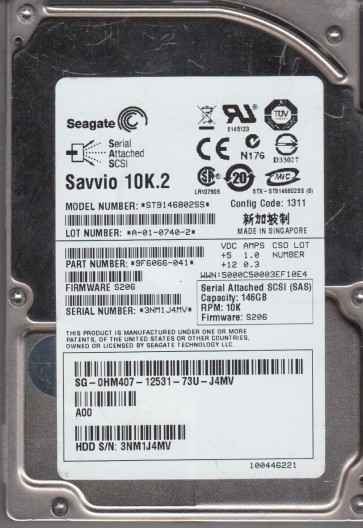
The Seagate ST9146802SS is a 2.5-inch, 146GB, 10,000 RPM SAS (Serial Attached SCSI) enterprise-class hard drive. It is designed for high-performance server and storage array environments, often used in RAID configurations. Key characteristics include a 32MB cache, a 6Gb/s SAS interface, and a robust construction intended for 24/7 operation. Unlike consumer SATA drives, this model uses a dual-port SAS connector and is built with enterprise-grade error recovery and vibration tolerance. Understanding this drive’s enterprise pedigree is crucial; its failure modes often stem from different wear patterns than consumer drives, such as prolonged spindle bearing wear due to constant operation or electronic faults from power supply issues in a server chassis. Data on this drive is typically sensitive and mission-critical.
Identifying Common Failure Types
1. Mechanical / Head Crash
This involves physical damage to the read/write heads or platters. Symptoms include repeated clicking sounds (often described as a “click of death”), grinding, scraping, or whirring noises. The drive may be detected by the BIOS but with a very slow response, or may spin up but fail to initialize. In an enterprise environment, this could be triggered by physical shock during transport, excessive vibration, or a severe power event. The ST9146802SS has a high MTBF, but mechanical failures eventually occur, particularly due to spindle bearing degradation after many years of runtime. Data recovery from a head crash is extremely complex and often requires a cleanroom.
2. Electronic / PCB Failure
The drive’s printed circuit board (PCB) can fail due to power surges, overheating, or component aging. Symptoms include the drive not spinning up at all (no activity), a brief spin-up followed by immediate shutdown, or the drive being fully detected but reporting a “bad” or “unknown” status. On the ST9146802SS, common failure points include the SAS controller chip, voltage regulators, or the preamplifier circuit. Unlike simpler SATA drives, PCB swap on SAS drives often requires component-level repair (e.g., transferring the original firmware chip) because the UUID and adaptive data are stored on the PCB, not just the platters.
3. Firmware Corruption / Logical Failure
The drive’s internal firmware (ROM and SA – System Area) can become corrupt due to a sudden power loss, a failed firmware update, or bad sector propagation. Symptoms include the drive spinning up normally but not being recognized by the host server OS, stalling during initialization, or reporting a “0GB” or incorrect capacity. The ST9146802SS uses sophisticated error recovery algorithms. If firmware becomes corrupted, the drive may enter a “busy” state (often indicated by a specific SAS error code). This is a software-level problem but requires specialized tools to repair, as the firmware is tightly coupled with the hardware.
4. Bad Sector Development
Progressive bad sector growth occurs when the media degrades over time, often due to weak magnetic domains or mechanical wear. Symptoms include extremely slow read/write speeds, read errors, file system corruption (e.g., NTFS showing as RAW), and the drive being forced offline by a RAID controller. Enterprise SAS drives have robust error correction (ECC) and built-in remapping (reallocation of sectors), but a high rate of pending/reallocated sectors (detectable via SMART) indicates a failing drive. This often precedes a mechanical failure.
Potential Recovery Paths
Professional Data Recovery Services
Recommended for: Any physical damage (clicking, grinding), PCB failure requiring component-level repair, severe firmware corruption, or when data is critical and a DIY attempt could cause permanent loss.
Process: A professional lab will assess the drive in a clean environment (Class 10 or better). For mechanical failure, they will swap the head stack assembly (HSA) or replace damaged platters into a donor drive. For PCB issues, they will perform micro-soldering to replace blown components or transfer firmware chips. For firmware problems, they will use specialized equipment (e.g., PC-3000 SAS, MRT Ultra) to read the drive’s ROM and SA, repair corrupted modules, and extract data sector-by-sector onto a healthy target drive.
Cost: Typically $300 to $3,000+ depending on complexity and urgency. The enterprise nature of the ST9146802SS often commands a premium due to specialized hardware requirements.
DIY Recovery (For Logical Issues Only)
Caution: DIY methods are strictly for logical failures (accidental deletion, file system corruption, format recovery) where the drive is physically healthy and detected correctly by the system. Do NOT attempt DIY on a clicking or unrecognized drive.
Tools: Software like R-Studio, DMDE, or ReclaiMe File Recovery (SAS version supports SAS drives over dedicated controllers).
Procedure: Connect the drive to a SAS HBA (Host Bus Adapter) or a SAS backplane in a non-RAID mode. Use the software to scan for lost partitions and files. The software will attempt to reconstruct the file system tree from the raw data. Image the drive first (using a tool like ddrescue in Linux) to a healthy target drive to avoid further stressing the failing media. Avoid writing any data back to the ST9146802SS.
Risks: High risk of making the situation worse if the drive has undiagnosed weak sectors. Using conventional imaging software on a failing SAS drive can cause the drive to hang or trigger permanent firmware corruption. The SAS protocol is more complex than SATA, so standard consumer recovery tools may not work.
What Not to Do
- Do NOT power cycle repeatedly: If the drive is clicking, spinning up then down, or not recognized, repeatedly connecting and disconnecting power can damage the heads further. Each spin-up is a mechanical stress cycle.
- Do NOT open the drive enclosure: The platters are extremely sensitive to airborne contaminants. Even a single dust particle can cause a head crash. The ST9146802SS is a hermetically sealed unit; opening it outside a cleanroom will destroy the data.
- Do NOT attempt a PCB swap on a SAS drive without component-level expertise: Unlike SATA drives, simply swapping a PCB from a donor drive will almost never work due to firmware and adaptive data mismatch. You risk bricking the drive permanently.
- Do NOT use “low-level format” or “erase” utilities: If the drive has bad sectors, attempting a low-level format will trigger the drive’s internal reallocation process, which can corrupt the system area and make recovery impossible.
- Do NOT ignore strong vibrations or heat: If the drive emits unusual heat or vibration during operation, immediately stop. Continued operation can cause platter surface damage.
- Do NOT attempt data recovery from a RAID array without first isolating the failing drive: Running a RAID rebuild on a failing ST9146802SS will likely cause the entire array to become degraded or fail.
Summary
The Seagate ST9146802SS is a robust enterprise SAS drive, but it is not immune to failure. The three most common failure types are mechanical head/platter damage, PCB/electronic failure, and firmware corruption. Professional data recovery is almost always required for physical and complex firmware issues, as DIY attempts on these drives are high-risk. For logical recovery (accidental deletion), careful software imaging is possible but must be done with SAS-aware tools and strict caution. The most important rule is: do not aggravate the condition. If the drive exhibits any strange behavior (clicking, not spinning, unrecognized), immediately power it off and consult a professional recovery service that specializes in SAS/enterprise drives. The cost of a professional recovery is far less than the cost of losing irreplaceable business or operational data.