
Data recovery on vintage hard drives like the Toshiba MK4313MAT starts with identifying the failure type – electronic, firmware, or mechanical. Each requires a different approach, and misdiagnosis can make things worse. Here’s a quick guide to help you assess your situation and decide on the next step.
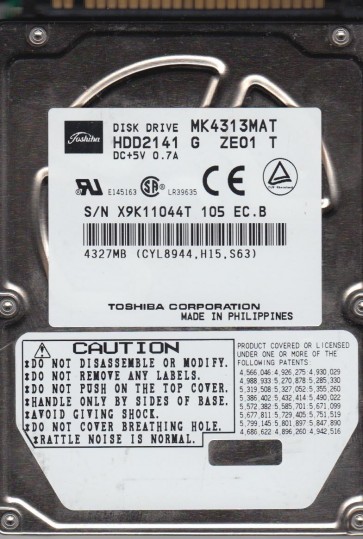
The Toshiba MK4313MAT is a 2.5-inch IDE (PATA) hard disk drive with a formatted capacity of 4.3 GB. It features a rotational speed of 4200 RPM and a 2 MB buffer. This drive utilizes a glass platter and magneto-resistive (MR) heads. Key components that are prone to failure include the spindle motor, the voice coil actuator, the preamplifier chip on the head assembly, and the aging IDE interface connector. Due to its age (manufactured in the early 2000s), lubricant degradation and stiction are common mechanical failure contributors. The drive’s firmware resides on the platters, making firmware corruption a complex issue that often mimics head failure.
Identifying Common Failure Types
1. Mechanical Failure (Head Crash or Stiction)
Symptoms: The drive spins up (you may hear the platters rotating) but emits a persistent clicking, scratching, or chirping sound. In cases of stiction, the platter may not spin at all, and you might hear only a faint whir or a solid low hum without full rotation. The BIOS does not detect the drive or detects it with incorrect parameters (e.g., 0GB capacity). Common Cause: Aging lubricants have dried out or become viscous, causing the heads to stick to the platter surface (stiction). Head deterioration due to contamination or wear.
2. Firmware Corruption
Symptoms: The drive spins up normally and is silent, but the BIOS detection time is extremely long (over 20 seconds). The drive may identify with a strange model number or a series of zeros and spaces. It may click once during initialization then go silent with no data access. Common Cause: Service area (SA) defects on the platters, corrupted module tables, or damaged translator modules. This is often linked to weak heads unable to read the firmware zone reliably.
3. Logical Failure (File System / Bad Sectors)
Symptoms: The drive is detected correctly and sounds normal, but the operating system reports it as unformatted, RAW, or exhibits extremely slow performance. You may see “cyclical redundancy check” (CRC) errors when trying to read files. Common Cause: Aging media developing weak sectors, invalid partition table entries, or corruption in the file system (FAT32 or NTFS on this vintage). This is the least severe failure type.
Potential Recovery Paths
Professional Recovery Services (Recommended for Mechanical or Firmware Issues)
When to use: For any audible mechanical sound (clicking, scratching), firmware detection problems, or when DIY attempts have failed. Process: A professional lab with a cleanroom (Class 10 or better) will perform a head swap with a compatible donor drive (e.g., from the same MKxxxxMAT family). For firmware issues, specialized tools like PC-3000 or MRT are used to rebuild translator modules or force the drive to read service area data. Cost: Typically $300-$900+ USD for this drive class, depending on media damage and required parts.
DIY Software Recovery (Only for Logical Failures)
Requirements: The drive must be detected correctly in BIOS and sound completely healthy. You will need a working PATA-to-USB adapter or a desktop PC with an IDE port. Tools: Use data recovery software like R-Studio, DMDE, or GetDataBack. Procedure: 1) Clone the drive first using a tool like HDDSuperClone or ddrescue (Linux) to a larger, healthy hard drive. 2) Do NOT scan the failing drive directly. 3) Scan the cloned image with your chosen file recovery software. 4) Recover needed files to a separate healthy drive. Important: Never write data back to the failing drive.
What Not to Do
- Do NOT apply power to the drive if you hear internal scraping or grinding sounds. Running it further will scrape off the magnetic coating, making data unrecoverable.
- Do NOT open the drive’s sealed casing under any circumstances. The internal platters are highly sensitive to even microscopic dust particles. A single speck can destroy the read/write heads.
- Do NOT attempt to freeze the drive. This is an outdated myth that causes condensation and permanent platter damage.
- Do NOT use recovery software that writes to the drive (e.g., filesystem repair tools like chkdsk /f). Writing can overwrite the directory structures you are trying to recover.
- Do NOT attempt to reassemble a drive after a head crash. Any movement can cause further physical damage.
Summary
The Toshiba MK4313MAT is a vintage drive with high susceptibility to mechanical (stiction/head crash) and firmware failures due to age. If the drive makes unusual noises or is not detected correctly, immediately disconnect power and consult a professional data recovery service. For silent, correctly-detected drives with logical file or bad sector issues, a careful DIY approach using a direct sector-by-sector clone to a healthy drive is possible. Prioritize cloning over direct scanning. Never operate a noisy drive or open the casing. Your data’s safety depends on the first action you take.