
Data recovery on vintage hard drives like the Western Digital WD30PURZ starts with identifying the failure type – electronic, firmware, or mechanical. Each requires a different approach, and misdiagnosis can make things worse. Here’s a quick guide to help you assess your situation and decide on the next step.
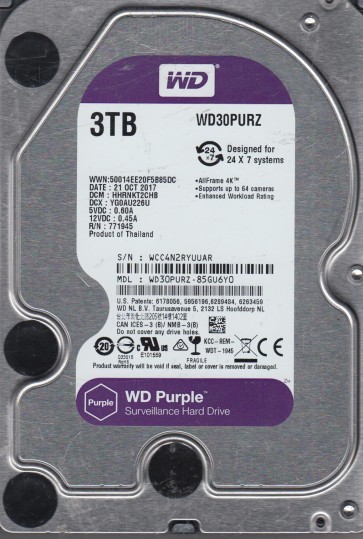
The Western Digital WD30PURZ is a 3TB 3.5-inch hard drive from the WD Purple series, specifically designed for 24/7 operation in surveillance and video recording systems (DVRs/NVRs). It utilizes conventional magnetic recording (CMR) technology and is optimized for streaming and sequential write workloads rather than random access. Its firmware is tuned for low power consumption and continuous write-heavy environments. While highly reliable in its intended role, its unique firmware and operational characteristics introduce specific failure patterns distinct from desktop drives.
Common Failure Types
1. Mechanical Head Failure (Head Crash): Common in surveillance drives due to sustained operation and vibration. Symptoms include loud clicking or scraping noises, immediate dropping from the system, and a “click of death.” Recording may stop and the system may lock up. Caused by physical damage to the read/write heads due to shock, power surges, or manufacturing defects. The drive bay’s vibration from multiple drives can exacerbate this.
2. Bad Sectors / Surface Degradation (S.M.A.R.T. Reallocated): The WD20PURZ’s surveillance firmware aggressively reallocates bad sectors. Early symptoms involve video glitches, lag in playback, or system warnings in the NVR log. As reallocation fails, the drive may become very slow, show pending sectors, and eventually fail to mount. This is often a progressive failure, unlike the sudden death of a head crash.
3. Firmware Corruption (Service Area/ROM Issues): A critical failure mode for Purple drives, often triggered by power loss during a firmware update or from underlying mechanical damage. Symptoms include the drive powering up but not being detected (showing as “0 bytes” or “no media”), clicking without spinning up fully, or being recognized with a wrong model/serial number. A damaged SA Erase module on the PCB is a common root cause.
4. PCB (Printed Circuit Board) Failure (Electronic): Usually caused by power surges, lightning strikes, or overheating within the DVR enclosure. Symptoms include no power (no spin/no idle noise), a burning smell, or visible damage to the TVS diodes or controller chip. The drive may also be seen but with intermittent connection. A simple board swap is rarely effective due to unique NVR (adaptive) data on the PCB’s ROM.
5. Logic/File System Corruption (Logical Damage): Occurs when the file system (often NTFS, exFAT, or a proprietary video format) becomes corrupted due to improper shutdown, incorrect formatting, or malware on the NVR system. Symptoms include the drive showing as raw/unformatted, being accessible but with “Disk Structure Corrupt,” or the NVR losing its recording schedule. The physical condition of the drive remains good.
Potential Recovery Paths
DIY Methods (Use Only for Logical Issues): Only for file system corruption without physical failure. Use a SATA-to-USB adapter connected to a healthy PC (not the NVR). For NTFS/exFAT corruption, use professional software (e.g., R-Studio, DMDE). Never format the drive. For video footage, video repair tools (e.g., Grau Video Repair) can reconstruct fragmented streams. If the drive makes any unusual noise, stop immediately and seek professional help.
Professional Services (For Physical/Firmware Issues): This is required for head crashes, bad sectors beyond a few remaps, clicking, or firmware corruption (dead PCB). A specialist will use a Class 10 cleanroom to replace heads or the PCB (with firmware transplant). For firmware issues, tools like PC-3000 or MRT are used to rebuild the SA modules. Head replacements on these drives are complex due to high density, requiring precise alignment. Cost ranges from $300 to $1000+ depending on the complexity. Services like Secure Data Recovery or DriveSavers are reputable for such work.
What Not to Do
1. Do not attempt to open the drive’s internal cover. Even a single speck of dust can destroy the heads and make professional recovery far more difficult or impossible.
2. Do not apply power to a drive making clicking or scraping noises. This will cause further mechanical damage, grinding the platters and heads.
3. Do not attempt a PCB swap from a donor drive unless you have equipment to reprogram the NV-RAM (unique calibration data). A direct swap will not work and can overwrite critical data.
4. Do not run chkdsk /f or any surface scan software on a drive with known physical problems. This will force the drive to read damaged areas, leading to head damage and data loss.
5. Do not freeze the drive. This is a dangerous myth that introduces condensation and moisture, causing platter corrosion and irreversible damage.
Summary
The WD30PURZ is a robust surveillance drive, but its 24/7 operation and firmware design make it susceptible to head failures, bad sectors, and firmware corruption. Physical issues (noise, clicking, detection failure) almost always require a professional cleanroom and firmware tools. Logical problems (raw/unformatted, visible but failing to mount) may be recoverable by software. The most critical rule is to stop using the drive at the first sign of mechanical or firmware trouble and to never open it or apply power to a failing unit.