
Data recovery on vintage hard drives like the Western Digital WD3200BUCT starts with identifying the failure type – electronic, firmware, or mechanical. Each requires a different approach, and misdiagnosis can make things worse. Here’s a quick guide to help you assess your situation and decide on the next step.
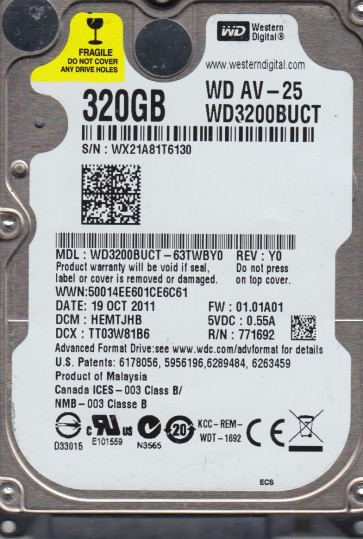
The Western Digital WD3200BUCT is a 2.5-inch, 320GB SATA hard drive commonly used in external portable drives and older laptops. It typically operates at 5400 RPM and utilizes perpendicular magnetic recording technology. Known for its balance of capacity and power efficiency, this drive is susceptible to specific failure modes due to its age, mechanical design, and common usage scenarios. Recognizing its architecture is key to diagnosing issues correctly.
Common Failure Types
1. Mechanical Head Crash
Symptoms: Loud clicking, scratching, or grinding noises; drive not spinning up; system failing to detect the drive; repetitive ticking sounds. Cause: Physical contact between the read/write head and the platter surface, often due to shock, dropping, or gradual degradation of the head actuator mechanism.
2. Stiction (Stiction of the Heads to the Platters)
Symptoms: Drive spins up for a few seconds, then stops; motor may be heard whirring but no access; SMART data may show high “Spin Retry Count”. Cause: The read/write heads become temporarily or permanently stuck to the platter surface, often after a period of inactivity or a sudden power loss. The hydrophobic coating degrades over time.
3. Firmware Corruption (SA/Zoned Defects)
Symptoms: Drive is detected with the correct model name but incorrect or no capacity (e.g., 0GB); drive clicks or spins up but fails to initialize; BIOS or system hangs during detection. Cause: Corruption of the drive’s System Area (service area) on the platters, possibly from power fluctuations, bad sectors, or weak magnetic signals.
4. Bad Sectors / Logical Damage
Symptoms: Slow read/write speeds; file system errors; operating system freezes; chkdsk or disk utility reporting bad blocks; drive is detected but data becomes inaccessible. Cause: Physical defects on the platter surface (weak magnetic domains) or logical corruption (e.g., partition table damage, file system errors, virus attacks). Often progressive.
5. SATA/NAND Controller Failure (PCB Failure)
Symptoms: Drive is completely dead (no spin, no sound, not detected at all); burning smell possible; visible damage to the printed circuit board (e.g., burnt components, cracked chip). Cause: Electrical surge, static discharge, overheating, or physical impact that damages the controller chip, motor driver, or preamplifier.
Potential Recovery Paths
DIY Methods (For Logical Issues Only)
Software Recovery: Use tools like R-Studio, GetDataBack, or DMDE to create a forensic image (byte-for-byte backup) of the failing drive to a healthy drive. This is only advisable if the drive makes no unusual noises and SMART parameters are not critical. Do not write to the failing drive. Attempt to repair file system errors using chkdsk /f only on a cloned image, not the original, to avoid data overwriting.
Freezing the Drive (WARNING – High risk, only as a last resort for brief access): Place the drive in a sealed bag and freeze for 2-4 hours. This may temporarily contract components to free a stuck head or lubricant. This is not a fix; it is a dangerous, temporary, and unreliable technique that often causes further damage. Only attempt if you accept 100% data loss risk.
Professional Services (For Mechanical, Firmware, or Severe Issues)
Cleanroom Recovery: For head crashes, stiction, or damaged platters, a professional data recovery lab must open the drive in a Class 100 or better cleanroom. They can replace the heads, harvest platters, or repair the motor. Costs range from $300 to $3000+ depending on severity.
Firmware Repair: Specialized equipment like PC-3000 or DeepSpar can read and rewrite the System Area, fix translator issues, and bypass bad sectors on a firmware level. This is not possible with standard software. Expect costs of $200-$800.
Physical PCB Replacement: A failed controller board can often be replaced, but it must be from an identical donor drive (same model, firmware revision, and date code). Professional labs can transplant the drive’s original ROM chip (SPI flash) from the damaged PCB to the donor board. DIY PCB swapping without ROM transfer will not work and can cause more damage.
What Not to Do
1. Do not open the drive outside a cleanroom. Hard drives are sealed against microscopic dust particles. Even a single speck can destroy platters or heads. Opening the drive at home guarantees permanent data loss.
2. Do not run chkdsk /f or defrag on a failing mechanical drive. These tools induce heavy read/write activity, which can worsen bad sectors, cause head crashes, or overwrite recoverable data. Only run them on a cloned copy.
3. Do not continue to power cycle a clicking or grinding drive. Each power-on cycle risks further damage to the platter surface. If you hear abnormal noises, immediately disconnect power and shut down the system to prevent head plowing.
4. Do not use strong magnets, heat guns, or percussive methods. Hitting the drive, using a screwdriver to pop the lid, or applying extreme heat will destroy the platters and heads. Data recovery is a precision process, not brute force.
5. Do not try to swap the PCB yourself without ROM transfer. Many Western Digital drives (including the WD3200BUCT) have unique adaptive data stored in an external EEPROM/ROM chip. Swapping the board without transferring this chip will cause the drive to not function properly and may prevent detection.
Summary
The Western Digital WD3200BUCT is a reliable 2.5-inch SATA drive prone to mechanical head crashes, stiction, firmware corruption, bad sectors, and PCB failure. Logical data loss (deleted files, partition loss) can often be addressed with DIY imaging software. However, any mechanical noise, stiction, or firmware issues require immediate disconnection and professional cleanroom intervention. Avoid opening the drive, running repair tools on the original, or attempting risky PCB swaps without proper equipment. For the best recovery outcome, cease all use at the first sign of trouble and consult a reputable data recovery specialist.