
Data recovery on vintage hard drives like the Western Digital WD4000AAJB starts with identifying the failure type – electronic, firmware, or mechanical. Each requires a different approach, and misdiagnosis can make things worse. Here’s a quick guide to help you assess your situation and decide on the next step.
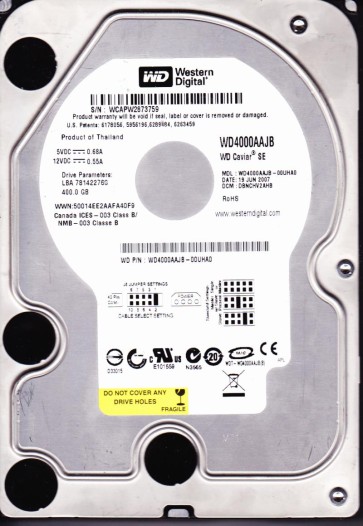
The Western Digital WD4000AAJB is a 3.5-inch, 400GB PATA (IDE) hard drive from the Caviar series, utilizing a 7200 RPM spindle speed and an IDE interface. Known for its relative reliability in older desktop systems, it features a single-platter design in later revisions. Its age (typically manufactured in the mid-to-late 2000s) means it is susceptible to specific age-related failure mechanisms, particularly involving the preamplifier, heads, and spindle motor bearings. The drive uses a proprietary Marvell or LSI controller chip, and its firmware is stored on the PCB and the system area on the platters.
Common Failure Types
Mechanical Head Crash: Symptoms include loud clicking, scraping, or grinding noises. The drive may be detected but cannot read data, showing “I/O device error” or “No media” messages. Cause: Physical contact between the read/write head and the platter surface, often due to contamination, shock, or wear over time.
Stiction: Symptoms: The drive spins up but is silent or makes a faint humming sound, and the system hangs. The platters cannot rotate freely because the heads have adhered to the platter surface. Cause: Deterioration of the lubricant on the platters, typically after long idle periods or due to manufacturing defects.
PCB / Controller Board Failure: Symptoms: The drive is completely dead with no spin or noise. It may also show a “No Device” or “Power On Hours” error. Cause: Power surge, blown TVS diode, fried preamplifier chip (Marvell 88i8840/88i8842), or failed motor controller.
Firmware Corruption: Symptoms: The drive spins up, is detected in BIOS but with a wrong model name or capacity (e.g., 0GB, 125GB). The drive might click for a few seconds then go silent. Cause: Bad S.M.A.R.T. reallocation sectors, corrupted system area (SA) modules, or a failed translator module.
Bad Sectors and Logical Damage: Symptoms: The drive is detected but read/write operations are extremely slow, showing “Data error (cyclic redundancy check)” or “Sector not found.” The system may freeze during file access. Cause: Physical platter degradation, shock damage, or accumulated weak sectors that the drive cannot reallocate.
Potential Recovery Paths
DIY Methods (For Logical Issues Only): Use data recovery software (e.g., R-Studio, ReclaiMe) in read-only mode to clone the drive to a healthy target. For a few bad sectors, perform a sector-by-sector clone using tools like ddrescue (Linux) or HDDSuperClone (bootable). For logical corruption (deleted files, formatted drive), use file carving software to reconstruct data. Do not attempt to reinitialize the drive firmware or run disk repair utilities (e.g., CHKDSK /f).
Professional Services (For Physical and Firmware Issues): For head crash, stiction, or PCB failure, send the drive to a cleanroom facility. A professional can replace the heads in a Class 10 cleanroom, repair or replace the PCB (with firmware transplant), and extract the data on specialized hardware (like PC-3000 or DeepSpar). For firmware corruption, a professional can recover the firmware modules or fix the system area using advanced tools without damaging the platters.
What Not to Do
Do not open the drive enclosure in a non-cleanroom environment. Dust particles will cause immediate head damage. Do not apply power to a drive making suspicious noises as this can further damage the platters. Do not run CHKDSK, ScanDisk, or any file system repair tool on a failing drive as it may overwrite critical data. Do not freeze the drive as condensation can permanently damage the platters and heads. Do not attempt to swap the PCB from another drive without transferring the original firmware ROM chip, as the drive will not operate correctly.
Summary
The WD4000AAJB is an aging IDE drive vulnerable to mechanical and firmware failures. For logical issues, DIY cloning may succeed. For physical or complex firmware problems, professional cleanroom recovery is required. Avoid destructive DIY attempts like freezing or opening the drive. The primary challenge lies in its age and the availability of compatible donor parts for specialized repair tools.