
Data recovery on vintage hard drives like the Western Digital WD80EDAZ starts with identifying the failure type – electronic, firmware, or mechanical. Each requires a different approach, and misdiagnosis can make things worse. Here’s a quick guide to help you assess your situation and decide on the next step.
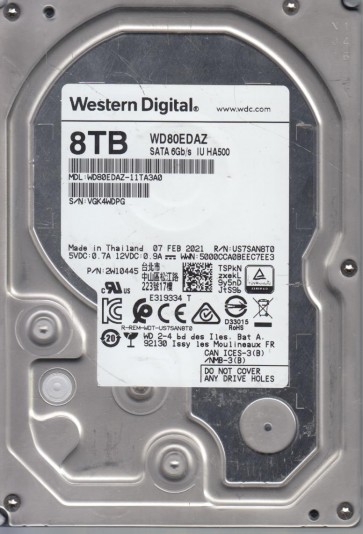
The Western Digital WD80EDAZ is an 8TB model from the WD Red Pro series, designed for NAS environments with a 7200 RPM spindle speed and CMR (Conventional Magnetic Recording) technology. It utilizes a helium-filled enclosure to reduce friction and power consumption, and features a SATA 6Gb/s interface. This drive is optimized for high workload rates but is still susceptible to failures common to high-capacity helium drives, including helium leakage and head stack assembly (HSA) degradation.
Common Failure Types
1. Helium Depletion and Aero-Dynamic Instability
Symptoms: Intermittent clicks, repeated recalibration cycles, significant speed fluctuations during read/write, and eventual drive not spinning. The drive may report “SMART 220 (Current Helium Level)” errors or “Spin Retry Count” failures. Cause: Gradual molecular leakage of helium through seal joints, leading to increased drag on the heads and loss of aerodynamic stability, causing head crashes or platter damage.
2. Head Stack Assembly (HSA) and Actuator Failure
Symptoms: Loud repetitive clicking (the “click of death”), drive being recognized but with zero capacity, or immediate I/O errors on specific LBAs. Cause: Mechanical wear on the pivot bearing, seized voice coil, or physical contamination causing head slap. In helium drives, internal debris can exacerbate head movement issues.
3. Preamp and Read/Write Channel Failure
Symptoms: Drive powers on and initializes but returns “Uncorrectable Sector Count” or “Read Error Rate” warnings in SMART data. The drive may be very slow, or show “No Media” in some utilities. Cause: Electrical failure of the preamplifier IC located on the HSA flex cable, or damage to the read/write channel electronics on the main PCB. This can be caused by voltage spikes or mechanical stress.
4. Media Surface and Servo Pattern Damage
Symptoms: Bad blocks, corrupted files, system hangs when accessing specific folders, or a drive that suddenly becomes raw and asks to be formatted. Cause: Head touchdowns (head slaps) on the platters, contamination from leaked helium carrying particulate matter, or physical shock causing platter deformation or servo track corruption.
5. Firmware Corruption and Translator Issues
Symptoms: Drive appears as “Device Not Ready” in Disk Management, shows full capacity but constant “Data Error (CRC)” messages, or gets stuck in a boot loop. Cause: Bad sectors in the System Area (SA) on the platters, which store the drive’s firmware and translator. Power outages during a firmware update or gradual smear of magnetic charge can corrupt this area.
Potential Recovery Paths
DIY Methods (Only for Logical Issues)
Scenario: Drive is recognized and passes SMART checks but files are missing or corrupted.
Tools: Use professional-level data recovery software like R-Studio, UFS Explorer, or DMDE. Create a bit-for-bit image (disk clone) to a healthy drive using ddrescue or HDDSuperClone before any scanning.
Procedure: Scan the raw image for lost partitions and files. Recover data to a separate healthy drive. Do not run chkdsk or format on the failing drive.
Professional Service (For Mechanical, Firmware, or Helium Issues)
Scenario: Any clicking, unrecoverable SMART errors (Current_Pending_Sector, Reallocated_Event_Count), or drive is not spinning.
Approach:
– Clean Room Level 10/ISO 3: For WD80EDAZ, the head stack replacement must be performed in a laminar flow hood to prevent particle contamination. Heads are specific to this model and must be harvested from a donor drive with near-identical firmware and head map.
– Helium Refill: A specialist may use a vacuum chamber to replace lost helium with helium or dry air in controlled cases, but this is risky and often requires head replacement if leakage is severe.
– Firmware Recovery: Using tools like PC-3000, DeepSpar, or MRT to rebuild the translator from the service area, bypass bad sectors, or read ROM data via the UART terminal.
– Platter Transfer: As a last resort, the platters may be moved to a donor drive body, requiring precision alignment tools.
Specialized Tools & Equipment
Professional labs use:
– PC-3000 for WD with full support for Helium series (including head map editing).
– DeepSpar Disk Imager for adaptive reading algorithms.
– Clean room with class 10 HEPA filters.
– Oscilloscope and soldering station for PCB-level repairs (TVS diode replacement).
What Not to Do
– DO NOT open the drive. The WD80EDAZ is a helium-filled drive. Opening it outside a certified clean room will almost always lead to immediate internal contamination and permanent data loss. The internal pressure will equalize with atmosphere, ruining the aerodynamics.
– DO NOT apply power if the drive is clicking or making scratching sounds. Each power cycle can cause additional head crashes, potentially slicing the platter surface and making data unrecoverable even for advanced labs.
– DO NOT run system utilities like chkdsk, disk repair, or defragmentation. These tools write to the disk, which can overwrite the very data you need to recover, especially if the file system is damaged.
– DO NOT freeze the drive or shave it. Freezing causes condensation that corrodes heads and platters. Shaving (moving platters manually) without proper alignment will destroy servo data.
– DO NOT attempt to flash firmware from a different model or revision. The firmware is unique to the WD80EDAZ family. Using a mismatched ROM can brick the drive completely.
Summary
The Western Digital WD80EDAZ is a high-capacity helium NAS drive prone to specific failure modes: helium depletion leading to head crashes, HSA mechanical failure, preamp/channel electrical faults, media surface damage, and firmware corruption. DIY recovery is only viable for logical corruption on a drive that spins up correctly and has no audible clicks. In all cases of physical or firmware failure, immediate professional intervention in a clean room environment is mandatory. Avoid self-opening, power cycling, or any software writes to the drive. The single most important step is to stop using the drive at the first sign of trouble and consult a specialist with experience in helium drive recovery.