
There are 3 ways to find the serial number of your WD drive:
 Option 1 – If you are using Windows
Use Windows Data Lifeguard Diagnostics. The software can provide the serial and model number of the WD drive in your system. The software will work for all of the following types of drives: EIDE, and Serial ATA. It also works with many USB 2.0 and FireWire external drives.
Option 2 – PC Only
If you have not installed an operating system, use Data Lifeguard Diagnostic for DOS (floppy) or Data Lifeguard Diagnostic for DOS (CD). The software can provide the serial and model number of the WD drive in your system.
Option 3
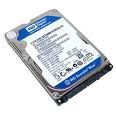
The serial number is located on the label on the back or side of the drive. Please note that the location will vary according to the drive. It is usually proceeded by a “S/N:” or “SN:”. If you are unable to read the serial number, many customers have taken digital pictures of the label and enlarged it on their computer to make it easier to read.
Option 4
You can also check the box packaging on a retail-boxed WD internal or external drive. Usually the serial number is on the sticker that contains the barcode
Related Links:
3 Ways To Determine Seagate Hard Disk Model And Serial Number