
Wondershare Recoverit is a comprehensive, professional-grade data recovery software designed to retrieve lost, deleted, or inaccessible files from various storage devices, including hard drives, SSDs, USB flash drives, memory cards, cameras, drones, and more. Developed by Wondershare Technology Co., Ltd., a software company founded in 2003 with over 20 years of industry experience, Recoverit has become one of the most recognized names in data recovery, serving millions of users worldwide.
Data recovery software is non-destructive and read-only, capable of providing safe and accurate retrieval of data from inaccessible, formatted, corrupted, or undetectable storage media. All data including photos, pictures, videos, audio files, music, documents, emails, archives, and other file types lost due to accidental deletion, virus damage, drive corruption, formatting, partition loss, software failure, or system crash can be effectively recovered from all types of storage devices such as internal/external HDDs, SSDs, USB flash drives, pen drives, thumb drives, SD cards, memory sticks, digital cameras, drones, and even NAS devices.
Wondershare Recoverit works with storage devices of all capacities and supports Windows operating systems from Windows 7 through Windows 11, as well as macOS from version 10.13 (High Sierra) onward. The software is known for its clean, inviting user interface and its specialization in multimedia recovery, particularly photos and videos.
Key Features of Wondershare Recoverit
Here are the key features typically associated with Wondershare Recoverit:
Comprehensive Device Support
- Storage Devices: Supports HDD, SSD, USB flash drive, memory card (SD, microSD, CompactFlash), external hard drive, digital camera, camcorder, drones, and more.
- Camera Support: Advanced support for premium digital camera brands including Sony, Canon, Nikon, DJI, GoPro, Insta360, and more, with upgraded fragmentation restoration algorithms.
- Encrypted Drives: Supports recovery from encrypted portable drives from Western Digital, Seagate, and other manufacturers.
- Advanced Storage: Supports NAS (Network Attached Storage), RAID recovery, and Linux-based systems.
- File Systems: Supports FAT, exFAT, NTFS, HFS+, APFS, and more.
Multiple Data Loss Scenarios
- Accidental Deletion: Recovers files deleted from Recycle Bin (Windows) or Trash (Mac) or using permanent deletion commands.
- Formatting Recovery: Retrieves data from drives that have been quick-formatted or fully formatted.
- Partition Recovery: Restores lost or deleted partitions and rebuilds corrupted partition tables.
- Corrupted Drive Recovery: Extracts data from drives that appear as RAW or are inaccessible.
- System Crash Recovery: Creates bootable recovery USB drive to recover data from unbootable computers.
- Virus Attack Recovery: Recovers files hidden, deleted, or encrypted by malware.
- NAS and Linux Recovery: Recovers data from NAS servers, RAID arrays, and Linux-based systems.
AI-Powered Intelligent Recovery
Recoverit incorporates AI-driven device recognition technology that identifies hardware models and automatically applies the most accurate recovery strategy for each specific device. The software can recognize over one million devices and covers more than 10,000 recovery scenarios, with a high success rate for common data loss situations.
Two Powerful Scan Modes
Wondershare Recoverit features multiple scan technologies for different recovery scenarios:
- Quick Scan: For recently deleted files and simple recovery scenarios. Fast and efficient for standard deletions.
- Deep Scan (Enhanced Recovery): For formatted, corrupted, or severely damaged drives. Scans every sector of the drive using advanced algorithms. Users praise its effective Enhanced Recovery mode, which digs deep into corrupted or formatted drives.
Specialized Video Recovery and Repair
One of Recoverit’s standout features is its focus on multimedia recovery:
- Enhanced Video Recovery: Dedicated to recovering lost videos, including deeply hidden and large-scale 4K/8K videos. The patented technology automatically scans, collects, and matches video fragments to ensure complete restoration.
- Corrupted Video Repair: Can repair corrupted or damaged video files that cannot be played, supporting a wide range of video formats and encoding types.
- Photo Recovery: Advanced support for professional photo formats including RAW, CR2, NEF, ARW, DNG, and HEIC.
- Mac Media Support: Dedicated support for ProRes, ProRes RAW, HEVC, HEIF, Apple ProRAW, and iCloud-native storage.
File Preview Functionality
Allows users to preview recoverable files before initiating the recovery process. The preview feature supports a wide range of file types including images, documents, videos, and audio files. This enables you to verify file integrity and content before committing to recovery, ensuring you only recover files that are intact and needed.
Selective Recovery
Provides the option to selectively recover specific files or folders rather than restoring the entire scan results. Files can be organized by file type for easy browsing, and you can select individual files or entire categories for recovery.
Bootable Recovery Media
Creates bootable recovery USB drive (WinPE for Windows or Mac bootable drive), enabling data recovery from computers that fail to boot due to system crashes, blue screen errors, or other startup issues. This feature supports recovery from unbootable Macs and Windows PCs, even when the operating system cannot start.
⚠️ Note on Bootable Drive Creation: Independent testing has found that the USB boot drive creation module can be problematic, particularly on newer Macs with Apple silicon. The feature succeeded only once in testing and failed to correctly format or write to several USB flash drives. The program suggested using this function on a Mac running macOS 12 (Monterey) or older. This appears to be due to Apple’s restrictions on boot drive creation for third-party software on recent Macs.
Remote and Cloud Recovery
Recoverit offers unique capabilities for network-based recovery:
- NAS Drive Recovery: Can locate and access network-based drives to have data recovered from them, useful for network administrators.
- Google Drive Integration: Can save recovered data directly to a Google Drive folder, providing flexible storage options for recovered files.
Save and Resume Scan Results
Allows you to save scan results and reload them later, eliminating the need to rescan large drives repeatedly. This is especially valuable for large capacity drives where scanning takes hours.
Supported File Types
Wondershare Recoverit supports recovery of over 1,000 file types and formats across all major categories:
| Category | Supported File Extensions |
|---|---|
| Documents | DOC, DOCX, XLS, XLSX, PPT, PPTX, PDF, RTF, TXT, HTML, XML, ODT, ODS, ODP, PAGES, NUMBERS, KEY, PST, EML, MSG, MBOX, CSV, WPD, PUB, MDB, ACCDB, SQLITE, and more |
| Images & Graphics | JPG, JPEG, PNG, BMP, GIF, TIFF, PSD, CR2, CR3, NEF, ORF, RAW, ARW, DNG, HEIC, HEIF, WEBP, SVG, AI, EPS, CDR, DWG, DXF, ICO, and more |
| Audio | MP3, WAV, WMA, AAC, FLAC, M4A, OGG, MKA, APE, AU, AIFF, MID, MIDI, RA, RAM, RM, and more |
| Video | AVI, MOV, MP4, MPG, MPEG, WMV, ASF, MKV, FLV, 3GP, M4V, MTS, M2TS, VOB, RMVB, OGV, WEBM, ProRes, ProRes RAW, HEVC, and more |
| Archives | ZIP, RAR, 7Z, TAR, GZ, BZ2, CAB, ISO, DMG, and more |
| Email & Databases | PST, OST, DBX, EML, MBOX, MBX, NSF, MDB, ACCDB, SQLITE, and more |
How to Use Wondershare Recoverit
Follow these steps to recover your lost data using Wondershare Recoverit:
- Download and Install – Download Recoverit from the official Wondershare website. Important: Do not install the software on the drive from which you want to recover data, as this may overwrite lost files. Install it on your local hard drive or another safe location.
- Launch and Select Recovery Mode – Launch Recoverit. The main screen offers various recovery modules:
- Hard Drives and Locations: For recovering from computer hard drives and specific locations
- SD Card Recovery: For recovering from memory cards and digital cameras
- Enhanced Recovery: For advanced video and photo recovery
- Crashed Computer Recovery: For recovering from unbootable systems
- NAS and Linux Recovery: For network and Linux-based storage
- Select the Target Drive – Choose the drive, partition, or storage device you want to scan. The software displays all connected drives and partitions for easy selection.
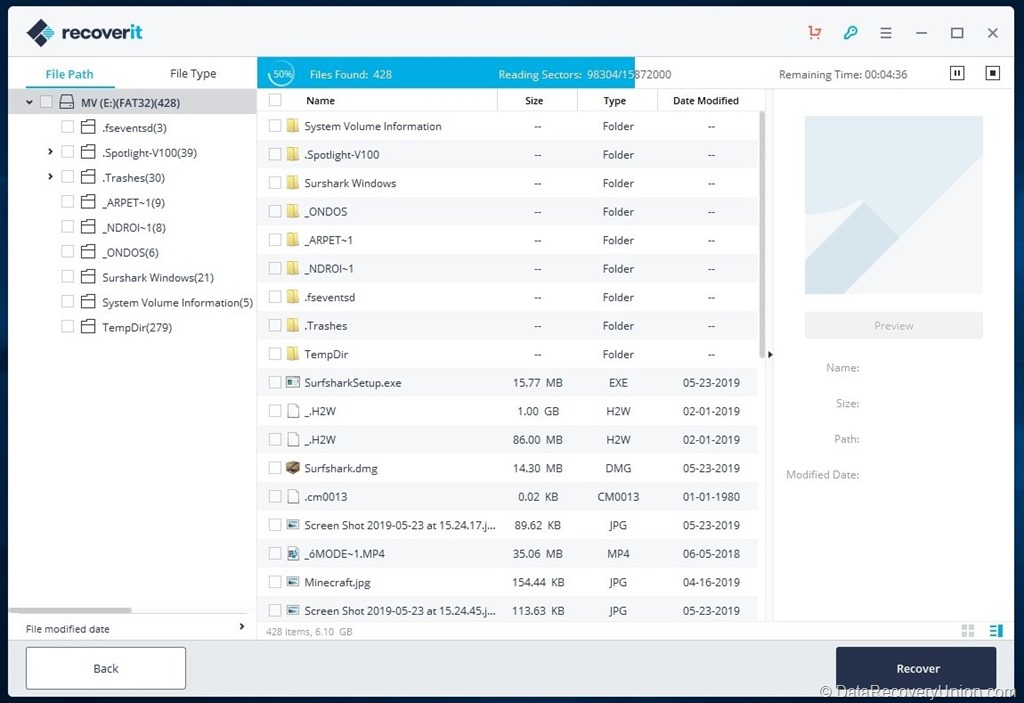
- Scan the Drive – Click “Start” to begin the recovery process. Recoverit will perform a Quick Scan first. If the Quick Scan does not find your files, the software will automatically proceed to Deep Scan. The software displays found files in real-time as the scan progresses.
- Preview and Select Files – Browse the recoverable files. Recoverit organizes files by file type (Photos, Audio, Documents, Videos, Archives, Other) for easy browsing. Use the preview function to verify file integrity before recovery.
- Recover Files – Select the files or folders you wish to restore. Click the “Recover” button and choose a destination location on a different drive to avoid data overwriting. Recovered data can be saved locally, to a NAS drive, or directly to Google Drive.
Editions and Pricing
Wondershare Recoverit offers multiple editions and licensing options to accommodate different user needs:
| Edition | Price (1-Year) | Price (Lifetime) | Description |
|---|---|---|---|
| Free Trial | Free | Free | Allows scanning and previewing of recoverable files. Recovery limited to 100MB (Windows). Use the free version to verify that your files can be recovered before purchasing. |
| Essential / Basic | $59.95 – $69.99/year | $119 one-time | For 1 PC. Includes photo and data recovery, deep scanning, and free technical support. Unlimited data recovery. |
| Standard | $69.95 – $79.99/year | $139 one-time | For 1 PC. Adds crashed PC recovery and bootable USB drive creation. |
| Premium / Advanced | $79.95 – $99.99/year | $159.99 one-time | For 2 PCs. Adds advanced video recovery, video merging and repair tools, NAS recovery, RAID recovery, and Linux recovery. |
Mac Version Pricing
For Mac users, Recoverit is variably priced: approximately $79.99 for a one-month license for unlimited recovery for two Macs, $89.99 for a one-year license, and $139.99 for a perpetual license for two Macs. Discounts are available for students, educators, and small to medium businesses.
Note: Recoverit does not offer a traditional free trial with full access. Instead, the free version allows you to use all features but caps recovery at 100MB (Windows version) until an activation code is entered. This is significantly smaller than competitors like EaseUS (2GB) and Stellar (1GB).
System Requirements
Before installing Wondershare Recoverit, ensure your system meets the following requirements:
- Processor: 1GHz Intel/AMD processor or higher
- RAM: 1GB minimum (2GB or more recommended for better performance)
- Hard Disk Space: Approximately 200MB for software installation, plus additional space for recovered files
- Supported Operating Systems (Windows):
- Windows 11, 10, 8.1, 8, 7 (32-bit and 64-bit)
- Windows Server 2019, 2016, 2012, 2008
- Supported Operating Systems (Mac):
- macOS 10.13 (High Sierra) or later
- Supports macOS up to the latest version
- Compatible with both Intel and Apple Silicon (M1/M2/M3) Macs
- Permissions: Administrative privileges required for installation and certain recovery operations (especially for bootable media creation)
Safety and Privacy
Wondershare Recoverit is safe to install and run. The software runs without hidden processes, does not create auto-start entries, and does not interfere with antivirus software.
Data Privacy
Recoverit does not upload your personal documents, photos, or recovered files to Wondershare servers. The program scans only the drives and folders you select. However, like most licensed software, Recoverit may collect limited metadata for activation and diagnostics, including IP address (for license checks and fraud prevention), device information (Windows version, hardware ID, language), license key, and usage statistics (anonymous crash reports or update checks).
A notable drawback is that Recoverit does not provide any in-app privacy settings to disable telemetry or usage statistics. Privacy-conscious users can run Recoverit offline or block its internet access through a firewall to limit data transmission.
Known Limitations
While Wondershare Recoverit offers powerful and feature-rich recovery capabilities, users should be aware of the following limitations:
- Small Free Tier (100MB): The free version only allows recovery of up to 100MB of data (Windows version). This is significantly smaller than competitors like EaseUS (2GB) and Stellar (1GB).
- Price Compared to Competitors: Recoverit is generally more expensive than rivals. Lifetime licenses range from $119-$159, while competitors like Disk Drill ($89) and EaseUS ($149 for 3 PCs) offer comparable or better value.
- Subscription Model Predominance: Recoverit defaults to subscription pricing, which can become expensive over time compared to one-time purchase competitors.
- Bootable Drive Issues: Independent testing has found that the USB boot drive creation module can be problematic, particularly on newer Macs with Apple silicon, failing to correctly format or write to several USB flash drives.
- Windows Recovery Limited to 100MB: The Windows version caps free recovery at 100MB, offering very limited free data retrieval for testing.
- No Customer Support Without Purchase: There is no phone, email, or chat support for free trial users – only a ticket system that may take days to receive a response.
- Deep Scans Take Time: Deep scanning large capacity drives (2TB+) can take many hours, comparable to other recovery tools.
- Physical Damage Not Covered: Cannot recover data from physically damaged drives (broken connectors, burned circuit boards, water damage, or mechanical failures). Hardware repair is required first.
- Overwritten Data Cannot Be Recovered: If lost files have been overwritten by new data on the drive, recovery becomes impossible regardless of software quality.
- TRIM on SSDs: On modern SSDs with TRIM enabled, recently deleted files may be permanently erased almost immediately due to garbage collection. This affects all data recovery software, including Recoverit.
Comparison at a Glance
| Feature | Wondershare Recoverit | Typical Competitors |
|---|---|---|
| Free Tier | 100MB recovery limit (Windows) | Often 1GB-2GB free recovery |
| Lifetime License | ✓ Available ($119-$159) | Often $70-$150 one-time |
| Video Repair | ✓ Advanced (Premium edition) | Not typically available |
| NAS & Linux Recovery | ✓ Included (Premium) | Often premium or not available |
| Bootable Media | ✓ Included (Standard and above) | Often premium feature |
| File Preview | ✓ Extensive preview support | Standard feature |
| Platforms | Windows & Mac | Often Windows only |
| Ease of Use | Very user-friendly | Varies widely |
Common Data Loss Scenarios Where Recoverit Excels
- Accidental Deletion: You emptied the Recycle Bin or Trash – Recoverit can quickly scan and recover recently deleted files.
- Formatting: Whether quick format or full format on a USB drive, hard drive, or memory card – the Enhanced Recovery mode can retrieve data.
- Corrupted or RAW Drive: When Windows says “You need to format the disk before you can use it,” Recoverit can bypass the corruption and extract files.
- Camera and Drone Recovery: Lost photos or videos from Sony, Canon, Nikon, DJI, GoPro, or Insta360 devices – Recoverit’s specialized camera recovery is designed for this scenario.
- Corrupted Video Recovery: When video files from a camera or drone are corrupted or damaged, Recoverit can repair them.
- System Crash: When your computer won’t boot, use the bootable recovery drive feature (Standard and above) to recover data from the unbootable system.
- Virus or Malware Attack: Viruses often hide, delete, or encrypt files – Recoverit can recover them from the affected drive.
- NAS and Server Recovery: When network-attached storage devices fail, the Premium edition can recover data.
Final Verdict: Is Wondershare Recoverit Right for You?
Wondershare Recoverit is a polished, feature-rich data recovery tool that stands out for its multimedia-focused capabilities, particularly video recovery and repair. Its clean interface, cross-platform support (Windows and Mac), and advanced features like NAS recovery, Linux recovery, and Google Drive integration make it a versatile solution for both home users and professionals.
This software is ideal for:
- Photographers and Videographers: The specialized camera recovery, 4K/8K video recovery, and corrupted video repair features are unmatched by most competitors.
- Mac Users: Unlike many competitors that offer limited Mac support, Recoverit provides full functionality on macOS with Apple Silicon compatibility.
- Users with NAS or Linux Systems: The Premium edition’s ability to recover from NAS devices and Linux-based storage is rare among consumer data recovery tools.
- IT Professionals and System Administrators: The bootable recovery media, NAS recovery, and remote recovery options provide valuable tools for professional environments.
- Users Who Value Modern Design: Recoverit has one of the cleanest, most inviting interfaces in the data recovery market.
Consider alternatives if:
- You need a larger free recovery tier – the 100MB limit is very small compared to EaseUS (2GB) or Recuva (unlimited).
- You are on a tight budget – Recoverit’s lifetime licenses ($119-$159) are more expensive than Disk Drill ($89).
- You need to recover data from a physically damaged drive – professional hardware repair services are required regardless of software.
- You prefer one-time purchases over subscriptions – while Recoverit offers lifetime licenses, it defaults to subscription pricing.
Pro Tip: After data loss, stop using the affected drive immediately. Do not add new files, run disk repair tools like CHKDSK, or attempt to format the drive. The more you use the drive, the higher the chance that lost files will be overwritten and become permanently unrecoverable. Use Recoverit’s free version first (100MB limit) to scan and preview your files – this confirms whether your data can be recovered before you purchase a license. For video files, the Premium edition’s repair features may be worth the upgrade if you find that recovered videos are corrupted. Always save recovered files to a different drive than the one you’re recovering from.
Official website: recoverit.wondershare.com
Disclaimer: Recovery success depends on multiple factors, including how long ago data was lost, whether the drive has been used since the loss, and the extent of corruption or physical damage. No data recovery software can guarantee 100% recovery in all situations. This article is for informational purposes only. All product names, logos, and brands are property of their respective owners.
