
Data recovery on vintage hard drives like the Samsung HM160JC starts with identifying the failure type – electronic, firmware, or mechanical. Each requires a different approach, and misdiagnosis can make things worse. Here’s a quick guide to help you assess your situation and decide on the next step.
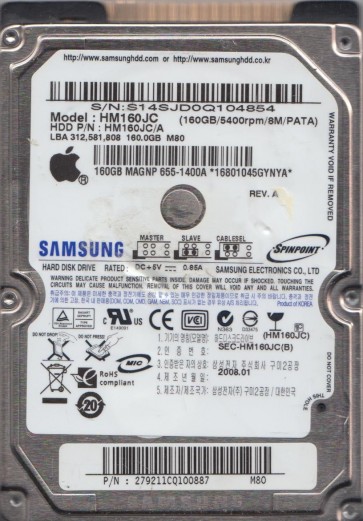
The Samsung HM160JC is a 2.5-inch, 160GB SATA hard disk drive commonly found in older laptops and external enclosures from the mid-to-late 2000s. It features a single 160GB platter with an 8MB cache and a rotational speed of 5400 RPM. This drive uses a Samsung proprietary controller chip and a standard SATA interface. Due to its age, common failure modes include mechanical wear, bad sectors, and firmware corruption. The drive’s internal architecture relies on a complex adaptive servo system and thin-film magnetic head technology, making it sensitive to physical shock and electrical anomalies.
Identifying Common Failure Types
1. Mechanical Failure (Head Crash / Stiction)
Presenting as a clicking, grinding, or whining noise. The drive may be detected in BIOS but fails to initialize, or it spins up and immediately stops. This is caused by the read/write heads contacting the platter surface, physical damage to the spindle motor, or the heads getting stuck on the platter (stiction). Data recovery from this state requires a cleanroom environment as opening the drive in normal air will introduce particles that destroy the platter. Professional intervention is almost always required.
2. Logical Failure (Bad Sectors / File System Corruption)
The drive spins up normally and is detected, but the operating system reports errors like “CRC errors”, “sector not found”, or the drive appears as unallocated or RAW. The drive may freeze when trying to read certain files. This is often caused by accumulated bad sectors, a corrupted partition table (MBR/GPT), or a damaged NTFS/FAT32 file system. While the motor and heads are likely functional, the media has developed defects.
3. Firmware Corruption (SA Failure)
The drive spins up but remains undetected by the BIOS, or is detected with an incorrect model name/capacity (e.g., “Samsung HM160JC” appearing as “Samsung HM160”). You might hear a steady “click of death” or see the drive continuously retrying to read the system area (SA). The firmware modules that control head mapping, defect lists, and adaptive parameters have become corrupt. This is a common failure mode on Samsung drives of this era due to weak SA sectors.
4. Electronic Failure (PCB Damage)
The drive shows no signs of life: no spin-up, no sound, and it is not detected by the system. Often caused by a power surge, faulty USB enclosure, or physical damage to the connector. The circuit board (PCB) has failed, typically due to a blown TVS diode or damaged preamplifier chip. In many cases, the platters and heads remain unaffected.
Potential Recovery Paths
Professional Data Recovery Services
For mechanical failures (head crash, stiction, grinding noises) or severe firmware corruption where the drive is not detected, professional intervention is mandatory. A lab will use specialized tools like a PC-3000 or DeepSpar to image the platters in a cleanroom. This involves replacing heads, repairing firmware via terminal commands, or performing a direct platter transplant. Costs typically range from $300 to $1500+ depending on the severity. Service providers like Gillware, DriveSavers, or local labs with Samsung-specific experience are recommended. They will provide a free evaluation and quote.
DIY Methods (For Logical / Electronic Failures)
- Logical corruption: If the drive is detected but shows errors, use a reliable data recovery tool like R-Studio, DMDE, or TestDisk. First, create a full sector-by-sector image (using ddrescue or HDDSuperClone in Linux) to a healthy drive. Do not work directly on the failing drive. Scan the image for lost partitions and recover files to a separate destination. Avoid any “chkdsk /f” or “repair” operations as they can overwrite critical data.
- Electronic failure (PCB damage): If the drive does not spin but you have an identical donor drive (exact model and firmware revision), you can swap the PCB. However, the HM160JC typically requires transferring the “ROM” or firmware U12 chip from the original PCB to the donor PCB to maintain unique head calibration parameters. If possible, simply replace the damaged TVS diode (often a small surface-mount component near the power connector) using soldering. Do not connect the drive to a standard power supply if you suspect surge damage.
- Bad sectors: Use a tool like HDD Regenerator or Victoria to mark bad sectors, but only after you have secured a backup image. For accessible data, use a file recovery tool that reads sequentially and skips unreadable blocks.
What Not to Do
- Never open the drive cover. The platters are sealed in a cleanroom environment. Even a single dust particle can scratch the platter surface, destroying data. Opening the drive voids any hope of professional recovery.
- Never run chkdsk /f or any repair utility. This can cause the drive to reallocate bad sectors, overwrite the partition table, or trigger a firmware-induced logic error. It can turn a logical failure into a permanent data loss situation.
- Never apply excessive voltage or shock. Do not hit the drive, freeze it, or subject it to high heat. These “old tricks” can cause platter warping, head damage, or motor seizure.
- Never continue to power-cycle the drive if it makes abnormal noises. Each click or grinding sound represents physical damage. Continuing to run the drive will scrape the platters, making recovery impossible.
Summary
The Samsung HM160JC is a legacy drive prone to specific failures: mechanical head crashes, firmware corruption, and PCB damage. Accurate diagnosis is the first step:listen for noises, check detection, and observe OS behavior. For logical issues (bad sectors, file system corruption) and simple PCB swaps, careful DIY recovery is possible using imaging tools like ddrescue and recovery software like R-Studio. For any mechanical symptoms, firmware lock, or if you are unsure, immediately power off the drive and consult a professional data recovery lab. Never disassemble the drive or run repair utilities. The priority is preserving the current state of the platters. With the correct approach, the HM160JC’s data is often recoverable, but time and care are critical to avoid permanent loss.