
Data recovery on vintage hard drives like the Maxtor 6L160M0 starts with identifying the failure type – electronic, firmware, or mechanical. Each requires a different approach, and misdiagnosis can make things worse. Here’s a quick guide to help you assess your situation and decide on the next step.
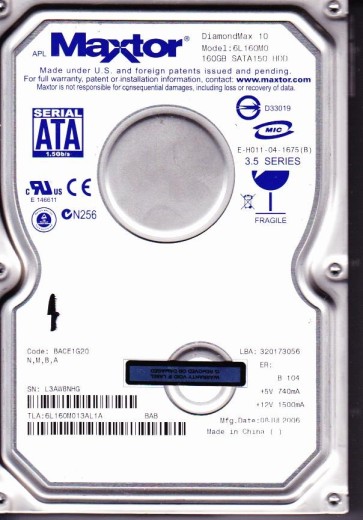
The Maxtor 6L160M0 is a 160GB 3.5-inch Parallel ATA (PATA) hard disk drive from the DiamondMax 16 family, manufactured in the mid-2000s. It utilizes a single 160GB platter and operates at 7200 RPM with a 2MB or 8MB cache buffer. These drives are known for being part of the problematic generation that suffered from firmware corruption and controller board failures, particularly in the LBA (Logical Block Addressing) and servo system. The drive uses a Marvell or Agere controller paired with a smooth motor driver IC. Understanding these specific components is critical as failure patterns often center around them. The drive relies heavily on its SA (Service Area) stored on the platters, which contains adaptive data unique to each unit.
Identifying Common Failure Types
1. Firmware Corruption (Preamp/LBA Issues)
This is the most frequent failure. The drive spins up normally and may be detected by BIOS with a correct model number, but it reports a very small capacity (e.g., 0MB, 2GB) or hangs/freezes when accessed. Often, the drive will click a few times before falling idle. This is caused by corruption of the Service Area modules storing defect lists and translator data. Symptoms include: drive detected but not accessible, spinning up and then clicking, or reporting an incorrect size.
2. Mechanical Failure (Head Crash / Stiction)
Indicated by a sharp, repetitive clicking sound (heads attempting to load) or a high-pitched whining noise. The drive may fail to spin up at all (no sound of platters spinning) due to bearing seizure. Stiction occurs when the heads stick to the platters after the drive has been idle for a long period. Physical damage to the platters from a head crash results in irreversible data loss on the affected areas. A clean “click of death” without any data access is a classic sign.
3. Damaged PCB / Electronic Failure
The drive shows no signs of life: no spin-up, no sounds, and the motor does not move. This is often caused by a failed power connector, a blown TVS diode (transient voltage suppression), or a burned motor controller IC. A visual inspection may reveal a burnt component or a cracked PCB. This failure is the most electrically straightforward but requires careful board matching. A common issue is a failed preamplifier chip on the HDA (Head Disk Assembly) flex cable, which is not always visible.
Potential Recovery Paths
Professional Data Recovery Services
Recommended for mechanical failures, severe firmware corruption, or head-related issues. A professional lab will use donor drives in a cleanroom environment (Class 10 or better). For firmware failures, they utilize specialized tools like PC-3000 or MRT to read Service Area modules and repair the translator. For head crashes, they replace the head stack assembly (HSA) with a donor unit of the exact same model and firmware version. They also have the ability to perform a direct platter transfer to a donor mechanism if the bearings are seized. Costs typically range from $300 to $1500+.
Do-It-Yourself (DIY) Approaches
Caution: Only suitable for basic electronic failures or simple firmware issues if you have advanced skills. For a no-spin drive: with a multimeter, check the TVS diodes on the PCB (near the power connector). If shorted, remove them and try powering the drive. This may work for a damaged diode but leaves the drive without overvoltage protection. For firmware corruption: use a PC-3000 or similar tool to repair the translator. This requires removing the PCB to access the ROM and using a terminal connection. Do not attempt this without proper tools as incorrect writes can permanently kill the drive. A simple PCB swap is rarely successful on these drives because the adaptive data is stored on the PCB and HDA. Swapping boards without transferring the original ROM chip will cause wrong head mappings and immediate failure.
What Not to Do
1. Never open the drive enclosure. Maxtor drives from this era have a very fine air filter. Opening the drive in a normal room will introduce dust that can instantly destroy the platters and heads. The head-to-platter clearance is smaller than a smoke particle. 2. Do not run recovery software on a dying drive. If the drive is clicking, making grinding noises, or is detected with wrong capacity, do not continue to power it on. Every spin-up or read attempt further damages the platter surface. 3. Avoid freezing the drive. The old “freezer trick” is destructive for modern drives. Rapid temperature changes cause condensation inside the HDA, which leads to corrosion and head stiction. 4. Do not attempt to swap the PCB without transferring the original ROM. As noted, a direct PCB swap from a donor drive will almost always fail due to adaptive parameters. 5. Do not use strong magnets or tools near the drive. Magnets can corrupt the servo data on the platters, making recovery impossible.
Summary
The Maxtor 6L160M0 is a mid-2000s drive prone to firmware corruption and mechanical failures. The most common issue is a firmware crash causing the drive to report a tiny capacity or hang. A no-spin drive is likely a PCB-level electronics fault, while a clicking drive indicates a head or mechanical problem. Professional recovery is strongly advised for any physical symptoms or firmware issues you cannot diagnose with a specialist tool. DIY is limited to basic electronic repairs (like removing a blown diode) or using a professional tool if you are experienced. Never open the drive or run software on a failing unit. Immediate power-down upon hearing unusual sounds is the best way to preserve your data. The drive is elderly; act quickly before mechanical wear worsens.