
Data recovery on vintage hard drives like the Toshiba MQ04ABB400 starts with identifying the failure type – electronic, firmware, or mechanical. Each requires a different approach, and misdiagnosis can make things worse. Here’s a quick guide to help you assess your situation and decide on the next step.
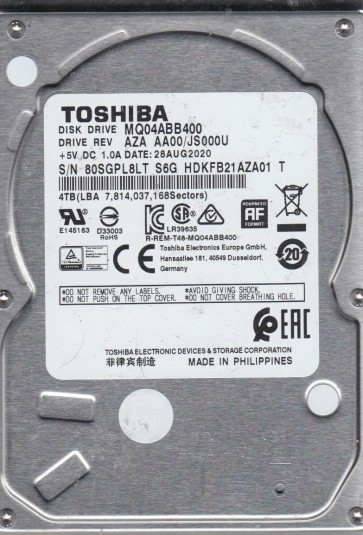
The Toshiba MQ04ABB400 is a 2.5-inch, 4TB, 5400 RPM SATA hard disk drive (HDD) using Conventional Magnetic Recording (CMR) technology. It is commonly found in external portable drives and laptops. Understanding this drive’s architecture is crucial for recovery. It uses a single glass or aluminum platter with a high areal density to achieve 4TB capacity. The head stack assembly (HSA) is highly sensitive due to the narrow head-to-platter spacing. The drive controller board (PCB) manages data flow and motor control. Failure modes can be mechanical, electrical, or firmware-based.
Identifying Common Failure Types
1. Mechanical Head Crash or Stiction
Symptoms: The drive clicks, whirs, or is completely silent after initial spin attempt. In stiction, the heads stick to the platter surface, preventing rotation. This results in a “click of death” or no spin. The high platter density makes the MQ04ABB400 vulnerable to head crashes from drops or vibration. Data recovery requires cleanroom environment to replace the head stack assembly.
2. PCB / SATA Bridge Board Failure
Symptoms: Drive is detected by BIOS/OS but shows incorrect capacity (e.g., 0MB or 4KB), or times out. The MQ04ABB400 often uses an integrated SATA bridge on the main PCB. Power surges or component burnout (TVS diodes) can kill the controller. This is a common failure in external drives with USB adapters. Electronics failure is often repairable without opening the sealed chamber.
3. Firmware (FM) Corruption or Bad Sector Reallocation
Symptoms: Drive is detected but very slow, freezing, or showing unreadable sectors. The advanced format CMR layout and complex defect management tables can become corrupted. The drive may enter a “busy” state or stop responding to commands. This is a logical issue but can mimic physical failure. In severe cases, the translator (logical to physical mapping) is damaged.
4. Motor Seizure (Spindle Lock)
Symptoms: Drive does not spin up at all. No sound of platter rotation. The stepper motor or bearing can seize due to age or physical shock. This requires precise mechanical intervention to unstick the spindle without damaging the platters or media surface.
Potential Recovery Paths
Professional Data Recovery Services
For any physical damage (clicking, no spin, head crash), professional intervention is mandatory. These services use Class 100+ cleanroom facilities to perform HSA replacements, platter transplants, or motor unsticking. The MQ04ABB400’s single-platter design often allows full recovery if the platter surface is undamaged. Expect costs from $500 to $3000 based on severity. Choose a lab with experience in Toshiba CMR drives and PC-3000 or DeepSpar tools for firmware repair.
DIY Methods (Only for Specific Cases)
DIY – PCB Swap (Electrical Failure Only)
If the drive is detected but not spinning or shows incorrect capacity, and there are no clicking noises, the PCB may be the culprit. You can attempt a PCB swap: Find a donor board with identical firmware version (P/N and date code). Swap the TVS diodes if required. WARNING: Swapping the board alone often fails because the drive’s unique adaptive parameters (NVRAM) are stored on a separate SPI flash. You must desolder and transfer that 8-pin flash chip to the new PCB. Without this, the firmware will fail to load and the drive will remain inaccessible. This requires micro-soldering skills.
DIY – Firmware Repair (Software Only)
If the drive is recognized but slow, use professional tools like MRT or PC-3000 to read the ROM and module directories. Creating an image using ddrescue on Linux can bypass bad sectors. Use `ddrescue -d -b 4096 /dev/sdX /mnt/recovery/image.img /mnt/recovery/log.log` for logical reads. Do NOT run S.M.A.R.T. self-tests or automatic remapping (CrystalDiskInfo). This can cause the drive to reallocate sectors, destroying original data. Only attempt this if the drive is mechanically healthy and data is not critical.
Frozen Head
If the drive hums but no spin, and it’s not a motor seizure, the heads may be parked and stuck to the ramp. A gentle tap on the side of the drive (while powered off) can sometimes free them. This is a desperate last-resort DIY method. Success is very low.
What Not to Do
- NEVER open the sealed HDA chamber. Dust and fingerprints will destroy the platter surface. The platters are magnetic media, and particles as small as 1 micron can cause permanent read errors.
- DO NOT attempt to freeze the drive. Condensation will destroy the bearings and heads. This is a myth that does not work for modern drives.
- DO NOT run CHKDSK /F or any repair software. Write operations that mark bad sectors can overwrite important translation tables or cause the drive to reallocate sectors, making the data non-recoverable. Use read-only tools only.
- DO NOT apply excessive power or jolt a clicking drive. Repeated power cycles can grind the heads further into the platter.
- DO NOT swap the PCB without transferring the original flash chip. It will destroy the adaptive data and the drive will not work.
- DO NOT use cheap USB-to-SATA adapters. They can introduce power irregularities. Use direct SATA connection to the motherboard or a quality external dock.
Summary
The Toshiba MQ04ABB400 is a high-capacity CMR drive that is vulnerable to physical shock and PCB failure. For mechanical issues (clicking, no spin, grinding), stop all use immediately and consult a professional data recovery lab with cleanroom capabilities. PCB or firmware issues can sometimes be repaired by advanced DIY users with micro-soldering skills and specialized tools like PC-3000. The most critical step is correct diagnosis: distinguish between electrical and mechanical failure by listening to the drive. Never open the drive, freeze it, or run repair software. For valuable data, professional service is the only safe path. Remember: The MQ04ABB400’s single-platter design often allows complete recovery if the platter is physically intact. Act quickly and correctly.