
Data recovery on vintage hard drives like the Seagate ST1000LX015 starts with identifying the failure type – electronic, firmware, or mechanical. Each requires a different approach, and misdiagnosis can make things worse. Here’s a quick guide to help you assess your situation and decide on the next step.
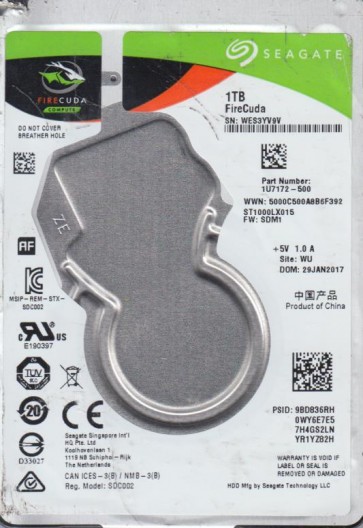
The Seagate ST1000LX015 is a 2.5-inch 1TB hybrid drive (SSHD) combining a traditional 5400RPM platter-based hard disk drive with an integrated 8GB NAND flash memory cache. This design aims to accelerate frequently accessed data, offering a balance between high capacity and improved performance over a standard HDD. The SMR (Shingled Magnetic Recording) technology used on the platters writes tracks that overlap, increasing density but complicating write operations, especially under heavy or random workloads. For data recovery, the hybrid nature introduces complexity: failure can originate from the mechanical HDD components, the NAND flash controller, or the hybrid firmware managing both. The drive uses a SATA 6Gb/s interface. Understanding that the SSHD has a limited NAND endurance and relies on HSA (Head Stack Assembly) for platter access is critical.
Identifying Common Failure Types
1. Electronic Failure (PCB Failure) – The drive’s printed circuit board (PCB) may fail due to power surges, voltage spikes, or component degradation (e.g., a burned TVS diode or failed motor controller chip). Symptoms include the drive not spinning up, no detection in BIOS, or a clicking sound from the spindle motor not engaging. Unlike traditional HDDs, the ST1000LX015 has a custom ROM (typically a Winbond or MXIC chip) that is unique to the drive’s head mapping and NAND configuration. Swapping the PCB with an identical donor board without transferring this ROM will not work. This is a primary point of confusion for DIY attempts.
2. Mechanical Failure (Head Crash / Stiction) – Frequent in drives with SMR technology due to thermal expansion and head parking issues. Symptoms include a loud clicking (heads repeatedly trying to land), grinding, or the drive being totally silent. The weak point is the HSA. A head crash can damage the platter surface, creating abrasive debris that spreads and destroys data on other tracks. SMR platters are more susceptible to surface damage because the overlapping tracks mean a small defect can corrupt a large area. If the heads fail, the drive may initially spin up but then click, or it may not spin at all due to head stiction (heads sticking to the platter).
3. Firmware / Logical Failure – The hybrid firmware manages both the HDD and NAND cache. Corruption in the System Area (SA) or Service Area (firmware modules) can cause the drive to be recognized incorrectly, report 0GB capacity, or be permanently busy (busy state). Symptoms include the drive spinning but not being detected, showing as a RAW device, or taking an unusually long time to initialize. A specific failure for SSHDs is the NAND cache going bad – the drive may hang when trying to access cached, corrupted blocks. This is often misdiagnosed as a conventional bad sector issue, but standard CHKDSK or data recovery software can worsen the situation by attempting to write to the failing cache.
Potential Recovery Paths
Professional Service – For electronic failure: A recovery lab will desolder the original PCB’s ROM chip and transplant it onto a known-good donor PCB, then use a programmer (e.g., PC-3000) to fix any adaptation issues. For mechanical failure: The drive requires a Class 100 cleanroom to open and perform a head stack replacement. Due to SMR’s tight tolerances, the heads must be perfectly aligned to avoid scraping the platters. Professional tools like the PC-3000 for Seagate can also handle firmware corruption by rebuilding the translator, reading system modules directly, and disabling problematic zones. For NAND cache issues, professionals can use specialized hardware to treat the cache as a separate device and extract cached data, or disable the cache in the firmware to access the base HDD platters. Expect costs from $300 to $3000+ depending on severity.
DIY Approach – Limited and high-risk. Only for non-mechanical, non-firmware issues. If the drive makes no unusual sounds but is not detected, you can try a different SATA cable, port, and power cable. For logical damage like accidental file deletion, use read-only data recovery software (e.g., R-Studio, DMDE). Do not write to the drive. For electronics: You may attempt to replace the PCB IF you can successfully desolder and resolder the original 8-pin or 16-pin ROM chip onto a donor board. This requires a hot air station, steady hands, and exact donor matching (same board number, same firmware revision). Without this, the drive will not work and may be bricked. If the drive clicks, do not open it. A freezer trick or tapping is ineffective for mechanical failures and will cause platter damage. Do not attempt to disassemble the drive outside a cleanroom.
What Not to Do
1. Do not attempt to open the drive’s sealed enclosure. The internal environment is particle-free. Even a speck of dust can cause a head crash. Any attempt to manually move the heads or platters will destroy data permanently.
2. Do not apply power repeatedly if the drive is making clicking sounds. Each click causes physical contact between the head and platter, scraping away magnetic coating and creating new bad sectors, which can be fatal to SMR media.
3. Do not use data recovery software that attempts to rebuild the drive’s file system or write back recovered data (e.g., TestDisk or CHKDSK /F). These operations can overwrite critical sectors, corrupt the MFT, and render data non-recoverable even for professionals.
4. Do not attempt a PCB swap without transferring the original ROM chip. Using a donor PCB as-is can burn out both boards or supply incorrect voltages to the heads.
5. Do not freeze the drive. This is a myth. Condensation from thawing will cause severe internal corrosion and short circuits. A frozen drive will not magically unstick heads, and thermal shock can crack the platters.
6. Do not try to manually spin the motor or tap the drive casing. This can misalign the spindle bearing and damage the internal magnets.
Summary
The Seagate ST1000LX015 is a complex hybrid drive with SMR technology, making data recovery more challenging than standard HDDs. Typical failures are electronic (PCB with ROM transfer needed), mechanical (head crash requiring cleanroom intervention), or firmware/cache corruption (requiring advanced tools like PC-3000). Professional recovery is the only safe path for mechanical or serious firmware issues, with costs varying based on parts and labor. DIY methods are only safe for logical file deletion or cable issues. Avoid all brute-force attempts (opening, freezing, tapping) as they guarantee data loss. The most critical steps: stop using the drive immediately after failure, note the symptoms (spinning, clicking, detection), and choose the appropriate recovery path without writing any data to the drive. For the best chance of success, consult a data recovery specialist experienced with Seagate hybrid drives and SMR platters.