
Data recovery on vintage hard drives like the Seagate ST3120023A starts with identifying the failure type – electronic, firmware, or mechanical. Each requires a different approach, and misdiagnosis can make things worse. Here’s a quick guide to help you assess your situation and decide on the next step.
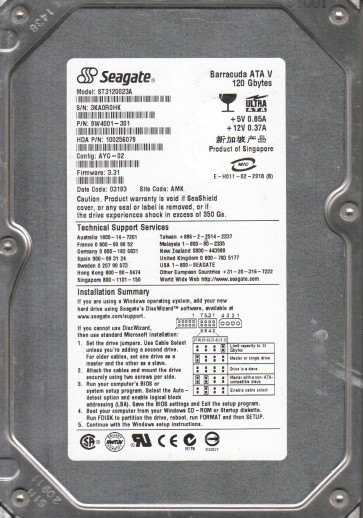
The Seagate ST3120023A is a 120GB 3.5-inch ATA/IDE hard drive from the early 2000s, based on 80GB platters with a 7200 RPM spindle speed. It was commonly used in desktop PCs and external enclosures. The drive uses a Marvel or Agere read/write channel and a standard Seagate controller board. Key characteristics for recovery include its use of aluminum platters, a voice coil motor (VCM) for head positioning, and a relatively large 2MB cache. Over time, these drives are prone to mechanical wear, particularly from head stiction and spindle bearing degradation. The ATA interface is parallel, making it compatible with older systems but requiring specific adapters for modern host machines.
Identifying Common Failure Types
Mechanical Failure (Head Crash / Stiction)
This drive often suffers from head stiction where the read/write heads stick to the platter surface after a period of inactivity. Symptoms include a series of faint clicks or a loud ticking sound on power-up, the drive being detected as an unknown device or not at all, and a grinding noise. A head crash is similar but often produces a rough, continuous scraping sound. Data is usually recoverable only by a professional lab with cleanroom access, as opening the drive will contaminate the platters.
Logic Failure (Firmware Corruption)
The ST3120023A relies on firmware stored on the platters. Corruption of this firmware, often due to sudden power loss or sector errors, causes the drive to spin up but not respond to ATA commands. Symptoms include the drive being detected with a wrong model number, zero capacity, or an unrecognizable name. The drive may appear as a “ST3120023A” but show “0 MB” in BIOS. Software-based recovery is occasionally possible, but often requires specialized tools to rewrite the firmware modules without affecting user data.
Electronic Failure (PCB Board Damage)
The printed circuit board (PCB) on the bottom of the drive is vulnerable to power surges, static discharge, or age-related component failure. Common failures include blown TVS diodes, shorted voltage regulators, or damaged read/write preamplifier circuits. Symptoms include the drive not spinning up at all, no motor activation, or a faint burning smell. If the spindle motor is still good, replacing the PCB with a donor board (with matching firmware version) can resolve the issue. However, the drive’s unique adaptive data is often stored on the PCB, requiring a ROM transfer for full recovery.
Bad Sectors and Media Degradation
Over time, the magnetic media on the platters can degrade, producing bad sectors. Symptoms include excessive clicks during reading, very slow file access, file corruption, and operating system errors like “CRC” or “I/O device error.” The drive may still be logically accessible but becomes unreliable. Software-based disk imaging with a tool like ddrescue can often recover most data by skipping bad sectors. However, using the drive as a working source can exacerbate the damage.
Potential Recovery Paths
Professional Data Recovery Services
This is strongly recommended for any mechanical failure, firmware corruption that cannot be bypassed, or when data is highly critical. A professional lab will perform procedures in an ISO Class 5 cleanroom. For the ST3120023A, this includes: head stack replacement using a matched donor drive, firmware extraction and manipulation using specialized tools like PC-3000 or Seagate Data Extractor, and direct platter imaging to bypass bad sectors. Typical costs range from $300 to $3000+ depending on the severity. Reputable services offer no-data, no-fee diagnostics.
DIY Recovery (For specific cases)
WARNING: DIY recovery risk permanent data loss. Only attempt if data is non-critical or you are experienced.
Electronic Failure: If the drive does not spin, and you can confirm it is a PCB issue (e.g., check for blown TVS diodes with a multimeter), you can attempt a PCB swap. Purchase an identical donor drive (exact model and firmware revision). Transfer the original drive’s 8-pin serial ROM chip (usually a 93C66 or 25P series) to the donor PCB. This preserves the drive’s unique calibration.
Bad Sectors: Use a tool like GNU ddrescue on a Linux system. Connect the ST3120023A as a secondary drive via a USB-IDE adapter (ensure it can supply enough power). Run: ddrescue -d -f -r3 /dev/sdX /mnt/recover/image.img /mnt/recover/log.log. This creates a compressed image, skipping bad areas. After completion, use ddrescue -d -r3 /dev/sdX /mnt/recover/image.img /mnt/recover/log.log to retry.
ATA Security Lock: If the drive asks for a password, you can attempt to unlock it using a master password (often “Seagate” or a blank string) via ATA commands in Linux using hdparm: hdparm --security-unlock "" /dev/sdX. If that fails, professional unlock is required.
What Not to Do
- Do not open the drive enclosure. The platters are highly sensitive to dust. A single particle can destroy the heads and data. Professional cleanroom is required for internal access.
- Do not power a clicking or grinding drive repeatedly. Each spin-up can grind the heads further into the platters, making recovery impossible. Stop immediately.
- Do not use file recovery software (e.g., Recuva, EaseUS) on a failing drive. These programs write to the drive, overwriting your data. Only image the drive first.
- Do not apply freezer or shock methods. These are myths for modern drives and can cause condensation or further mechanical damage.
- Do not attempt to write any data to the original drive. Always image the drive to a different healthy storage device.
- Do not ignore burning smells. A failed PCB can short out the entire drive. Disconnect power immediately.
Summary
Recovering data from a Seagate ST3120023A is a process that hinges on correctly diagnosing the failure type. For a non-spinning drive, check the PCB first:a swap is often the cheapest and easiest DIY solution. For clicking or grinding sounds, the problem is mechanical; stop all attempts and send the drive to a professional recovery lab immediately. Slow but spinning drives with bad sectors can be imaged with ddrescue, but this requires patience and a stable setup. Always prioritize imaging the drive over direct file access. In all cases, avoid any physical or electrical tampering that could worsen the damage. The decision to use DIY or professional help depends on the value of the data and your technical comfort level. When in doubt, consult a professional to maximize the chance of a successful recovery.