
Data recovery on vintage hard drives like the Toshiba MK2104MAV starts with identifying the failure type – electronic, firmware, or mechanical. Each requires a different approach, and misdiagnosis can make things worse. Here’s a quick guide to help you assess your situation and decide on the next step.
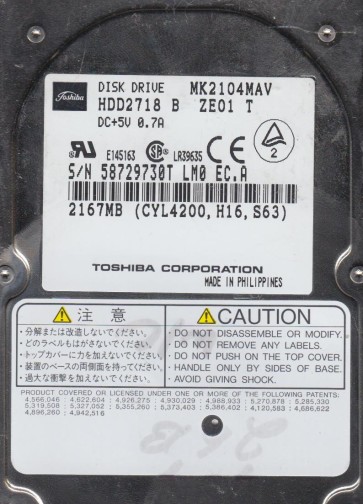
The Toshiba MK2104MAV is a 2.5-inch PATA (Parallel ATA) hard disk drive with a formatted capacity of 20.0 GB, featuring a rotational speed of 4200 RPM and a 2MB buffer. This model was commonly used in early 2000s laptops, portable media players, and embedded systems. It utilizes a single-platter design with glass substrates and GMR (Giant Magneto-Resistive) heads. The drive employs a standard ATA-6 interface and is known for its relatively low power consumption but also for its vulnerability to head crashes and spindle motor issues due to its age and mechanical design. Understanding these fundamental characteristics is critical for diagnosing the failure mode and selecting an appropriate recovery strategy.
Identifying Common Failure Types
1. Mechanical Head Crash / Stiction
The most critical failure for the MK2104MAV involves the read/write head assembly physically contacting the platter surface, often due to shock or gradual degradation of the head’s air bearing. Symptoms include a loud clicking, scraping, or grinding noise, the drive may not spin up, or the system may detect it as an unknown device with excessive bad sectors. In cases of stiction, the heads “stick” to the platter surface, preventing the spindle motor from rotating.
2. Spindle Motor Failure / Seized Bearing
Given the drive’s age, spindle motor bearings can seize due to lubricant degradation or contamination. The drive will appear completely dead: no spin-up sound, no vibration, and the BIOS will not detect it. A common electrical symptom is a short spike in current draw (often causing the laptop to shut down) if the motor windings short.
3. Degraded PCB / Failed SMD Components
The external printed circuit board (PCB) on this model is susceptible to failure of SMD (Surface Mount Device) components, particularly TVS diodes (Transient Voltage Suppression) and capacitors. A failed TVS diode on the 5V or 12V power rail will cause the drive to not spin up at all. A bulging or leaking capacitor can cause unstable operation, random freezing, or corrupted data reads. This is often confused with a logical failure.
4. Firmware Corruption / SA Defects
The drive’s firmware is stored on the system area (SA) of the platters. Over time, weak servo patterns or a single bad sector in the SA can cause the drive to be stuck in a “busy” state (BSY LED solid), or to repeatedly click as it attempts to load firmware. The drive may be detected with an incorrect model name or zero capacity, or lock up immediately after power-on.
Potential Recovery Paths
Professional Data Recovery Services
For any mechanical issue (head crash, seized spindle, grinding noises) or complex firmware corruption, professional intervention is mandatory. A cleanroom environment (Class 10 or better) is required for head replacement or platter transfer. For the MK2104MAV, a donor drive of an identical model (same firmware revision, same date code is ideal) must be sourced. The PCB may need to be repaired (replacing TVS diodes or capacitors) or the ROM chip (EEPROM) must be desoldered from the original PCB and transferred to a working donor PCB. Certified labs use specialized tools like PC-3000 or DeepSpar Disk Imager to handle firmware tasks and create a bit-by-bit clone before any deeper analysis. Expect costs from $300 to over $2000, depending on complexity.
DIY Recovery (Limited to Logical Issues Only)
DIY recovery is ONLY safe if the drive is detected correctly in BIOS, makes no unusual noises, and has no physical damage. Use the following method:
1. Immediately connect the drive to a stable desktop computer using a known-good PATA-to-USB adapter. Do NOT use a laptop’s internal port if the drive is failing.
2. Use specialized imaging software such as ddrescue (Linux) or HDDSuperClone (Linux/WinPE). The command: sudo ddrescue -d -r3 /dev/sdX /target/image.img /logfile.log will image the drive, skipping bad sectors, and retry them in reverse passes.
3. Never attempt a normal file copy (Windows Explorer) or chkdsk /f as these can cause the drive to work harder and accelerate failure.
4. Once the image is complete, recover files from the clone using data recovery software like R-Studio or PhotoRec.
What Not to Do
- Never open the drive enclosure outside of a cleanroom. Exposing the platters to dust will destroy any chance of recovery.
- Never apply power to a drive making clicking or scraping noises. This can shatter the glass platter, making recovery impossible.
- Never run chkdsk, fsck, or any disk repair tool. These write to the drive and can overwrite critical file system data, worsening logical corruption.
- Never freeze the drive. This is a myth that can cause condensation, corrosion, and further mechanical damage.
- Never shake or tilt the drive while it is spinning, as this can cause the heads to crash.
- Do not use “head parking” utilities or attempt to shock the drive to release stuck heads.
Summary
The Toshiba MK2104MAV is an aging mechanical device with a high probability of mechanical or firmware failure. Correct diagnosis is vital: if it makes noise or does not spin, it is a hardware failure requiring professional cleanroom recovery. If it is detected and quiet but has bad sectors, immediate cloning with ddrescue is the only safe DIY path. Due to the high cost of professional services and the irreplaceable nature of data, the best recovery is a backup before failure. Always prioritize cloning over direct file copying to preserve the original evidence.