
Data recovery on vintage hard drives like the Seagate ST3160827AS starts with identifying the failure type – electronic, firmware, or mechanical. Each requires a different approach, and misdiagnosis can make things worse. Here’s a quick guide to help you assess your situation and decide on the next step.
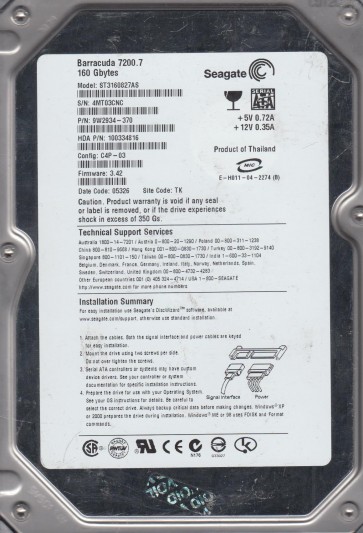
The Seagate ST3160827AS is a 160GB 3.5-inch desktop hard drive belonging to Seagate’s Barracuda 7200.7 family. It utilizes a single 160GB platter, spins at 7200 RPM, and features an Ultra ATA/100 (parallel ATA) interface with an 8MB cache. This is an older generation drive, commonly found in early to mid-2000s desktop computers. The drive uses a fluid dynamic bearing (FDB) motor and a typical PMR (perpendicular magnetic recording) head stack assembly (HSA). Understanding its architecture is critical because the ATA interface itself is a common point of failure, alongside the mechanical and electronic components. The controller board is located on the underside of the drive and is susceptible to static discharge and power surges.
Identifying Common Failure Types
1. Electronic Failure (PCB / Controller Board Failure)
This is a frequent failure for this model. Symptoms include the drive not spinning up at all, no sounds, or no detection in BIOS. The most common cause is a failed TVS (Transient Voltage Suppression) diode or a damaged motor controller chip (e.g., a Shibaura or LSI chip). A power surge or even a faulty power supply can instantly fry the PCB. The drive’s PCB can often be replaced with a donor board from an identical model (same PCB number, e.g., 100322161 or 100322162), but the drive’s original firmware must be transferred (usually via hot-swapping the ROM chip) because the adaptive data stored on the PCB is unique to each drive.
2. Mechanical Failure (Head Crash / Stiction)
This is a critical hardware failure. Symptoms include a clicking sound (heads repeatedly parking and trying to load), a scratching or grinding noise, or the drive spinning but not being recognized. For the ST3160827AS, head crashes can occur due to age, physical shock, or contamination. “Stiction” (where the heads stick to the platters) is also possible after being powered off for long periods. If you hear any non-normal sounds, do not power the drive again. Any further attempts can shave magnetic material off the platters, making data recovery impossible even by professionals.
3. Firmware Corruption
The Barracuda 7200.7 family is known for firmware bugs that can cause the drive to be detected with incorrect capacity (e.g., 0GB, LBA0), or to spin up but click after a few seconds. This is a logical/software issue at the drive’s firmware level, often triggered by bad sectors or a sudden power loss. Symptoms include the drive being recognized by the BIOS but with a garbled model name or capacity, or the drive locking up during identification. Specialized tools like MRT (Magnetic Research Tools) or PC-3000 are required to repair the firmware modules, specifically the “VEN” or “RCT” modules.
Potential Recovery Paths
Professional Data Recovery
When to use: If you hear clicking, scratching, or the drive does not spin. Also for cases of severe firmware corruption that blocks access. For the ST3160827AS, professional recovery is highly recommended due to the delicate nature of the aged platters and the complexity of PCB repair requiring firmware transfer. A professional cleanroom (Class 100 or better) is mandatory for head stack assembly replacement. Expect to pay $300-$1500+ depending on severity. Companies like DriveSavers, Kroll Ontrack, or local specialists like Data Recovery Boston are options. They can perform head swaps on this model using a donor drive with matching firmware.
DIY Recovery (Only for specific, low-risk scenarios)
Scenario A: Dead PCB (No Spin, No Sound)
Step 1: Remove the PCB by unscrewing the small Torx screws (usually T6 or T8). Carefully disconnect the motor contacts and the flex cable from the head preamp.
Step 2: Locate a donor drive with an identical PCB number (e.g., 100322161 Rev A). The donor must be from the exact same model and firmware version.
Step 3: Perform a ROM swap. The ROM chip (often an 8-pin SOIC like a 25X40 or a 25X80) stores the unique adaptive data. Use a hot air station or a soldering iron to desolder the ROM from the original PCB and solder it onto the donor PCB. Warning: Do not use the donor PCB without swapping the ROM because it will not match the platters’ servo patterns.
Step 4: The drive should now spin up and be detected. Do not attempt to read damaged platters with a new head if the old heads failed.
Scenario B: Logical Error (Corrupted File System)
Step 1: Do not attempt to scan the drive with chkdsk or format it. Instead, use a read-only, block-level imaging tool like ddrescue (Linux) or HDDSuperClone (Windows PE).
Step 2: Create a disk image to a healthy drive of equal or larger capacity. Use command: ddrescue -d -r3 /dev/sdb /dev/sdc logfile.log.
Step 3: Then, use data recovery software like R-Studio or DMDE on the image to recover files. Warning: Scanning the original failing drive directly can cause further damage and bad sectors.
What Not to Do
- Do not open the drive’s cover. The internal environment is a cleanroom; any dust or particle will destroy the platters and the heads.
- Do not use any software “repair” tools like chkdsk, TestDisk, or SpinRite on a failing drive with audible issues. These tools write to the disk and can push bad sectors into the service area, causing permanent firmware damage.
- Do not apply external voltage or “freeze” the drive unless you understand the exact failure. Freezing can temporarily free stuck bearings, but it introduces condensation which causes corrosion. This is a last-ditch trick for a drive that is already dead.
- Do not power cycle the drive repeatedly if it clicks. Each cycle can stress the head actuator, potentially breaking it off.
- Do not attempt a PCB swap without transferring the ROM chip. Using a bare donor PCB will cause wrong head parameters and permanent platter damage.
Summary
The Seagate ST3160827AS is a legacy drive with age-related vulnerabilities: failed PCB components (TVS diodes, motor driver), weak heads prone to stiction, and firmware bugs that lead to incorrect capacity detection. For a dead PCB with no noises, a ROM-swapped donor PCB is a viable DIY step. For any noise (clicking, scratching), head damage is present; the drive must be sent to a professional cleanroom. For logical errors (corrupted directories, slow access), use read-only imaging (ddrescue) before any software recovery. Never attempt physical disassembly without proper tools and environment. Always prioritize creating a full disk image before any file recovery attempt.