
Data recovery on vintage hard drives like the Seagate ST9408114A starts with identifying the failure type – electronic, firmware, or mechanical. Each requires a different approach, and misdiagnosis can make things worse. Here’s a quick guide to help you assess your situation and decide on the next step.
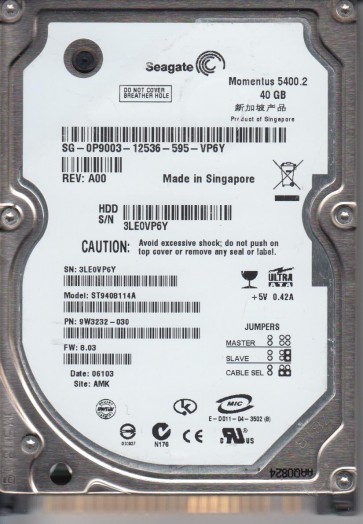
The Seagate ST9408114A is a 40GB 2.5-inch IDE laptop hard drive from the Momentus 5400.2 family, manufactured for OEM use in laptops and printers. It spins at 5400 RPM, contains one platter with two read/write heads, has an 8MB cache, and uses a Parallel ATA (IDE) interface with a maximum transfer rate of 100 MB/s. This drive predates SATA and SMART-based recovery tools, making it reliant on legacy firmware and PCB compatibility. A key feature is its use in OEM devices such as printers, where manufacturers often applied firmware-level capacity restrictions or Host Protected Area (HPA) settings to limit the drive to 20GB or other sizes, even though the physical platters support the full 40GB. Understanding this OEM history is critical, as many failures are actually intentional configuration locks rather than physical damage.
Identifying Common Failure Types
1. Host Protected Area (HPA) or Capacity Restriction
This is the most distinctive failure mode for this model. The drive may be detected by the BIOS but report only 20GB or another reduced capacity, despite the label stating 40GB. This occurs when an OEM uses firmware commands to create an HPA or modify the drive’s native maximum address, effectively hiding the remainder of the platter space from the operating system. Standard partitioning and formatting tools cannot recover this space because the restriction is embedded in the drive’s firmware or configuration registers. The drive otherwise operates normally, with no strange noises or errors, making it a purely logical configuration issue.
2. PCB or Logic Board Failure
Because this drive uses an older IDE interface, the printed circuit board is susceptible to voltage spikes, electrostatic discharge, or component aging. Symptoms include the drive not spinning up, no motor sound, and complete absence from BIOS detection. The PCB contains a ROM chip that stores unique adaptive calibration data specific to that individual drive. Replacing the PCB with a donor board without transferring this ROM data will result in the drive not calibrating correctly, potentially causing head-banging or further damage. The PCB sticker numbers and firmware revision must match for a donor board to be compatible.
3. File System Corruption or Bad Sectors
As a drive from the mid-2000s, the ST9408114A is prone to developing bad sectors over time, especially if used in high-vibration environments like laptops. Symptoms include file read errors, system freezes, missing partitions, or the drive being detected but inaccessible. Unlike HPA locks, this is not a capacity issue but a media integrity problem. The drive may show RAW file system in Disk Management or prompt for formatting. This model’s 5400 RPM speed and 12.5ms seek time make it relatively slow, which can cause timeouts during recovery attempts.
4. Mechanical Failure
Physical damage manifests as clicking, buzzing, or grinding noises, especially during spin-up. The drive may spin up briefly and then stop, repeating this cycle. This indicates the heads cannot read servo tracks or the spindle motor is failing. Because this drive uses a single platter and two heads, head misalignment is common after shock. In such cases, any power-on attempt exacerbates platter scratching and debris generation.
Potential Recovery Paths
Professional Data Recovery Service
For clicking, buzzing, or any mechanical anomaly, immediate professional intervention is required. Labs with cleanrooms can replace the heads, but finding donor parts for this legacy IDE drive may be challenging. Professional services can handle this model, though turnaround times may extend due to parts availability. For logical issues like HPA locks or file system corruption, professional labs can use tools to directly edit firmware registers or rebuild the translator without risking further damage. Expect costs starting from $300 to $1500 depending on severity.
DIY HPA Removal
If the drive spins normally and is detected but shows reduced capacity, you can attempt to remove the HPA using free tools. Boot from a USB drive or CD containing HDAT2 or MHDD, then use the Device Configuration Overlay or HPA menu to set the native maximum address back to 40GB. After removing the restriction, the full capacity will appear in Disk Management, allowing you to create a new partition. This is safe because it only modifies configuration registers, not user data. However, if the restriction was applied by the OEM for compatibility reasons, removing it may make the drive undetectable on older systems, so use it only on modern hardware.
DIY PCB Swap with ROM Transfer
If the drive does not spin and you suspect PCB damage, you can source a donor board with identical model number, firmware revision, and PCB sticker numbers. The critical step is transferring the 8-pin serial EEPROM chip containing unique adaptive data from the original PCB to the donor. Without this, the drive will not calibrate correctly. This requires micro-soldering skills or you can purchase a pre-adapted board from specialized vendors that include ROM transfer service. After successful transplant, the drive should spin up and become detectable. Immediately create a full disk image using ddrescue before any data extraction.
DIY Software Recovery
If the drive is detected with correct capacity and no mechanical noise, software recovery is possible. Use TestDisk to attempt partition table repair, or PhotoRec and R-Studio to carve files by signature. Since this is an IDE drive, connect it via a USB-to-IDE adapter or direct motherboard IDE port. Older tools like EasyRecovery or FinalData have been reported to work, and O&O DiskRecovery has been noted for better success rates with this model. Always work on a sector-by-sector disk image created with ddrescue rather than the original drive to prevent further corruption from write operations.
What Not to Do
- Do not run CHKDSK, format, or any filesystem repair tool on a drive with bad sectors or reduced capacity, as these tools will write to the media and may overwrite recoverable data.
- Do not attempt to open the drive enclosure outside a cleanroom. The platters are extremely sensitive to dust and will be permanently damaged.
- Do not repeatedly power-cycle a clicking drive. Each spin-up stresses the heads and increases platter damage.
- Do not assume a donor PCB will work without ROM transfer. The adaptive parameters are unique to each drive; swapping boards without the ROM will make the drive inoperable.
- Do not ignore HPA restrictions. Before declaring the drive faulty, verify the reported capacity in Disk Management; if it shows 20GB instead of 40GB, the issue is likely a configurable HPA lock, not physical failure.
Summary
The Seagate ST9408114A is a legacy 2.5-inch IDE drive with distinct failure modes: HPA capacity restrictions from OEM use, PCB electronic failures, file system corruption, and mechanical head damage. The most unique and easily fixable issue is the 20GB capacity lock, which can be resolved with HDAT2 or MHDD without data loss. For PCB failures, a donor board with ROM transplantation is required, and professional adaptation services are recommended. For physical clicking or mechanical issues, professional data recovery is mandatory. Always start diagnosis by checking the reported capacity in the BIOS or Disk Management, as this will quickly differentiate between an OEM restriction and a true hardware failure. For critical data, professional services remain the safest option, with turnaround times typically around 30 days.