
Data recovery on vintage hard drives like the Seagate ST3200820AS starts with identifying the failure type – electronic, firmware, or mechanical. Each requires a different approach, and misdiagnosis can make things worse. Here’s a quick guide to help you assess your situation and decide on the next step.
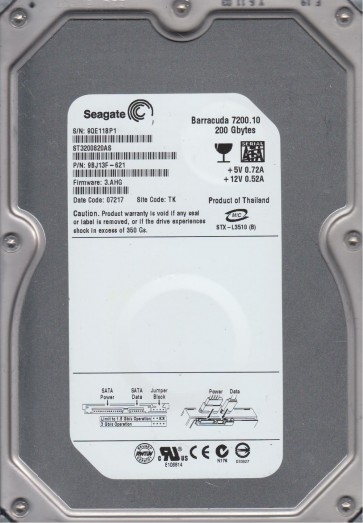
The Seagate ST3200820AS is a 200GB 3.5-inch SATA hard disk drive from the early 2000s Barracuda 7200.7 family. It uses a single 200GB platter and features an 8MB cache. This generation of Seagate drives is known for specific firmware and mechanical failure points, primarily related to the PCB (Printed Circuit Board) controller chip (often a Smooth or Agere chip) and the spindle motor. The drive operates at 7200 RPM and uses a standard SATA interface. Understanding this model’s architecture is critical for determining recovery paths, as it heavily relies on firmware calibration stored on the platters and the PCB’s ability to initialize the drive.
Identifying Common Failure Types
1. PCB / Electronic Failure (Flash Corruption or Component Burnout)
This is very common. Symptoms include: drive spins up but clicks or is not detected by the BIOS (Basic Input/Output System). The drive may also be completely dead (no spin). The firmware on the PCB’s flash chip can become corrupted due to a power surge, ESD (Electrostatic Discharge), or age. Sometimes, a visible component like a TVS (Transient Voltage Suppression) diode, fuse, or controller chip is burnt. The SATA connector may also be damaged.
2. Mechanical Failure – Stiction or Spindle Motor Seizure
The drive powers on, but you hear a single click or a continuous “tick-tick” sound. This often indicates the read/write head is stuck to the platter surface (stiction) or the spindle motor bearing has seized. The motor may try to spin but fail. This is a typical failure for drives that have been powered off for extended periods or have suffered a physical shock. The sound is distinct from rapid clicking firmware issues.
3. Head Crash or Degraded Read/Write Head
Symptoms include loud scratching sounds, repetitive clicking (like a Geiger counter), or the drive being detected but having extremely slow read times with many bad sectors. A head crash usually occurs when the head physically contacts the platter, damaging the magnetic coating. On the ST3200820AS, the single platter design means one failed head renders the entire drive inaccessible. Bad sector proliferation is a key sign of a developing head problem.
4. Firmware Corruption (Smooth Chip or ROM Issue)
The drive spins up normally and clicks a specific number of times (e.g., 2 or 3 clicks), then stops. The drive may be detected as “0 GB” or “ST3200820AS” in the BIOS but with incorrect capacity. This is often a firmware problem where the system area (SA) is corrupted or the module responsible for head configuration is damaged. This can sometimes be triggered by bad sectors in the SA or a failed firmware update.
Potential Recovery Paths
Professional Service (Recommended for Mechanical or Complex Firmware Issues)
Clean Room Recovery: For head crashes, stiction, or seized motors, a professional data recovery lab with a Class 10 or better clean room is required. The lab will perform a head transplant using a known good donor drive of the exact same model and firmware revision. For firmware issues, they use specialized tools (e.g., PC-3000, DeepSpar) to repair the ROM (Read-Only Memory) and system area without opening the drive. Expect costs from $300 to $3000+ depending on severity.
DIY Recovery Paths (Only for Non-Mechanical, Low-Risk Cases)
1. PCB Replacement (for electronics failure): If the drive is completely dead or has a burnt component, find an identical donor drive (same model number, same PCB part number). Critical: You must transfer the original drive’s 8-pin serial flash ROM (usually a 25P10AV or similar) from the old PCB to the donor PCB. Simply swapping the PCBs will not work because the ROM contains adaptive calibration data unique to your drive. You will need a hot air rework station and experience with SMD (Surface Mount Device) soldering. If the PCB has a burnt TVS diode, you can often remove it (but lose overvoltage protection).
2. Firmware Fix (for click-of-death or wrong capacity): This is extremely advanced. Requires a hardware tool like a PC-3000 or a terminal connection via a serial port (e.g., using a USB-TTL adapter). You will need to enter the drive’s terminal mode, identify the firmware error, and repair or reload specific modules. For example, if the “CERT” module or “APP” code is corrupt, you may need to write a new version from a donor while keeping the unique adaptives. This is not for beginners and carries a high risk of permanent data loss.
3. Imaging with Bad Sectors (For software corruption only): If the drive is detected but has many bad sectors (no clicking or scratching), use a tool like DDRescue or HDDSuperClone on a Linux system. Connect the drive via SATA directly to the motherboard. Do not boot from this drive. Use the tool to create a full image to a healthy drive. Use options like –no-scrape to avoid stressing the head on damaged areas. This may salvage a partial recovery but is not suitable for hardware damage.
What Not to Do
- Do NOT open the drive enclosure. Even a single particle of dust can destroy the platter surface. The drive is designed to be sealed. Opening it in a normal room will cause permanent data loss.
- Do NOT apply power repeatedly. If the drive makes scratching or clicking sounds, power it off immediately. Each power cycle can cause further physical damage to the heads and platters.
- Do NOT use recovery software like Recuva or TestDisk if the drive is clicking or has physical damage. These tools are meant for logical recovery (deleted files), not physical failure. They can force the drive to read bad areas, worsening head alignment.
- Do NOT freeze the drive. This is a dangerous myth. Freezing causes condensation and thermal shock, potentially seizing the spindle motor or cracking the platters. It will destroy any remaining data.
- Do NOT attempt a simple PCB swap without transferring the ROM chip. As mentioned, the ROM is unique to your drive. Using a donor PCB without its original ROM will usually result in the same failure or a different one.
- Do NOT shock or tap the drive. This old technique is ineffective for modern drives and can easily cause a head crash if one hasn’t already occurred.
Summary
The Seagate ST3200820AS is an aging drive prone to PCB electronic failure, head crashes, and firmware corruption. For any mechanical issues (clicking, scratching, stiction) or complex firmware problems, professional clean room recovery is the only safe path. For purely electronic failures (dead drive, burnt component), a DIY PCB replacement with ROM transplant is possible for experienced electronics technicians. Do not attempt to open the drive, use software tools on a failing drive, or apply physical treatments like freezing. The most reliable way to prevent data loss is a proper backup. If the data is beyond personal value, consult a professional lab immediately.