
Data recovery on vintage hard drives like the Seagate ST3300655SS starts with identifying the failure type – electronic, firmware, or mechanical. Each requires a different approach, and misdiagnosis can make things worse. Here’s a quick guide to help you assess your situation and decide on the next step.
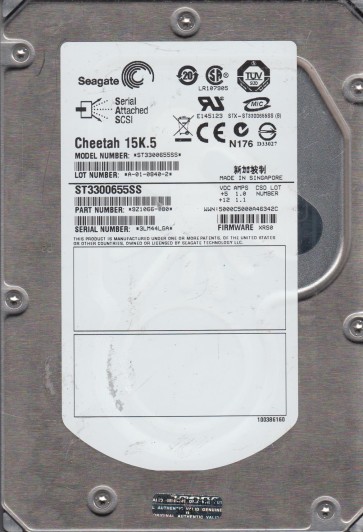
The Seagate ST3300655SS is a 300GB 15K RPM SAS (Serial Attached SCSI) 2.5-inch enterprise hard drive. Designed for high-performance server and storage environments, it features a robust 24/7 duty cycle and advanced error correction. Unlike consumer drives, it utilizes a SAS interface with dual-port capability and a 16MB cache. The drive’s internal architecture includes a sealed head-disk assembly (HDA), a dedicated controller board with a Marvell or similar DSP, and a voice coil motor (VCM) actuator. Understanding these components is critical for diagnosis, as SAS drives often have different failure mechanisms than SATA drives, particularly in firmware behavior and power-on hours (POH) expectations. Enterprise drives like this one are built to handle high vibration and temperature, but are still susceptible to mechanical wear, especially on the spindle and actuator pivot.
Identifying Common Failure Types
1. Electronic Failure (Controller Board)
This is a common failure on ST3300655SS drives. Symptoms include: the drive not spinning up at all, no activity LED, or a completely dead drive when powered on. This may be caused by a blown TVS diode, a damaged SAS connector (bent pins), or a failed power management IC. In some cases, the drive may emit a slight burning smell. The electronics board (PCBA) is located on the underside of the drive. A quick visual inspection for blackened components or visible damage is recommended. However, swapping the board with a donor drive is NOT straightforward due to unique adaptive data stored in flash memory on the board.
2. Mechanical Failure (Heads or Spindle)
Mechanical failures are more terminal. Audible symptoms include: a repetitive clicking sound (head crash), a high-pitched screeching or whining (spindle bearing failure), or a series of faint clicks followed by silence (stiction). The ST3300655SS can suffer from head stiction after long idle periods, or from rapid deceleration in a server environment. A head crash usually results in physical damage to the platters, making data recovery extremely difficult. Spindle bearing failure may present as the drive failing to reach full RPM, or producing a rhythmic grinding sound. Never attempt to open the HDA in a non-cleanroom environment.
3. Firmware Corruption
Firmware issues are common on SAS drives of this generation. Symptoms: the drive spins up correctly but is not detected by the system, shows as a “raw” device with no capacity, or reports an “abort” or “SCSI” error in logs. The drive may also hang during initialization. Firmware corruption can result from improper power-off events, sudden power surges, or weak servo data. This is a logical failure but requires advanced tools (like PC-3000 SAS or specific terminal commands) to repair. Attempting a standard OS-level format will not fix this and may make things worse.
4. Bad Sectors and Media Degradation
Over time, the magnetic media on the platters degrades. Symptoms: slow read/write speeds, system hangs when accessing specific files, or “uncorrectable” errors in the system logs. The ST3300655SS uses sector remapping (G-List and P-List) but can be overwhelmed by extensive media wear. A drive may begin to produce minor clicking during retries. This is often a pre-cursor to mechanical failure, especially if the drive has accumulated high Power-On Hours (e.g., > 50,000 hours).
Potential Recovery Paths
Professional Data Recovery (Recommended)
Given the complexity and cost of data stored on enterprise drives, professional recovery is the safest path. A lab will perform the following steps: 1) Diagnosis in a cleanroom (Class 100 or better) to identify exact failure. 2) For electronics: rework or replacement of the controller board with donor firmware adaptation. 3) For mechanical failures: head replacement using a matched donor drive (same firmware version and P/N) in a cleanroom. 4) For firmware: use of tools like PC-3000 SAS or DeepSpar SA R5 to rebuild translator modules, repair defective modules, or create a drive image with head map manipulation. 5) For bad sectors: imaging using specialized hardware that can skip and retry individual sectors without damaging remaining data. Professional services for a SAS drive typically cost $500-$3000+ depending on severity. For critical data, this is the only reliable option.
DIY Recovery (High Risk – Not Recommended for Mechanical/Firmware Issues)
If you are certain the problem is a simple electronic failure (e.g., no power) AND you have exact matching donor drives, you can attempt these steps, but understand the risks. 1) Electronic: Test the SAS power cable and motherboard port. If the board is physically damaged, you may attempt a board swap but ONLY if you can transfer the 8-pin serial flash chip (usually a 25 series chip) from the original board to the donor board using a hot air rework station. A straight board swap without this will likely result in no detection. 2) Bad Sectors (software): For media degradation only, you can try a Linux utility like `ddrescue` on a powerful machine with a SAS HBA (e.g., LSI 9211-8i). Use the command `sudo ddrescue -d -r3 /dev/sdb /dev/sdc image.img mapfile.log`. This will attempt to copy data, skipping bad areas and retrying later. Never run `fsck` or `chkdsk` on a failing drive. 3) Firmware: DIY firmware repair is not possible without dedicated hardware and software. Attempting terminal commands without a proper protocol will likely brick the drive permanently. DIY is only advisable for non-critical data and clear electronic symptoms.
What Not to Do
- Do not open the HDA (internal platter chamber). Even a single dust particle landing on a platter can destroy the read/write heads and make recovery impossible. Only cleanroom labs can open these drives.
- Do not apply excessive voltage or power cycle repeatedly. This can damage the motor IC or cause head-disk contact. Power cycle a SCSI/SAS drive no more than 3-5 times.
- Do not run standard data recovery software (like Recuva, EaseUS, or Disk Drill) directly on a failing drive. This triggers massive read operations, which can further weaken heads and corrupt data. Image first, then recover.
- Do not attempt to write data (format, partition, or copy files) to a failing drive. This can overwrite damaged areas and destroy residual data.
- Do not freeze the drive. This is a dangerous myth that introduces condensation, causing short circuits and catastrophic media damage.
- Do not ignore S.M.A.R.T. status. If raw read error rates or reallocated sector counts are high, the drive is failing. Immediate backup is needed.
- Do not swap the controller board with a non-identical donor (different firmware version or board revision, e.g., Rev A vs Rev B). This can cause incompatibility and damage the preamp.
Summary
The Seagate ST3300655SS is a robust enterprise SAS drive with a specific failure profile: electronic board issues (often repairable with flash transplant), mechanical head failure (needs cleanroom), firmware corruption (requires specialized tools), and media sector degradation. For valuable or irreplaceable data, professional recovery is the only safe path. DIY recovery is limited strictly to verified simple electronic failures (power surge) or basic sector imaging on a mechanically healthy drive. Never attempt physical repairs or software repairs without complete understanding. Always isolate the drive and back up immediately if it shows any signs of distress. The cost of recovery is high but far less than the cost of losing critical business or personal data.