
Data recovery on vintage hard drives like the Seagate ST4000DM005 starts with identifying the failure type – electronic, firmware, or mechanical. Each requires a different approach, and misdiagnosis can make things worse. Here’s a quick guide to help you assess your situation and decide on the next step.
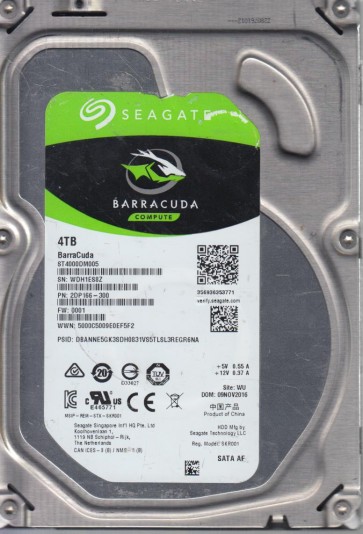
The Seagate ST4000DM005 is a 4TB 3.5-inch SATA hard drive belonging to Seagate’s Desktop HDD.15 series (model code: ST4000DM005-2DP166). It utilizes Perpendicular Magnetic Recording (PMR) technology with a 5900 RPM spindle speed and a 256MB cache. These drives are commonly used in desktop PCs, external enclosures, and NAS systems for bulk storage. Key characteristics affecting recovery include a multi-platter design (typically 3 or 4 platters), a sealed head-disk assembly (HDA), and a firmware architecture that handles SMR (Shingled Magnetic Recording) technology for higher density on some revisions. Understanding that the ST4000DM005 relies on complex servo patterns and thermal fly-height control is critical, as even minor head contamination can lead to read failures. The drive uses a SATA 6Gb/s interface and a built-in controller board with onboard ROM and DRAM. Common points of failure involve the preamplifier chip (often a Marvell or Synaptics component), the voice coil motor (VCM), and the spindle bearing.
Identifying Common Failure Types
1. Mechanical Failure (Head Crash / Stiction)
This is the most severe failure type. Symptoms include: the drive spins up but emits a repetitive clicking, ticking, or scraping sound; the drive may be detected by the BIOS but shows no partition or capacity; or the motor spins but heads do not unload. Common causes: physical shock during operation, power surges, manufacturing defects (contaminants in the HDA), or gradual wear of the head gimbal assembly. On the ST4000DM005, platter degradation due to head grazing is a known issue in units subjected to vibration. The clicking sound indicates the heads are repeatedly attempting to read servo data from a damaged surface. This is not recoverable via software.
2. Electronic Failure (PCB / Preamp Damage)
Symptoms: the drive does not spin up at all (no sound, no motor movement); the drive spins up but immediately spins down; or the drive appears with incorrect capacity (e.g., 0GB or an unusual value). Causes: power surge through the SATA connector, failed voltage regulator (often a 5V or 12V regulator on the PCB), shorted capacitor, or a damaged preamplifier IC. The ST4000DM005 PCB often uses a Marvell 88i9444 controller. A common failure point is the TVS diode which may short to ground, preventing power delivery. Another issue is firmware corruption on the controller board leading to a “busy” state with no data access.
3. Firmware Corruption (Translator / SMR Zone Issues)
Symptoms: drive is detected but with wrong model number or capacity; drive takes an extremely long time to become ready; the operating system hangs when trying to access the drive; or the drive produces “I/O errors” while spinning quietly. Causes: improper shutdown, power loss during a firmware update, logical corruption of the translator (P-list or G-list), or SMR (Shingled Magnetic Recording) zone management issues. On the ST4000DM005, firmware corruption often manifests as “SMART self test log entry count” failures or “Reallocated Sector Count” errors that skyrocket without physical head damage. This can be a software-level problem but requires specialized tools to repair the firmware modules.
Potential Recovery Paths
Professional Recovery Services (Recommended for mechanical/electronic issues)
For clicking, no-spin, or severe firmware corruption (where drive is not accessible), contact a professional lab with cleanroom facilities (Class 10 or better). These labs have access to donor drives, head stack replacements (HSA), and firmware tools like PC-3000, DeepSpar, or MRT. They can perform head swaps, read ROM dumps, and rebuild translators. Cost ranges from $300 to $3000+ depending on complexity. Choose a provider certified by ISO 9001 or who offers a no-data-no-fee evaluation. For the ST4000DM005, professional labs can often recover data even from a drive with bad sectors by using specialized firmware to skip defective areas.
DIY Recovery (Only for logical or minor electronic issues)
For electronic failures (no spin, incorrect capacity): You can attempt to swap the PCB (printed circuit board) with an exact donor PCB from a matching model and firmware revision. However, you must transfer the original ROM (usually an 8-pin serial flash chip) to the donor board using a hot air rework station or programmer, because the ST4000DM005 has adaptive data stored on the ROM. Without this, the donor board will not work. If you have basic soldering skills, you can test the TVS diodes with a multimeter:shorted diodes can be clipped or replaced (risky but possible for power recovery).
For logical corruption (file system errors, bad sectors from software): Use tools like ddrescue (Linux) or HDD Raw Copy Tool to create a complete sector-by-sector image to a healthy drive. Run ddrescue with read retry flags optimized for failing drives (e.g., –retry-passes=3). Do not write to the source drive. For file system issues, use TestDisk or PhotoRec. For corrupt partitions, try R-Studio or ReclaiMe. Never use chkdsk /f or fsck unless you have a verified backup, as they may corrupt the file system further.
What Not to Do
- Do not open the drive enclosure. The ST4000DM005’s HDA is sealed in a cleanroom environment. Any dust or fingerprint on the platters will cause permanent damage. Opening it will void warranty and likely destroy the data.
- Do not apply power repeatedly. If the drive clicks or emits a scraping sound, power cycling increases the risk of further head damage, especially on SMR drives where heads may slip.
- Do not run chkdsk, FSCK, or any repair tool on a failing drive. These tools write to the disk, potentially corrupting data from bad sectors and triggering further firmware errors.
- Do not freeze the drive. This is a myth that can cause condensation within the HDA, leading to catastrophic failure.
- Do not use vibration or tilt techniques like tapping the drive or turning it sideways:this may temporarily align a stuck head but often causes platter scratches.
- Do not attempt firmware repairs with generic software (e.g., HDD Regenerator) as these can erase critical servo data:only specialized tools like PC-3000 should be used.
Summary
The Seagate ST4000DM005 is a high-capacity desktop drive with known failure points in its mechanical assembly (head crashes), electronics (PCB voltage issues), and firmware (translator corruption). For clicking or no-spin issues, immediate professional intervention is mandatory. For electronic failures, a PCB swap with ROM transfer is possible for experienced hobbyists but risky. For logical problems, use sector-by-sector imaging with ddrescue and avoid writing to the drive. Always prioritize creating a clone to a healthy drive before attempting any data access. If the drive exhibits any unusual noises or SMART critical warnings, stop all operations and consult a specialist. Remember: the ST4000DM005’s FIPS-grade encryption is not user-accessible, so only physical tracks matter for recovery. Treat it as a sealed unit:never open, and never force. The best course is to assess the failure type accurately and choose the recovery path that matches your risk tolerance and technical skill level.