
Data recovery on vintage hard drives like the Seagate ST9500422AS starts with identifying the failure type – electronic, firmware, or mechanical. Each requires a different approach, and misdiagnosis can make things worse. Here’s a quick guide to help you assess your situation and decide on the next step.
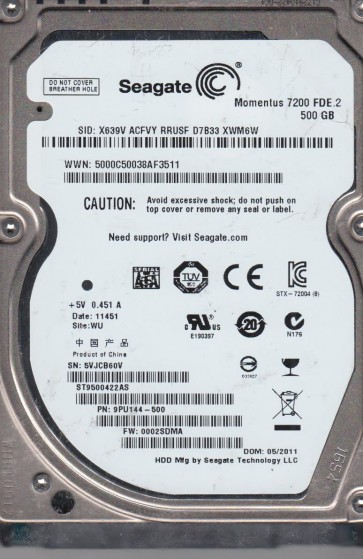
The Seagate ST9500422AS is a 500GB 2.5-inch SATA hard drive (model number ST9500422AS) commonly found in laptops and external enclosures. This drive uses perpendicular recording technology and typically spins at 7200 RPM. It features a Marvell main controller and a Seagate-specific firmware architecture. Key components include the printed circuit board (PCB), the head-disk assembly (HDA) with read/write heads and platters, and the preamplifier. Understanding these components is crucial for diagnosing failures, as problems can arise in the electronics, mechanical assembly, or logical structure.
Identifying Common Failure Types
1. Mechanical Failure (Head Crash or Stiction)
Symptoms: Audible clicking, scraping, or grinding noises from the drive. The drive may spin up but then stop repeatedly. In severe cases, the platters may become seized (stiction). This is often caused by physical shock, manufacturing defects, or age-related wear. Hardware issue: The read/write heads have made contact with the platters, damaging the magnetic media or the heads themselves.
2. Firmware Corruption
Symptoms: The drive is detected by the BIOS or operating system but fails to initialize, shows incorrect capacity (e.g., 0 MB or a very small value), or reports errors like “SMART status FAIL”. The drive may spin up normally but remain inaccessible. Software/firmware issue: Critical service area modules (such as the translator or defect list) on the platters have become corrupted due to a power surge, improper shutdown, or internal weak sector growth.
3. Electronic Failure (PCB Damage)
Symptoms: The drive is completely dead:no spin-up, no sounds, and not detected by the computer. This can follow a power surge, improper cable connection, or component failure (e.g., burned TVS diode or failed motor controller chip). Hardware issue: A component on the PCB has failed, preventing power from reaching the motor or the preamplifier.
Potential Recovery Paths
Professional Data Recovery Services
When to use: For mechanical failure (head crash, stiction), severe firmware corruption that involves proprietary Seagate tools, or when the platters are damaged. Professional labs have cleanroom facilities (Class 100 or better) for head swaps, specialized equipment (such as PC-3000 or DeepSpar) for firmware repair, and donor drives for parts. Expect costs ranging from $300 to $2,000+ depending on severity. Important: Choose a lab with experience in Seagate HDDs, as firmware solutions differ by model.
DIY Recovery (For Advanced Users Only)
For electronic failure: If the PCB is damaged but the HDA is intact, you may attempt a PCB swap. Locate exact PCB model (e.g., 100535458 Rev B) and obtain a matching donor PCB. However, the ST9500422AS uses a unique system adaptive stored on an external 8-pin serial flash memory chip (often a 25LV040). To recover data, you must transplant this chip from the original PCB to the donor. Without this, the drive will not access media correctly. Use a hot-air rework station or a reliable SPI programmer. For firmware corruption: You may try using professional tools like MRT or PC-3000 (illegal if not licensed), but Seagate F3 architecture is complex; do not attempt without deep knowledge. Simple terminal commands (e.g., “m0,6,2,,,,,22”) can sometimes unlock a drive stuck in “BUSY” state, but the risk of permanent data loss is high.
Software-Based Recovery (For Logical Issues Only)
When to use: For accidental deletion, formatting, or partition loss, assuming the drive is fully functional with no physical or firmware symptoms. Use tools like R-Studio, EaseUS Data Recovery Wizard, or TestDisk. Do not write any data to the failing drive. Use a separate healthy drive to store recovered files.
What Not to Do
- Never open the HDA. The platters are extremely sensitive to dust; opening a non-cleanroom environment will cause permanent contamination and data destruction.
- Do not apply power to a clicking or scraping drive. Running a mechanically damaged drive increases head and platter damage, making recovery impossible.
- Avoid using “freezer” or “tape mounting” tricks. These are myths that seldom work and can cause condensation or additional damage.
- Do not run CHKDSK, format, or file system repair tools on a physically failing or firmware-corrupted drive. These utilities can overwrite critical boot sectors and firmware modules.
- Never swap PCBs without transferring the firmware chip on ST9500422AS. Using a donor PCB directly will not work and may corrupt the original firmware.
Summary
The Seagate ST9500422AS is a robust drive but susceptible to mechanical head crashes, firmware corruption, and PCB failures. Accurate diagnosis is critical: listen for sounds (mechanical), check detection status (firmware), and inspect the PCB for physical damage (electronic). For any noise or non-detection, stop all DIY attempts and seek a professional lab with Seagate-specific tools. For logial issues, standard software may work. Always prioritize making a clone (if possible) before any recovery attempt. Do not attempt PCB swap without understanding the system flash requirements. Protect your data by avoiding risky experiments.