
Data recovery on vintage hard drives like the Samsung HD253GJ starts with identifying the failure type – electronic, firmware, or mechanical. Each requires a different approach, and misdiagnosis can make things worse. Here’s a quick guide to help you assess your situation and decide on the next step.
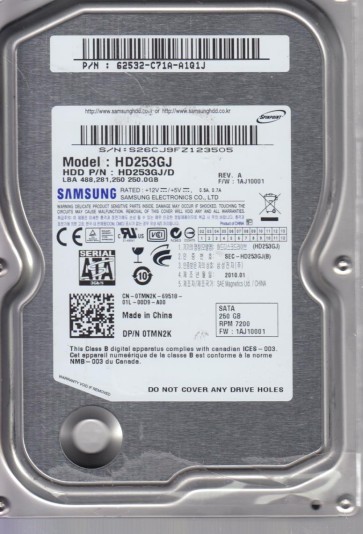
The Samsung HD253GJ is a 250GB 3.5-inch SATA hard disk drive from the Spinpoint F1 series, typically featuring a 7200 RPM spindle speed and a single platter design. This generation of Samsung drives is known for its use of proprietary head actuator mechanisms and a specific firmware architecture that can be sensitive to power fluctuations. The drive utilizes a Marvell or similar controller and a Samsung-specific servo system on the platters. Understanding that this is an older generation SATA drive (SATA 3Gb/s) is crucial, as its failure modes differ from modern SMR or helium-filled drives. The drive’s logic board (PCB) is often the first point of failure for electrical issues, while the head stack assembly (HSA) is susceptible to mechanical shock over time.
Identifying Common Failure Types
1. Electronic / PCB Failure
Symptoms include: The drive does not spin up at all, makes no sound, or is completely dead when powered. The drive may also click once then stop. In some cases a burnt electronic smell or visible damage to the TVS (Transient Voltage Suppression) diodes on the PCB is present. This is often caused by a power surge or a faulty PSU cable. The platters and heads are usually undamaged, making data logically intact.
2. Head Crash / Mechanical Failure
Identified by a distinct repetitive clicking sound (head slap), scratching noises, or the drive spinning up and rapidly down again. The HD253GJ’s heads can degrade over time due to contamination or bearing wear. This is a serious hardware failure where the read/write head physically contacts the platter surface, leading to data destruction if power is left applied.
3. Firmware Corruption / Translator Issues
The drive spins up normally and is detected in BIOS but shows an incorrect capacity (e.g., 0GB or 128GB), or the system hangs on detection. The drive may also click a few times and then go ready but remain inaccessible. This is a common software-level failure on these Samsung models where the translator module (used to map logical sectors to physical locations) becomes corrupted due to bad sectors or a sudden power loss. The data is still present but the drive’s internal mapping is broken.
4. Bad Sector / Degradation Failure
The drive works but becomes extremely slow, produces I/O errors, or the system freezes when accessing certain files. You may hear subtle repetitive seeking noises. This is often a precursor to a head crash or firmware failure. The HD253GJ can develop weak media areas (bad sectors) that the drive’s firmware struggles to reallocate, leading to a cascade of issues.
Potential Recovery Paths
DIY (Do-It-Yourself) Approach
Suitable only for electronic failure with no physical damage.
- PCB Swap (Donor Board): Locate an exact match donor drive (same model HD253GJ and same PCB revision number). Replace the 8-pin flash ROM chip from your original PCB to the donor board using a hot air station. Simply swapping the PCB without transferring the ROM will result in the drive not spinning or showing incorrect capacity. This requires soldering experience.
- TVS Diode Check: If the drive is dead, visually inspect the PCB for two small diodes near the SATA power connector. Test them with a multimeter for shorts. A shorted TVS diode can often be removed to restore power, but the drive will lose overvoltage protection.
- Software Imaging: If the drive spins and is recognized but has bad sectors, use a Linux tool like ddrescue (dd_rescue). Boot from a live USB, run `sudo ddrescue -d /dev/sdX /mnt/usb/image.img /mnt/usb/logfile.log`. Use the direct (-d) flag to bypass the OS cache and a log file to manage retries. Never use recovery software that writes to the failing drive.
Professional Recovery Services
Required for head crashes, severe firmware corruption, or when DIY fails. A professional lab (e.g., using PC-3000, Atola, or DeepSpar tools) will:
- For Head Crashes: Perform a clean-room head transplant. The donor heads must match the HD253GJ’s specific head ramp and preamp parameters. The platters are rarely touched, but the heads are replaced in a class 100 clean bench.
- For Firmware Issues: Use vendor-specific tools (PC-3000 Samsung) to force the drive into utility mode, rebuild the translator, and extract the SA (service area) modules. If the SA is severely damaged, a complex head map modification may be needed.
- For Degraded Media: Professional imagers can apply head map adjustments, reduce read channel speeds, and execute selective imaging to bypass damaged areas that cause OS freezes. Costs typically range from $300 to $2000+ depending on severity.
What Not to Do
- Never open the drive enclosure. The HD253GJ uses a specific HEPA filter location. Exposing the platters to room air (even for a second) will contaminate them, making professional recovery nearly impossible.
- Do not repeatedly power cycle a clicking drive. Each spin-up attempt can scar the platters further. If you hear clicks, power off immediately.
- Do not run CHKDSK / fsck or any repair software. These tools write to the drive’s file system. On a failing drive, they can overwrite critical metadata like the MFT (Master File Table) or corrupt the directory structure permanently.
- Do not freeze the drive. Freezing introduces condensation, causing bearing seizure and platter corrosion. This myth is dangerous and ineffective for modern high-density drives.
- Do not use the drive as a boot device. Running an OS from a failing drive generates continuous read/write cycles, accelerating failure. Always remove the drive and connect it as a secondary slave via a USB-SATA adapter.
Summary
The Samsung HD253GJ is prone to three primary failure categories: electronic (often repairable by PCB ROM swap), mechanical head crashes (requiring clean-room intervention), and firmware translator corruption (solvable via specialized tools). For any clicking, scratching, or unrecognized capacity, the data is best served by immediate power-off and professional evaluation. DIY recovery is only viable for a completely dead PCB with no physical platter damage, provided you have soldering skills and a matching donor board. Attempting software repairs on drives with mechanical or serious firmware issues will almost certainly result in total data loss. Prioritize preserving the current state of the drive over hasty recovery attempts.