
Data recovery on vintage hard drives like the Seagate ST980412AS starts with identifying the failure type – electronic, firmware, or mechanical. Each requires a different approach, and misdiagnosis can make things worse. Here’s a quick guide to help you assess your situation and decide on the next step.
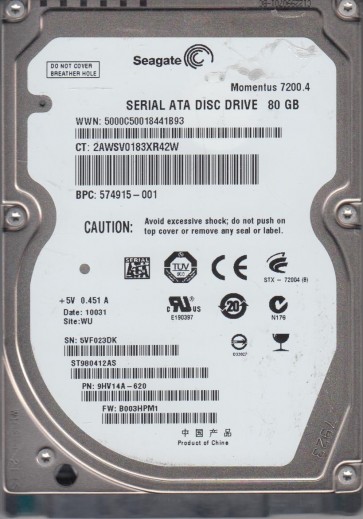
The Seagate ST980412AS is a 2.5-inch SATA hard drive with a 80GB capacity, commonly found in laptops and external enclosures from the late 2000s. It uses the Momentus 5400.3 platform, featuring a perpendicular magnetic recording (PMR) technology and a spindle speed of 5400 RPM. Understanding its mechanical and firmware architecture is critical for diagnosing failures, as its high areal density makes it susceptible to certain head/media issues and firmware corruption.
Common Failure Types
1. Mechanical Head Crash
Symptoms: Loud clicking, grinding, or scraping noises; drive is detected but unreadable; repeated retry cycles.
Cause: Physical contact between the read/write head and the platter surface, often from shock, drop, or head degradation due to weakness in the voice coil actuator.
2. Firmware Corruption (Media Cache/Burn)
Symptoms: Drive powers up, spins, and sometimes appears as Unknown Device or with a noise pattern then goes idle; modem may not respond to commands; SMART shows zero in many fields.
Cause: Corrupt servo data or load/unload logistics in the system area of the platter; common in STx000AS models due to weaker firmware handling of head lifts.
3. Logical File System Damage
Symptoms: Drive is spinning and detected correctly but shows as RAW or Unallocated; files are inaccessible; data appears as gibberish; deleted or corrupted partition table.
Cause: Accidental formatting, improper shutdown, file allocation table corruption, or virus attack.
4. Bad Sectors / Platter Degradation
Symptoms: Slow performance, freezes during file access, SMART Reallocated Sector Count or Current Pending Sector Count increasing, errors during read/write.
Cause: Aging of the platter, media warping, or contaminants; common in heavily used drives with PMR technology where the coating deteriorates.
5. Spindle Motor Stiction
Symptoms: Drive does not spin up; no sound or a faint whine; fails after long periods of non-use; sometimes a click followed by silence.
Cause: Bearing lubrication congeals or friction lock between spindle motor and platters due to thermal expansion or contamination.
Potential Recovery Paths
Professional Services
For Mechanical Failures (Head Crash, Motor Stiction): Contact a data-recovery laboratory with cleanroom (Class 10 or better). Replacement heads come from matching donor drives; calibration tools is required for firmware alignment. Cost: $300¨C$1500.
For Firmware Corruption: Professionals use hardware imagers that bypass the corrupt firmware, such as PC-3000 or DeepSpar, to extract data at the platter level without spinning the media into a crash. Cost: $200¨C$600.
For Logical Issues / Bad Sectors: A professional can create a sector-by-sector clone using dedicated equipment (Acronis True Image with sector skipping or DDRescue), then run filesystem repair on the clone. Pricing: $100¨C$400.
DIY Methods
Logical Damage Only: Use open source tools like TestDisk or PhotoRec on the cloned image; never create the recovery software on the source drive. You may also try R-Studio on a clone if the file allocation table is intact but broken.
Bad Sectors: Use DDRescue (Unix) or HDDSuperClone to make an image, skipping bad regions. Then scan with Recuva or DMDE on this image. Avoid trying to repair or run CHKDSK directly.
Important: Do not attempt DIY on head crashes or motor failures; any human error worsens the glass platter scratches.
What Not to Do
1. Do not open the drive outside a cleanroom. Even a small particle of dust can destroy the platters. Warranty voiding is irrelevant; data is an issue.
2. Do not run CHKDSK on a disk with suspected mechanical or firmware issues. It forces extensive head positioning, potentially scraping the platters.
3. Do not freeze, heat, or tap the drive. Thermal stress causes platter warping; tapping damages heads further. No ice or heat method works long-term and usually makes recovery impossible.
4. Do not use the same drive as a source during cloning. Working on a clone protects the original; any successful write to the source could overwrite needed data.
5. Do not ignore SMART data. Rising Reallocated, Current Pending, or Offline Uncorrectable counts are red flags; continued use accelerates failure.
Summary
The Seagate ST980412AS is vulnerable to mechanical head crashes, firmware corruption, logical errors, bad sectors, and spindle stiction. Recovery requires exact diagnosis: head and motor failures necessitate professional cleanroom, firmware issues need advanced hardware imagers, while logical and bad sector problems may be solved via cloning with DDRescue or dedicated tools. Always avoid DIY mechanical repair and disk crawling routines; prioritize creating a bit-level clone before any repair. Attempting incorrect steps can convert temporary data to permanently lost.