
Data recovery on vintage hard drives like the Maxtor STM3200820AS starts with identifying the failure type – electronic, firmware, or mechanical. Each requires a different approach, and misdiagnosis can make things worse. Here’s a quick guide to help you assess your situation and decide on the next step.
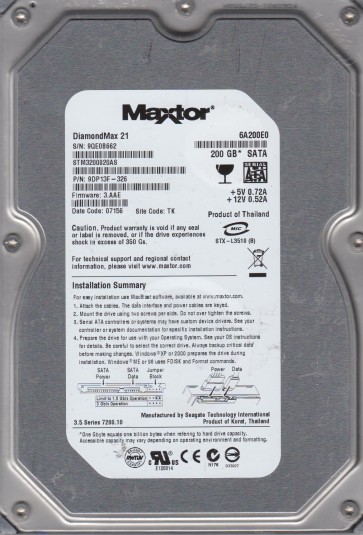
The Maxtor STM3200820AS is a 200GB SATA 3.5-inch desktop hard drive from the 2005 era, utilizing perpendicular recording technology and a single-platter design. It features an 8MB cache and a spindle speed of 7200 RPM. Known for its relatively high areal density for its time, this model is based on the Seagate Barracuda 7200.9 architecture (after Maxtor’s acquisition by Seagate). It is commonly found in older Dell, HP, and custom-built desktop systems. The drive is particularly sensitive to PCB (Printed Circuit Board) component failure, servo instability, and head stiction after extended idle periods.
Common Failure Types
1. PCB / Electronic Component Failure (Symptom: Drive not spinning, no activity, or beeping)
Causes: Power surge, aging capacitors, or a failed motor controller IC (typically the Smooth L293D or L7250E chip). The drive may appear dead or emit a repetitive beep from the voice coil. The PCB often fails while the internal mechanics and data are still intact.
2. Head Stiction and Media Scratches (Symptom: Clicking or grinding noise)
Causes: Prolonged inactivity can cause the lubricant on the platters to congeal, sticking the read/write heads to the disk surface. Upon power-up, the heads may rip off the platter, scratching the media and creating permanent data loss. Power-on cycles after months of storage are high-risk.
3. Servo Track Errors and Bad Sectors (Symptom: Slow performance, freezing, CRC errors)
Causes: Degradation of the servo patterns on the platters due to head wear, thermal expansion, or shock. The drive may remap sectors into G-List but eventually run out of spare areas, causing a “redundant read error” or “no data” status in SMART.
4. Firmware Corruption (Symptom: Drive detected but not accessible; zero capacity reported)
Causes: During bad sector remapping, accidental power loss can corrupt the Translator module or the Service Area (SA) modules. The drive may be recognized as “Maxtor 6Y0” or show a capacity of 0 MB. This is a logical corruption with physical origins.
5. Write Malfunction (Symptom: Files become corrupted, directories disappear, write caching errors)
Causes: Degraded write channel or preamplifier on the head assembly. The drive may read fine but fail to write data correctly, leading to silent data corruption until the underlying sector faults become severe.
Potential Recovery Paths
DIY Methods (Low Risk / No Clicking)
- PCB Swap (Only for exact same PCB revision): If the drive is completely dead with no spin, try a donor PCB from an identical STM3200820AS. Critical: You must transfer the original firmware ROM chip (usually a 8-pin serial flash, e.g., 25P05AV) from the faulty PCB to the donor board. A simple board swap without ROM transfer will not work due to unique drive adaptation data.
- Freeze Method (Emergency only): Place the drive in a sealed anti-static bag in a freezer for 60-90 minutes, then quickly connect and try to image the drive with a tool like ddrescue. This can temporarily reduce stiction or lubricant viscosity to allow one boot cycle. Data transfer must be done in one attempt. High condensation risk.
- SMART Attribute Reading: Use tools like CrystalDiskInfo or GSmartControl to read SMART attributes. Look for raw values of Reallocated Sector Count (ID 05), Current Pending Sector Count (ID C5), and Reported Uncorrectable Errors (ID C6). High values confirm physical damage.
Professional Services (For Clicking, Grinding, or Firmware Issues)
- Head Stack Replacement (HSR): Required if the drive emits clicking noises. Performed in a cleanroom (Class 100 or better) by a skilled technician. The donor drive must match the exact firmware version and head map configuration. Cost: $300 – $1000+.
- Firmware Repair via PC-3000 or MRT Ultra: If the drive spins but shows 0 MB capacity or is not recognized, professionals use specialized tools to rewrite the Translator and SA modules. This often requires loading drive-specific firmware patches (e.g., for DiamondMax 10/11 series). Do not try this without proper equipment.
- Platter Transplant: For severe media scratches, the original platters may be removed and installed into a donor drive of the exact same model and firmware. This is extremely high-risk and expensive ($1500+), and success is not guaranteed if the media surface is damaged.
- Data Imager (DeepSpar or PC-3000 UDMA): For drives with bad sectors, professionals use hardware-based imagers that can control head positioning and skip bad regions, creating a sector-by-sector copy. They can also read the drive in “slow mode” to bypass weak servo tracks.
What Not to Do
- Do not apply power to a clicking drive repeatedly. Each click can scratch the platter further, destroying data. Stop immediately after the first abnormal noise.
- Do not open the drive enclosure, including removing the top cover. Hard drives are sealed in contamination-free air. Any dust or fingerprint will cause permanent head crash. Even professional cleanroom work requires special equipment.
- Do not run CHKDSK (scandisk) or any file system repair tool on a drive with clicking or significant bad sectors. These utilities can write to the drive, altering data structures and making professional recovery impossible.
- Do not use data recovery software (such as Recuva or EaseUS) on a drive that is making mechanical noise. These tools are designed for logical recovery only and will stress the hardware further, often leading to total failure.
- Do not attempt to replace the read/write heads yourself unless you have a certified cleanroom and have performed hundreds of successful HSR operations. The risk of damaging the platters or misaligning the heads is extremely high.
Summary
The Maxtor STM3200820AS is prone to PCB failure (dead drive), head stiction (click after idle), and firmware corruption (zero capacity). For a dead drive, carefully performing a ROM-transfer PCB swap may recover data. For clicking or firmware problems, professional cleanroom head replacement or PC-3000 repair is the only viable path. Never power-on a noisy drive or run software recovery tools on a physically failing drive. Prioritize sending the drive to a specialized recovery lab as soon as physical symptoms appear.