
Data recovery on vintage hard drives like the Seagate ST2000LM015 starts with identifying the failure type – electronic, firmware, or mechanical. Each requires a different approach, and misdiagnosis can make things worse. Here’s a quick guide to help you assess your situation and decide on the next step.
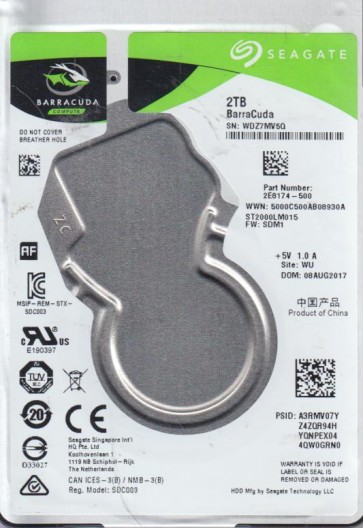
The Seagate ST2000LM015 is a 2.5-inch 2TB SATA hard disk drive, part of Seagate’s BarraCuda line. It typically spins at 5400 RPM and uses 2TB platters, often with a 128MB cache. This model is common in external USB drives (via an integrated SATA-USB bridge) and laptops. Key components include the read/write heads, platters, spindle motor, voice coil actuator, and a SATA controller PCB. The drive uses perpendicular magnetic recording (PMR) and often employs SMR (Shingled Magnetic Recording) technology in some revisions to maximize density. Understanding that the PCB contains firmware and a system area on the platters is critical for recovery.
Identifying Common Failure Types
1. Logical Corruption (Software/Firmware)
Symptoms include: drive detected but not accessible, file system errors, “RAW” partition, or clicking during initialization but without physical damage. Causes: improper ejection, power loss during write, bad sectors (reallocated), or virus damage. This is often recoverable with software if no physical damage exists.
2. Mechanical Failure (Head Crash or Actuator Damage)
Symptoms include: repetitive ticking or clicking sounds (head parking), scratching noises, drive spins up but never initializes, or no activity after spin-up. The 2TB platters are sensitive; a head crash can damage the magnetic surface. This usually requires a cleanroom replacement of the head stack assembly (HSA).
3. PCB / Electronics Failure
Symptoms include: drive not spinning up, no power on, burning smell, or visible damage to the PCB (e.g., blown TVS diode, burnt motor controller chip). The SATA controller or the preamplifier IC may fail. A simple PCB swap may work if the ROM chip is transferred, as each PCB is unique to the drive.
4. Motor Failure (Stiction or Locked Spindle)
Symptoms include: drive spins up briefly then stops, whining noise, or no rotation at all. The spindle motor bearings may seize, or the platters may stick to the parking ramp (stiction). This is often a physical issue requiring disassembly and manual platter removal.
Potential Recovery Paths
Professional Recovery Services
For mechanical failures (head crash, motor stuck, scratches), PCB failure with ROM damage, or severe logical issues beyond software reach, send to a professional lab with Class 10 cleanroom capabilities. Expect costs from $300 to $2500+ depending on platter damage. Labs use tools like PC-3000, DeepSpar, or MRT Pro to read system areas and clone media. For the ST2000LM015, they can replace heads, read platters with specialized firmware, and handle SMR zone issues. Do not attempt DIY on mechanical failures as you risk permanent data loss.
Do-It-Yourself (DIY) Methods
For Logical Issues:
- Try recovery software: R-Studio, GetDataBack, or DMDE. Connect the drive via a direct SATA connection (avoid USB bridge if possible). Scan for lost partitions and recover files to a different physical drive.
- Use Linux ddrescue: Create a sector-by-sector image. Example:
ddrescue -d -f -v /dev/sdX /target/image.img /target/logfile.log. This skips bad sectors and can retry later. - If drive clicks, stop immediately ¨C likely a head firmware issue. Use tools like HDD Regenerator can worsen it.
For PCB Failure (No Physical Damage):
- Identify the PCB model (e.g., 100812603 REV C). Check for blown TVS diodes (near SATA power pins) ¨C if shorted, they can be removed or replaced.
- Find a donor PCB with identical controller chip and firmware version. Swap the original ROM chip (8-pin SOIC) from the faulty PCB to the donor using a hot air station or solder iron. Without ROM swap, the drive may not spin or may behave wrong.
- Test with a safe power supply using a multimeter to avoid overvoltage.
For Bad Sector Cloning:
- Use HDDSuperClone (Linux) or Clonezilla with -rescue option. Expect very slow speeds if many bad sectors. Aim to clone to a healthy drive, then recover files from the clone.
What Not to Do
- Do NOT open the drive enclosure at home. Opening exposes platters to dust, which will destroy the magnetic surface and opportunities for recovery.
- Do NOT try to spin a seized motor by force or using a screwdriver ¨C this damages platters or spindle.
- Do NOT run chkdsk /f or fsck on a failing drive. It can cause further corruption by writing repairs to damaged areas.
- Do NOT apply freezing or heat (e.g., putting drive in freezer). This is a myth and can cause condensation leading to PCB corrosion or platter damage.
- Do NOT use “professional” data recovery software that claims to fix hardware ¨C it can’t unless the heads are working.
- Do NOT keep power cycling a clicking drive ¨C each spin can damage the heads more.
- Do NOT attempt to swap PCB without ROM transfer ¨C it will fail or cause firmware mismatch.
Summary
The Seagate ST2000LM015 is a 2TB laptop/portable drive with PMR and sometimes SMR technology. Failure types range from logical (file system errors, bad sectors) to mechanical (head crash, spindle seizure) and electronic (PCB burnout). For logical failures, software and sector cloning are viable DIY options if you have a clean SATA connection. For any clicking, grinding, or non-spinning behavior, immediate professional recovery is strongly recommended. Never attempt DIY on physically damaged drives ¨C they require a cleanroom. The key rule: stop using the drive at first sign of trouble, avoid power cycling, and consult a specialist if data is valuable.