
Data recovery on vintage hard drives like the Samsung SV1363D starts with identifying the failure type – electronic, firmware, or mechanical. Each requires a different approach, and misdiagnosis can make things worse. Here’s a quick guide to help you assess your situation and decide on the next step.
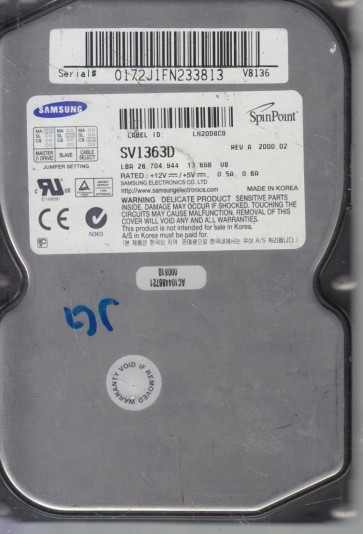
The Samsung SV1363D is a 3.5-inch Parallel ATA (IDE) hard disk drive with a storage capacity of approximately 136.5 GB, operating at a spindle speed of 5400 RPM. Part of the Samsung SpinPoint V series, this drive utilizes a single platter and advanced Giant Magneto-Resistive (GMR) head technology for its era. It is characterized by its aluminum chassis, a single processor driving both the servo and interface logic, and a firmware architecture that is sensitive to logical corruption and media degradation on the platter surface. Understanding these design elements is critical for diagnosing failure modes and planning a recovery strategy.
Common Failure Types
1. Mechanical Failure (Head Crash or Stiction)
Symptoms: Audible clicking, scraping, or high-pitched whining noises from the drive. The system may not detect the drive, or it may power down after a loud noise. The drive may spin up but fail to initialize. Causes: Usually caused by physical shock or prolonged wear. The read/write head can physically contact the platter surface, damaging the magnetic coating (head crash). The head assembly can also become stuck in the parking ramp (stiction).
2. Firmware Corruption (Service Area Damage)
Symptoms: Drive is detected with an incorrect model number or capacity (e.g., 0 GB or 128 MB). The drive clicks when accessing certain areas but otherwise sounds healthy. The system hangs while trying to read the drive. Causes: The drive’s firmware, stored on the platter in a reserved region called the Service Area (SA), can become corrupted due to a power surge, sudden power loss during a write operation, or natural degradation of the magnetic media in that area.
3. Logical Damage (File System and Partition Errors)
Symptoms: The drive is detected and sounds normal (no unusual noises) but is not accessible. Windows shows “The disk structure is corrupted and unreadable” or “The file or directory is corrupted and unreadable.” The drive appears as RAW or unallocated space. Causes: Accidental formatting, improper system shutdown, virus attacks, or software errors that corrupt the Master Boot Record (MBR), File Allocation Table (FAT), or NTFS master file table.
4. Bad Sectors (Media Degradation)
Symptoms: Gradual or sudden increase in read/write errors. The drive becomes extremely slow when trying to access specific areas. Files may be partially read or become corrupt. The system may attempt to reallocate sectors, leading to a reduction in available storage space over time. Causes: Aging of the magnetic media, physical shock that damages the platter, or manufacturing defects. A single growing cluster of bad sectors indicates a platter scratch, which will likely lead to a head crash.
5. Stuck Spindle Motor or Failed Electronics Board (PCB)
Symptoms: Drive does not spin up at all. No noise or vibration from the drive. The system does not detect the drive. A failed PCB may show visible burns or cracked components. Causes: Electrical surge can fry the drive’s controller logic. The spindle motor bearings can seize due to age or contamination, preventing the platters from rotating.
Potential Recovery Paths
DIY Methods
For Logical Damage:
Step 1: Create a Disk Image. Use a tool like R-Studio, GetDataBack, or ddrescue (Linux) to create a bit-for-bit copy of the drive to a healthy target drive. This is essential before any scanning or repair. Use a write-blocker to prevent any modifications to the source. Step 2: Recover Data from the Image. Scan the image file for lost partitions or files using the same software. Do not attempt to write to or repair the original drive.
For a Non-Spinning Drive (Simple PCB Swap):
Warning: This only works if the platters and firmware are intact. The PCB must be from an identical model, firmware revision, and region. After swapping the PCB, you may need to move a serial EEPROM chip from the original board to the new one for the drive to unlock and spin up. This requires a hot air station.
Professional Services
For Mechanical Failures (Head Crash, Stiction, Scratched Platters): A professional cleanroom (Class 100 or better) is absolutely required. The technician will replace the damaged read/write heads with a set from a matched donor drive. For scratched platters, a head replacement may still allow reading untouched sectors. If the scratch is critical, specialized tools can partially bypass the damaged area.
For Firmware Corruption: Professional tools like PC-3000 or MRT are used to read and rewrite the Service Area. This requires direct access to the drive’s firmware registers and is not possible with standard software. The technician will read a backup of the SA from a donor or attempt to reconstruct it based on common parameters.
For Stalled Motor: A professional can carefully loosen a seized spindle motor by applying controlled rotational force or heat, though this is risky for platter alignment and data integrity.
What Not to Do
- Do not open the drive. Opening the drive outside a cleanroom will introduce microscopic dust particles that will scratch the platters when the drive spins up, destroying data permanently.
- Do not run chkdsk or any file system repair tool. On a drive with physical damage or corruption, this tool can aggressively try to fix errors, often overwriting critical data and making recovery impossible.
- Do not attempt to replace the read/write heads yourself. This is an extremely precise procedure requiring steady hands, proper tools, and a zero-dust environment. A single mistake can damage the heads or platters beyond recovery.
- Do not bang or shake the drive. While it may temporarily unstick a seized motor, it almost always causes head displacement and platter damage, leading to a total loss of data.
- Do not repeatedly power cycle the drive. If it clicks or makes a scraping noise, each power-up and subsequent head movement can damage additional platter surfaces and data clusters.
Summary
The Samsung SV1363D is a legacy IDE drive prone to head crashes, firmware corruption, logical errors, and media degradation. For logical issues, safe DIY imaging with R-Studio is recommended. Mechanical, firmware, and seized-motor failures require a certified data recovery lab with cleanroom access and specialized tools like PC-3000. The most critical steps are to immediately stop using the drive upon noticing symptoms and to never attempt a physical repair outside a professional environment. Prioritize data integrity over cost or speed.