
Data recovery on vintage hard drives like the Western Digital WD2001FYYG starts with identifying the failure type – electronic, firmware, or mechanical. Each requires a different approach, and misdiagnosis can make things worse. Here’s a quick guide to help you assess your situation and decide on the next step.
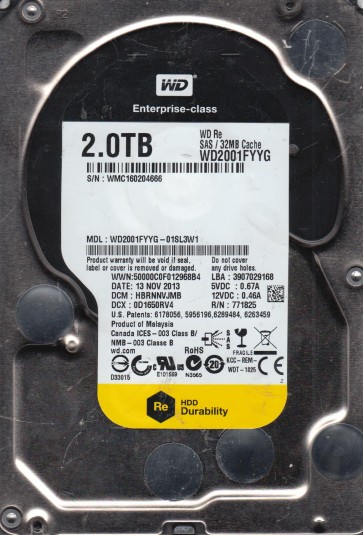
The Western Digital WD2001FYYG is a 2TB Enterprise-class SATA hard drive belonging to the WD RE4 family. It features a 7200 RPM spindle speed, 64MB cache, and dual-stage actuator technology. Designed for 24/7 operation in RAID environments and datacenters, it employs Advanced Format technology (4K physical sectors) and uses a Marvell 88i9345-TFJ2 controller. Its robust construction includes a sealed head-disk assembly (HDA) and a built-in vibration protection system (RAFF). Due to its enterprise usage, these drives often exhibit failure patterns related to extended duty cycles, thermal stress, and mechanical wear.
Common Failure Types
1. Mechanical Head Crash/Stiction:Symptoms include clicking, grinding, or whining noises; drive not spinning up; or immediate system hang upon connection. Causes are often physical shock, contamination, or wear of the spindle motor bearings. The drive may be detected with zero capacity or display a “click of death.”
2. Firmware Corruption:Symptoms include drive not detected in BIOS, spinning with no activity, or reporting incorrect capacity (e.g., 0GB or 1.2TB). Firmware can become corrupted due to sudden power loss during microcode updates, bad sectors proliferating to system files (SA/ROM), or age-related degradation. The drive may show “Ready” but with a “No Media” status.
3. Bad Sectors and Media Degradation:Symptoms include slow read/write speeds, frequent “Uncorrectable Sector Count” errors in SMART (ID 05, C6), file system corruption, and system crashes. Causes include physical media defects (platter damage), thermal asperities, or manufacturing defects. SMART reallocated sector counts may increase rapidly.
4. Logical Damage / File System Corruption:Symptoms include “RAW” file system, “The drive is not accessible” errors, lost partitions, or data showing as deleted. Causes include improper shutdowns, virus attacks, accidental formatting, or RAID controller misconfigurations. Unlike other failures, the drive spins normally and is detected by BIOS.
5. Electronic Failure (PCB Board Fault):Symptoms include complete power failure (no spin, no detection) or a burning smell. The drive’s printed circuit board (PCB) may have a blown TVS diode, failed pre-amp, or damaged controller chip, often from power surges or manufacturing defect.
Potential Recovery Paths
DIY Methods (for Logical/Software Issues ONLY):
For File System Corruption or Accidental Deletion:Use file recovery software like R-Studio or GetDataBack. Create a byte-for-byte image of the drive to a healthy drive using tools like ddrescue (Linux) before scanning. Avoid writing anything to the failing drive. Recover files to a separate storage device. Do not use chkdsk /f on a drive with physical issues.
For Bad Sectors (Early Stage):Use ddrescue to create a disk image with error handling. Pause the process if the drive begins clicking or making unusual noises. Use the tool’s retry and trim options to bypass unreadable areas. Only attempt this if the drive is recognized and not mechanically failing.
Professional Services (Recommended for all mechanical, firmware, and complex logical issues):
For Firmware Corruption (e.g., SA module errors):Professional labs use PC-3000 or MRT hardware/software suites to access the drive’s service area, repair damaged modules, and rebuild translator data. This is not DIY-able typically.
For Mechanical Failures (Head Crash, Stiction, Motor Failure):Requires a cleanroom (Class 10 or better) to open the HDA. The technician must replace the read/write heads, swap the spindle motor, or transplant platters into a donor drive. Cost ranges $500-$3000+.
For Electronic Failures:A professional can replace the PCB with a matching donor board and migrate the original ROM (usually stored on the controller or EEPROM). Simple TVS diode replacement is sometimes possible by experienced hobbyists.
What Not to Do
1. Do not attempt to open the hard drive enclosure. Exposing the platters to dust will destroy data permanently. This requires a certified cleanroom.
2. Do not apply power repeatedly to a clicking or non-spinning drive. Each spin attempt risks further head or platter damage.
3. Do not run chkdsk, fsck, or any file system repair tool on a drive with suspected physical damage. It will force reads on failing areas, worsening the condition.
4. Do not use freezer, heat, or hammer techniques. These are myths that often cause irreversible damage to platters or the spindle motor.
5. Do not attempt firmware repairs or PCB swaps without proper tools (PC-3000, hot air station) and donor firmware matching. Mismatched firmware can brick the drive.
Summary
The WD2001FYYG is a robust enterprise drive prone to mechanical wear, firmware corruption, and media degradation. For logical failures, DIY imaging with ddrescue and recovery tools is viable if precautions are taken. Mechanical, firmware, or electronic failures demand professional cleanroom intervention due to the drive’s sealed HDA and complex platter/head alignments. Prioritize immediate power-off and professional consultation for clicking, burning smells, or SMART reallocations above 100. Avoid any physical opening or electrical testing without specialized equipment.