
Data recovery on vintage hard drives like the Seagate ST250LT007 starts with identifying the failure type – electronic, firmware, or mechanical. Each requires a different approach, and misdiagnosis can make things worse. Here’s a quick guide to help you assess your situation and decide on the next step.
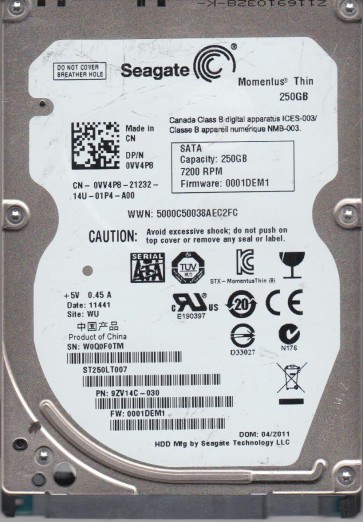
The Seagate ST250LT007 is a 250GB 2.5-inch SATA hard disk drive commonly found in laptops and external enclosures. It typically operates at 5400 RPM and uses a conventional magnetic recording technology. Understanding its physical and logical structure is crucial for effective recovery. The drive consists of a printed circuit board (PCB) with a controller and motor driver, a voice coil actuator, read/write heads, platters coated with magnetic media, and a firmware layer that manages logical addressing (LBA) and caching. Failures can occur in any of these domains.
Identifying Common Failure Types
1. Firmware Corruption
This is a common software-level failure where the drive’s internal firmware becomes corrupted. Symptoms include the drive being detected incorrectly (e.g., as 0GB or with a wrong model number), clicking sounds without spinning up properly, or being stuck in a “busy” state. It often results from sudden power loss or age-related degradation of the firmware modules.
2. Head Assembly Failure
A mechanical failure where one or more read/write heads cease to function. Physical signs include loud clicking or ticking noises, grinding sounds, or the drive being completely silent after power-up. This can be caused by a head crash (head touching the platter surface), shock damage, or aging of the head stack assembly. Data may be partially readable if only one head fails on a multi-head drive.
3. Motor (Spindle) Stiction
When the drive’s spindle motor cannot overcome static friction to spin the platters. Symptoms include a brief hum or buzz followed by silence, or a repetitive cycle of trying to spin and stopping. This is often due to dried lubricant or physical impact that has shifted the motor bearings. It is a hardware-level issue requiring specialized tools.
4. Bad Sectors / Media Degradation
Software-accessible failure where the magnetic media has deteriorated, developing physical bad sectors. Symptoms include slow read/write speeds, file system errors, and the drive generating reallocated sector counts (SMART errors). While initially recoverable via software, a spreading defect can lead to complete inaccessibility.
Potential Recovery Paths
Professional Data Recovery Services
For firmware, head, or motor failures, professional cleanroom services are recommended. A typical process involves: (1) Diagnosis using specialized tools like PC-3000 or DeepSpar. (2) For head failure: donor drive matching, head stack replacement in a Class 100 cleanroom. (3) For firmware: using hardware tools to re-flash or patch firmware modules. (4) For motor stiction: mechanical intervention to free the motor (e.g., applying controlled torque). Expect costs from $300 to $1500+ depending on complexity. Service providers like DriveSavers, Gillware, or local recovery labs are options.
DIY Recovery (Software-Level Only)
Only attempt DIY if the drive is detected with no unusual sounds and no SMART critical warnings. (1) Use a software tool like R-Studio, DMDE, or TestDisk to create a sector-by-sector disk image to a healthy drive. Do not attempt to write to the failing drive. (2) Analyze the image for lost partitions or files. (3) For bad sectors, use tools with “read retry” options but limit retry counts to prevent head wear. Never run chkdsk or fsck on a failing drive. (4) For firmware issues, advanced DIY with tools like MRT or PC-3000 is possible but not recommended for beginners as incorrect firmware writes can brick the drive permanently.
What Not to Do
- Never open the drive enclosure. The internal platters are sensitive to dust and even a single particle of smoke or skin can cause a head crash.
- Do not apply power repeatedly if you hear clicking or grinding. This can physically damage the platters.
- Avoid running defragmentation, chkdsk, or disk repair tools directly on a failing drive. These write operations can corrupt data further.
- Do not freeze the drive. This outdated “hack” can cause condensation that damages the read/write heads and platters permanently.
- Do not attempt to replace the PCB with a generic donor board without firmware transfer. Most Seagate drives have unique firmware that must be matched to the same model, PCB revision, and often require firmware chip swapping or re-programming.
- Do not use strong magnets to “scan” the drive. This can demagnetize the platters or damage the voice coil.
Summary
The Seagate ST250LT007 is a common 2.5-inch drive prone to firmware corruption, head failure, motor stiction, and media degradation. For hardware failures (clicking, grinding, no spin), immediate professional intervention is mandatory. For software issues (logical errors, bad sectors, but no physical noise), DIY imaging with cautious tools is feasible. The golden rule is to stop using the drive at the first sign of trouble and prioritize cloning to a healthy disk. Always handle the drive by its edges, avoid exposing it to static or shock, and never attempt mechanical repairs without cleanroom capability. Proper diagnosis upfront saves time and prevents irreversible data loss.