
Data recovery on vintage hard drives like the Western Digital WD2003FYYS starts with identifying the failure type – electronic, firmware, or mechanical. Each requires a different approach, and misdiagnosis can make things worse. Here’s a quick guide to help you assess your situation and decide on the next step.
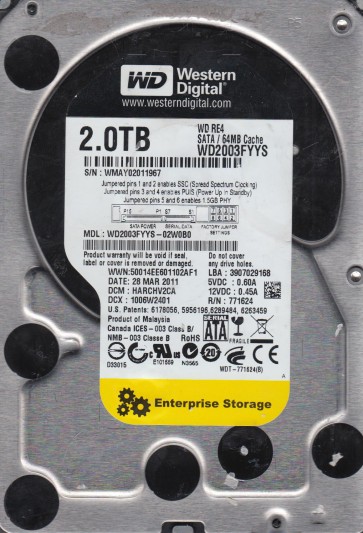
The WD2003FYYS is a business-critical 2TB 3.5-inch SATA hard drive from Western Digital’s RE4 series. It features a high duty cycle (550TB/year workload rate) and a robust dual-processor architecture, designed for 24/7 RAID environments and enterprise storage systems. Understanding its failure modes is essential for effective professional data recovery.
Common Failure Types
1. Mechanical Head Crash
Symptoms: Read/write head makes contact with platters, producing repetitive clicking sounds or no initialization. Drive is detected but with abnormal sounds.
Causes: Dropping, physical shock, motor wear, or failing head preamp. Can be due to sudden power loss while the head is unparked.
2. Firmware Corruption
Symptoms: Drive powers on but is not recognized by BIOS/OS. Shows as correct model but capacity is 0GB or incorrect. Drive spins down after a few seconds.
Causes: Broken SA (system area) modules, bad firmware updates, or corrupted translator due to weak servo SA.
3. Logical File System Damage
Symptoms: Drive is detected correctly but Windows asks to format or folders show as corrupted or inaccessible. File system is RAW.
Causes: Improper shutdowns, virus attacks, bad blocks affecting MFT/FAT, or partition table errors.
4. Electronic / PCB Board Failure
Symptoms: Drive is completely dead, no spin, no activity. No clicks. Fuse on PCB may be blown or visibly damaged.
Causes: Power outage, lightning strike, or incompatible PSU. The TVS diode or spindle motor controller chip (usually Marvell or LSI) can fail.
5. Bad Block Migration
Symptoms: Drive works but gradually develops corrupt files, slow read speeds, freezing during file transfers. SMART reports high Reallocated Sector or Pending Sector count.
Causes: Natural sector wear from high duty cycles, heat, or factory defects. Bad blocks spread as drive tries read-retries.
Potential Recovery Paths
Professional Services (Recommended for Mechanical/Electronic)
Clean Room Head Replacement: Required for head crashes. Service technicians open the drive and replace head assembly (normally custom matched).
PCB Board Swap with Firmware Migration: For PCB failure, replace the board but must transfer the original firmware ROM chip (8-pin SPI). Modern WD RE4 drives use binding between servo info and PCB SN.
Firmware Repair via Specialized Tools: Use dedicated tools (PC-3000, DFL-DDP) to fix corrupted translator or SA modules, creating firmware dumps and debugging.
DIY Methods (Only for Logical/Moderate Firmware)
Use Data Recovery Software: For file deletion, corrupted partition or RAW drives, employ professional tools like R-Studio, DMDE, or GetDataBack. Do not write anything to the affected drive.
SMART Check and Reallocation: If drive works but slow, use HDSentinel or CrystalDiskInfo to monitor. Reallocate bad blocks, but only as last resort.
Create Disk Image: Use ddrescue or HDDSuperClone on Linux to clone drive to working image, skipping stuck areas with carefully calibrated timers. Preserve original drive.
What Not to Do
1. DO NOT open the hard drive without a cleanroom. Any speck of dust can ruin platters and make professional recovery nearly impossible.
2. DO NOT apply power if the drive has significant clicking noise. Continuing to run the head-crashed drive can drill into the surface and lose still-readable data.
3. DO NOT use chkdsk /f or any repair command. It can overwrite file data or fragment critical filesystem structures. Wait for recovery first.
4. DO NOT freeze or heat the hard drive. This myth can cause thermal stress and conduction, damaging spindle or platters irreversibly.
5. DO NOT attempt to replace PCB without transferring firmware ROM. Straight board swap will not match the servo data, leading to worse configuration or stuck heads.
Summary
The WD2003FYYS is an enterprise RE4 drive that can fail mechanically (frequently head crash from shock), electronically (PCB fuse/controller chip), or logically (corrupted filesystem especially in RAID). Professional recovery necessitates cleanroom head swaps and firmware tooling for hardware-failed units. For logical failure, software imaging and minimal writes should be applied under DIY. Avoid power cycles with faulty sounds, never open the cover, avoid repair commands, and never freeze the drive. Identify the failure symptom first, and match the path to either a specialized service or careful systematic software imaging.