
Data recovery on vintage hard drives like the Hitachi HTS545080B9A300 starts with identifying the failure type – electronic, firmware, or mechanical. Each requires a different approach, and misdiagnosis can make things worse. Here’s a quick guide to help you assess your situation and decide on the next step.
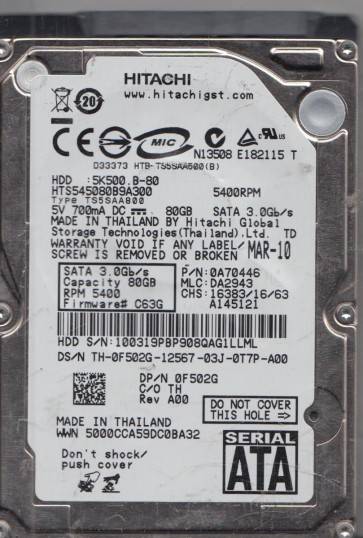
The Hitachi HTS545080B9A300 is a 2.5-inch, 80GB, 5400 RPM SATA hard drive commonly used in laptops from the late 2000s. It features a Travelstar 5K500 series platform with a perpendicular recording technology and a single glass platter. The drive utilizes a Marvell main controller and a Hitachi-manufactured read/write head assembly. Known for its balance of portability and modest capacity, this model is prone to specific failure patterns associated with its age, thermal cycling, and mechanical wear. Recognizing the exact failure mode is critical for choosing a recovery strategy.
Identifying Common Failure Types
1. Mechanical Head Failure (Stiction or Click of Death)
This is the most severe and common failure. The drive may power on but emit a repetitive clicking, ticking, or scratching sound. This indicates the read/write heads have failed to land properly (stiction) or have crashed into the platter surface. The heads may be stuck in the parking ramp or scraping the magnetic media. Data recovery is impossible without a cleanroom environment.
2. Firmware Corruption (S.M.A.R.T. Errors or Drive Not Detected)
The drive may spin up but be detected with a wrong capacity (e.g., 0GB or 4GB), or the BIOS may hang during detection. Often, the primary or secondary defect lists become corrupted. In some cases, the drive reports a “System Area Failure” or “S.M.A.R.T. status BAD”. Software cannot fix this without specialized tools to reflash or rebuild the firmware modules. Attempting to write data can permanently damage the translator modules.
3. Bad Sectors and Surface Degradation
The drive may work slowly, freeze during file access, or produce “CRC errors” and “Delayed Write Failed” messages. This is caused by weak magnetic domains, head misalignment, or thermal asperities. While a few bad sectors can sometimes be reallocated, excessive surface degradation often leads to secondary head damage if the drive is kept powered on. The HTS545080B9A300 is sensitive to platter contamination.
4. PCB (Printed Circuit Board) Electrical Failure
The drive may not spin up at all, or spin up and spin down immediately. The PCB may have visible burn marks, blown capacitors, or failed TVS (Transient Voltage Suppressor) diodes. A failed preamplifier IC on the PCB can cause no head activity. In rare cases, swapping the PCB with a donor board (matched to the same firmware version) may work, but often requires transferring the original ROM chip to unlock the drive.
Potential Recovery Paths
Professional Data Recovery Services
For mechanical clicks, scratching sounds, or severe firmware issues, a professional service is mandatory. Look for a lab with Class 100 or better cleanroom and support for Hitachi-specific tools like PC-3000 or DeepSpar Disk Imager. The procedure typically involves: (a) Diagnose the exact failure via preamp testing and SA (System Area) access. (b) For head failure: replace the head assembly with a donor from an identical HTS545080B9A300 model in a laminar flow hood. (c) For firmware: use a specialist tool to rebuild the SA modules and create a sector-by-sector copy. (d) For PCB failure: transplant the ROM flash chip to a matched donor board. Expect costs from $300 to $2000+ depending on complexity.
DIY Recovery (Limited Scenarios Only)
Only attempt DIY if the drive shows no abnormal sounds (no clicks, no grinding). If the failure is purely logical: (1) Connect the drive via a USB-to-SATA adapter to a different PC. (2) Do not initialize or format the disk if asked. (3) Use a low-level imaging tool like ddrescue (Linux/macOS) or HDDSuperClone (Windows). Run in read-only mode to create a full clone to a healthy drive. (4) If bad sectors are detected, let ddrescue skip them and retry later. Do not use chkdsk or fsck on the original drive. (5) For PCB issues: if the drive shows no power, measure the 5V and 12V pins. If a TVS diode is shorted, carefully remove it (using a hot air station) to see if the drive powers up. This is risky and voids any potential warranty. Swapping a PCB without matching firmware will almost always cause the drive to fail to spin up or damage the heads.
What Not to Do
- Never open the hard drive enclosure. The HTS545080B9A300 platter is extremely sensitive to dust particles and handling even a single speck of dust can permanently destroy the data surface.
- Do not apply software like “Data Rescue” or “Recuva” to a clicking or non-detected drive. The scanning writes use of heads will accelerate damage.
- Never freeze the drive. This is a dangerous myth for Hitachi drives. Temperature changes can cause platter warping and head stiction.
- Do not repeatedly power cycle the drive. Each power-on cycle on a failing head or seized spindle motor can widen the scratch zone.
- Do not use compression tools or attempt a “quick format.” The file system structure is often the only thing left to reconstruct.
Summary
The Hitachi HTS545080B9A300 is a mature but failure-prone drive. The most common failure is mechanical (head crash) causing audible clicks, requiring a professional cleanroom head swap. Firmware corruption manifesting as unrecognized capacity or hanging BIOS also needs specialist intervention. DIY imaging is only safe if the drive spins quietly and is detected correctly but shows logical errors or a few bad sectors. For PCB electrical failure, a matched donor board with ROM transfer may be attempted by a skilled technician but high risk. The golden rule: if you hear a clicking or scratching sound, power off immediately and contact a data recovery professional. The cost of a professional service is minimal compared to complete data loss.