
FreeAgent XTreme drive doesn’t wake up from hibernation when connected via USB.
With the original build of Windows Vista some computers may lose connection with the USB external drive after waking up from hibernation.
This issue is addressed in Vista Service Pack 1.
To determine what version of Windows Vista you have, follow these steps:
- Click the Windows (Start) Button.

- In the Search bar, type Welcome center and open the Welcome Center.
- In the upper right of the screen, click the button that says Show more details.
(Click to expand)

- On that screen it should say what version of Vista is running, including the service pack level.
(Click to expand)


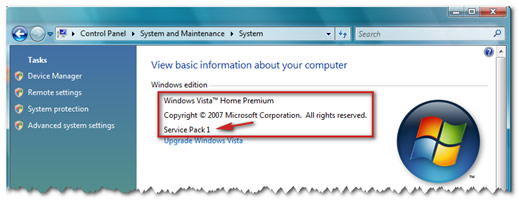
If no service pack is listed, please view Microsoft Knowledge Base article 935791 for instructions on how to obtain Service Pack 1.