Articles

Online Backup Price Comparison 2011

Online Backup Price ComparisonOnline backup services are usually priced as a function of the following things:

  • The total amount of data being backed up;
  • The number of machines covered by the backup service;
  • The maximum number of versions of each file that are kept;
  • Data retention and archiving period options;
  • Managed backups vs. Unmanaged backups;
  • The level of service and features available;

Some vendors limit the number of versions of a file that can be kept in the system. Some services omit this restriction and provide an unlimited number of versions. Add-on features (plug-ins), like the ability to back up currently open or locked files, are usually charged as an extra, but some services provide this built in.

Most remote backup services reduce the amount of data to be sent over the wire by only backing up changed files. This approach to backing up means that the customers total stored data is reduced. Reducing the amount of data sent and also stored can be further drastically reduced by only transmitting the changed data bits by binary or block level incremental backups. Solutions that transmit only these changed binary data bits do not waste bandwidth by transmitting the same file data over and over again if only small amounts change.

Online backup Payment Method:

  • Pay per computer. Additional fee for storage over a threshold.
  • Pay per computer. Storage per computer is unlimited.
  • Pay per unit of storage, but unlimited computers may share that storage.
  • Bandwidth capping or limits are used on accounts.

Recommended Online Backup Services

Carbonite, Keepit.com, IDrive, DropBox, BackBlaze, KeepVault, MozyHome, SugarSync, JungleDisk…

More details: Comparison of online backup services

Online Backup Price Comparison 2011 Read More »

Recommended 250GB Internal Hard Drives

Recommended 250GB Internal Hard DrivesRequire more storage for the games, images, music and films? An internal hard drive upgrade or perhaps a second drive might be what you’re searching for. Internal hard disk drives are utilized as primary storage in desktop Computers, work stations, and servers. Nowadays, small form factor internal hard disk drives are utilized in consumer electronic items like audio players and digital camera models too. No matter the application, this post will present a comprehensive choice of internal hard disk drive items that you should select from, from hard disk producers like Western Digital, Seagate, HItachi, LaCie, Maxtor yet others.

Bestselling 250GB Internal Hard Drives on Amazon.com

Western Digital 250GB 8MB Caviar Blue Desktop Hard Drive – WD2500AAJS
(Model: WD2500AAJS, Cache: 8MB, Price: $53.99, Amazon.com Price: $39.99)

Review: “This drive is very quiet. I’m running this along side of a Seagate Barracuda 250gb booting Windows Vista, with this drive running Ubuntu 10.10, and this drive barely makes a sound when loading. It’s also pretty fast as well.”

Western Digital 250GB Caviar Blue 16MB Cache Desktop Hard Drive – WD2500AAKS
(Model: WD2500AAKS, Cache: 16MB, Price: $57.99, Amazon.com Price: $47.13)

Review: “I bought one of these more than a year ago, and it has served me well. I bought another one recently, and so far so good. It’s not the fastest or biggest drive in the world, but it’s cheap, and that’s good enough for me.”

Seagate Barracuda 250GB 8MB Cache Internal Hard Drive – ST3250318AS
(Model: ST3250318AS, Cache: 8MB, Price: $52.50, Amazon.com Price: $38.00)

Review: “Does exactly what says it does, at the speed it says it does it. I purchased this as a hard drive replacement for a relative who wasn’t too concerned with the cache. It took a lil long to install Windows 7 but after that, the low cache wasn’t noticeable using the typical games/applications that my relative uses.”

Western Digital 250GB 8MB Caviar Blue IDE Desktop Hard Drive – WD2500AAJB
(Model: WD2500AAJB, Cache: 8MB, Price: $79.00, Amazon.com Price: $44.95)

Review: “No problems with this drive, needed one of these PATA type drives for the older computer, relatively quiet, obviously not as fast as a SATA but what do you expect. I like WD’s quality generally, I actually have two of this series AAJB drive in the older machine, this 250GB and a 160GB, same model, both work good.”

How to choose a 250GB Internal Hard Drive?

When choosing a hard disk, you will find two primary points to consider: speed and capacity. Budget enabling, always choose the quickest drive you are able to. Speed is measured while using Revoltions per minute figure a quicker spinning speed means greater performance, particularly in games, but could cause greater warmth and noise. The capability, measured in GB (gb), should rely on your personal storage needs. A greater capacity drive will almost always cost greater than a lower capacity drive, so an account balance must usually be struck between capacity and price. Additionally, the hard disk interface IDE, SATA, or SCSI determine a drives application: IDE and SATA for private storage and SCSI for enterprise, mission critical storage.

Recommended 250GB Internal Hard Drives Read More »

Recommended 1TB Network Attached Storage (NAS)

Network-attached storage (NAS) is data storage or perhaps a data storage device, like a hard disk or RAID array, attached to some type of computer network, supplying data use of different network clients.

NAS systems contain a number of hard drives, frequently arranged into logical, redundant canisters or RAID arrays (redundant arrays of affordable/independent disks). NAS products remove down to file serving using their company servers on the network.

Bestselling 1TB Network Attached Storage (NAS) on Amazon.com:

Seagate BlackArmor NAS 110 1TB Network Attached Storage
(MPN: ST310005MNA10G-RK, Price: $199.99, Amazon.com Price: $149.99)

Seagate BlackArmor NAS 110 1TB Network Attached StorageReview: “A little slower than I hoped. ~40MBps read and ~22MBps write – Sequential. Since the 1Gb ethernet spec can go up to 125MBps theoretical I was hoping it would be in the 80-100MBps range. Encryption requires a USB drive plugged in the front. Just fine if you have a small, old USB flash. The backup software is not the most reliable in recovery, but you get 5 free licenses and for Windows XP it is better than built-in. Use Windows 7’s built-in back up with drive.”

Iomega Home Media 1TB Network Attached Storage
(MPN: 34337, Price: $126.99, Amazon.com Price: $99.99)

Iomega Home Media 1TB Network Attached Storage Review: “very nice case design, internal fan for hard drive, hooks up to router through network at full speed (1000 mps), very fast, although my comp ethernet card is going at 100 mps, fast enough for now untill i get another eternet card, adjustable light brightness through software.”

Buffalo LinkStation Live 1TB Shared Network Attached Storage
(MPN: LS-CH1.0TL, Price: $129.99, Amazon.com Price: $108.90)

Buffalo LinkStation Live 1TB Shared Network Attached StorageReview: “Super easy setup out of the box. Using with Xbox Media Center with the actual original Xbox’s throughout the house. Kids playroom, living room, office. You can setup access rights so kids can only access Kids folder, etc. Also planning to use with Masscool Media Player.”

NAS provides both storage and file systems. This really is frequently compared with SAN (Storage Space Network) products, which offer only block-based storage leaving filesystem concerns about the “client” side. SAN methods include SCSI, Fibre Funnel, iSCSI, ATA over Ethernet, or HyperSCSI.

NAS Manufactors: Zoysia, Cavalry, D-Link, Hammer Storage, Apple, iomega, LaCie, Linksys, Maxtor, Netgear, QNAP, Thecus, Seagate, Western Digital and Synology.

Recommended 1TB Network Attached Storage (NAS) Read More »

Recommended 3.5 Inch 1TB Internal Hard Drives

Recommended 3.5 Inch 1TB Internal Hard DrivesRequire more storage for the games, images, music and films? An internal hard drive upgrade or perhaps a second drive might be what you’re searching for. Internal hard disk drives are utilized as primary storage in desktop Computers, work stations, and servers. Nowadays, small form factor internal hard disk drives are utilized in consumer electronic items like audio players and digital camera models too. No matter the application, this post will present a comprehensive choice of internal hard disk drive items that you should select from, from hard disk producers like Western Digital, Seagate, HItachi, LaCie, Maxtor yet others.

Bestselling 1TB Internal Hard Drives on Amazon.com

Seagate Barracuda 7200.12 1TB 7200 RPM 32MB Cache 3.5″ Internal Hard Drive
(MPN: ST31000528AS, Price: $135.99, Amazon.com Price: $64.99)

Review: “Drive works great i have a couple of these and have yet to have a problem. Speeds are decent. Compared to back in the day ha its not a ssd but i dont really care its for storage anyways.”

Western Digital 1TB Caviar Green 64 MB Cache Hard Drive
(MPN: WD10EARS, Price: $90.99, Amazon.com Price: $59.99)

Review: “plenty of space for video files and pictures and anything else that doesn’t require a very fast drive. This drive is meant to be a storage drive and not a drive to run your operating system or games on, for that get a SSD or 7200rpm drive. Other than that this is an excellent drive and is fairly quiet, hopefully it will last for many years to come!”

Western Digital Caviar Black 1TB Desktop Hard Drive
(MPN: WD1002FAEX, Price: $119.99, Amazon.com Price: $89.99)

Review: “Considering the price and performance, it is like the best deal on the market right now”

When choosing a hard disk, you will find two primary points to consider: speed and capacity. Budget enabling, always choose the quickest drive you are able to. Speed is measured while using Revoltions per minute figure a quicker spinning speed means greater performance, particularly in games, but could cause greater warmth and noise. The capability, measured in GB (gb), should rely on your personal storage needs. A greater capacity drive will almost always cost greater than a lower capacity drive, so an account balance must usually be struck between capacity and price. Additionally, the hard disk interface IDE, SATA, or SCSI determine a drives application: IDE and SATA for private storage and SCSI for enterprise, mission critical storage.

Recommended 3.5 Inch 1TB Internal Hard Drives Read More »

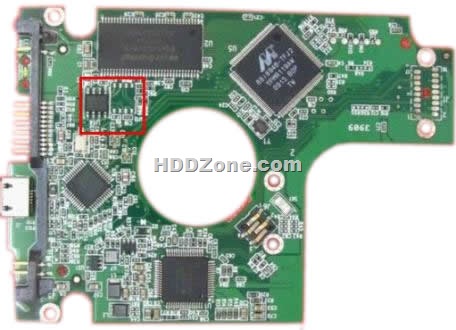
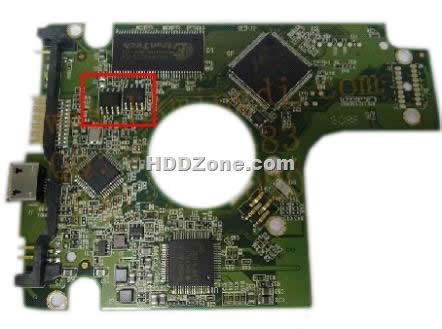
Western Digital PCB 2060-701675-001 REV P1

Swap Western Digital Circuit Board 2060-701675-001 REV P1 to recover data from damaged hard drives due to PCB failure. 2060-701675-001 REV P1 is the board number on this PCB. If your HDD’s PCB has problems, the drive usually cannot boot up or there may be an inaccurate display in the BIOS of the hard drive’s information. Also power may not get to the hard drive and as a result it will not spin up.

Western Digital PCB 2060-701675-001 REV P1:

Board No.: 2060-701675-001 REV P1
Main Controller IC: 88i9045-TFJ2

Western digital pcb board 2060-701675-001 has 2 different types:

One has 2 BIOS, as the below photo:

When you swap this western digital PCB, you should move both the BIOS(U12&U14 chips) from your original wd PCB’s BIOS to the replacement board.

Western Digital PCB 2060-701675-001 REV P1

Other one just has 1 BIOS, as the below photo:

Western Digital PCB 2060-701675-001 REV P1

Western digital pcb 2060-701675-004 REV P1 also has the 2 different types as WD 2060-701675-001 REV P1 2.5″ one.

More Western Digital 2.5″ Laptop PCB please visit HDDzone.com.

Western Digital PCB 2060-701675-001 REV P1 Read More »

Why Difficult to Find Professional Data Recovery Training School

Why Difficult to Find Professional Data Recovery Training SchoolThere is a direct correlation between the technology and economic interest. An ordinary PC’s hard disk stored the important day. If the hard disk is physically damage, the charge for a single hard disk drive is from $350-$1,000. There is a company who had the damaged hard disk. Their data is not classified. They sent the HDD to their location data recovery company who can’t extract the data. Then they delivered the HDD to another small company in Florida. After 1 month, they still not got back the data. Last, they find a professional data recovery company. They got the data back after 24 days. Be Charged $570. Another company has a damaged server. They asked the data recovery company to repair it. The price was $3,000. They can’t repair it at that time. They needed to bring it to their company. The price became $12,000.

How about the tracking charge? It is from $300-$750. This price is just to recover data from a physical damaged HDD. So please think is there anyone want to teach this technology to you.
It is common they don’t want to you know this technique.

Why many people do not willing to do the HDD repair business now? Repair HDD is much cheaper than data recovery. If you just repair HDD, perhaps you can’t afford the rent. Do data recovery business, maybe you can’t get an order per year. In some small towns, you should also repair other things to make a living. In some large city, it is possible to do data recovery business professional. However, the rent is also high. In some hot spot, a 40 square meter place should cost you $60,000-70,000. Maybe it will be higher. Not everyone can afford it. Furthermore, you should earn it little by little. Can you make up your mind to do this business? Not all of you, right?

So, how can you get into this field?
First, you can do this business from small. You should ensure the successful rate. Do not receive the case which you don’t have assurance to extract the data (Only if your customer told you it didn’t matter. You can do it and get experience). When you have a little repute, your business will become better and better. Then you can develop your company as a professional company. When you are more repute, you will get more cases. This time, you should employ staff to help you. Maybe you also afraid your technique be learnt by others now.

Why Difficult to Find Professional Data Recovery Training School Read More »

Recommended 2.5 Inch 1TB External Hard Drives

2.5 Inch 1TB External Hard Drives

Looking for a 2.5’’ External hard drive with 1TB capacity? please refer to this guide.

Today’s Storage disks’ capacity upgrade day by day. A few years ago, purchased a 1GB U-disk, you would already feel it was a great capacity and could not expect the 8GB, 16GB U-disks become noting in today. Moreover, the capacity of the external hard drive is extremely huge. You can see 1TB, 2TB’s external hard drives everywhere, greatly eased people’s requirement to massive data transmission. With the portable function and great capacity, the 2.5-inch external hard drives become the main force of high-capacity transmission. Now, the capacity of 1TB is the best capacity for 2.5-inch external hard drive. Many manufacturers have launched promotions for this capacity external hard drive. I have collected many promotions information to shall with you. Before you purchase these external hard drives, you can refer:

Seagate FreeAgent GoFlex 1 TB Ultra-Portable External Hard Drive
(MPN: STAA1000100, Price: $$144.99, Amazon.com Price: $99.99)

Huge capacity, no power supply needed, fast(depending on the cable you use), interchangeable interface cables(USB 3.0, Firewire 800, eSATA, USB 2.0), small, nearly the perfect external hard drive to carry around in your bag every day.

Toshiba Canvio Plus 1 TB USB 3.0 Portable External Hard Drive
(MPN:E05A100PBU3XS, Price: $139.01, Amazon.com Price: $99.99)

Small and light. Drive is very quiet too. The mini USB 3.0 plug seems like it makes a good connection. I can hold up my drive by the cable and it wont fall out. Doesn’t wiggle either.

Western Digital WD Elements SE 1 TB USB 2.0 Portable External Hard Drive
(MPN: WDBABV0010BBK, Price: $136.99, Amazon.com Price: $89.99)

Works with WD Live TV Hub. No power issues with single USB port. Matches cosmetically quite nicely. Sustained transfer rates of 28.0-30.0 MB/s for about 350GB of files. That’s about as good as you’ll do over USB–it’s about what the 3.5″ WD Elements drives get. No WD Smartware. You don’t have to deal with AutoRun or virtual drives that clutter things up. This is a plain old drive.

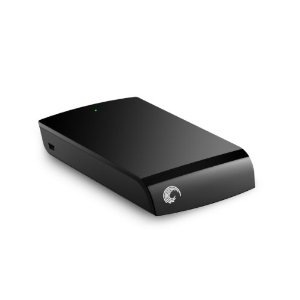
Seagate Expansion 1 TB USB 2.0 Portable External Hard Drive
(MPN: ST910004EXA101-RK, Price: $134.99, Amazon.com Price: $88.14)

As a PC Tech, I require a high-capacity portable drive with a common interface, that can run as fast as possible and not require a seperate power supply. This drive has about 14 hard drive images on it from Acronis and still has about 300GB free! When I first got it, I was surprised and a bit disappoint in its size, in that its about twice the size of a Western Digital Passport. However, I got over that real quick when I saw how much faster it was and its unique size helps me identify it from my group of portable drives very quickly. All my Western Digital drives look alike and I have to label them to tell which is which. If I order more of these, I may have to do the same thing, but its so capacious, I can’t see having to order another any time soon.

Recommended 2.5 Inch 1TB External Hard Drives Read More »

SanDisk Announces Agreement to Get Pliant Tech

SanDisk Announces Agreement to Get Pliant TechSanDisk, a worldwide leader in expensive memory storage solutions, today introduced a definitive agreement to get Pliant Technology, Corporation., the number one developer of enterprise solid condition drives (SSD). Underneath the the agreement, SanDisk can pay roughly $327 million in cash and supply certain equity-based incentives. The transaction, that has been authorized by the boards of company directors of both companies, is susceptible to customary closing conditions, including regulating review and approval, which is likely to near by the finish of SanDisk’s second fiscal quarter.

Pliant presently sells ultra-high end enterprise solid condition drives in line with the SAS protocol to satisfy the demanding performance, data integrity and reliability needs of enterprise storage clients. The business’s product roadmap includes PCIe-based solutions for high-performance compute servers. Pliant is really a leader in using multi-level cell (MLC) NAND in enterprise SSDs, and also the less expensive of MLC is really a key enabler for that broad adoption of SSDs within the enterprise market.

“Expensive memory is making significant inroads in to the enterprise by significantly growing application performance and reducing energy consumption, we feel the mixture of Pliant’s innovative technology and enterprise-level system expertise with SanDisk’s high-quality, large-scale MLC memory production is really a winning value proposition for clients. Our advanced expensive technology roadmap and expensive management capacity will complement Pliant’s talents and allow us lead the means by reliability and gratifaction within the Enterprise SSD market.” stated Sanjay Mehrotra, SanDisk leader and ceo.

“The Enterprise SSD marketplace is poised for considerable growth, with revenue forecasted to achieve $4.2 billion in 2015, up from $994 million this year, this trajectory is fueled through the growing utilization of MLC NAND technology, that will require extensive expensive management expertise to make sure effective adoption in enterprise programs.” stated Frederick Unsworth, research director at Gartner.

SanDisk needs the transaction to become dilutive to its non-GAAP earnings by 2% to threePercent in fiscal year 2011 and accretive to non-GAAP earnings in fiscal year 2012.

ABOUT SANDISK

SanDisk Corporation is really a world leader in expensive memory storage solutions, from research and development, product design and manufacturing to branding and distribution for OEM and retail channels. Since its founding in 1988, SanDisk continues to be finding in expensive memory and system technologies which have provided customers with new and life changing digital encounters. SanDisk’s diverse product portfolio includes expensive memory cards and embedded solutions utilized in wise phones, pills, digital camera models, video cameras, digital media gamers along with other consumer electronic products, in addition to USB expensive drives and solid condition drives for that computing market. SanDisk’s items are utilized by customers and enterprise clients all over the world. SanDisk is really a Plastic Valley-based S&P 500 and Fortune 500 company, using more than half its sales outdoors the U . s . States.

ABOUT PLIANT TECHNOLOGY

Pliant Technology’s Enterprise Expensive Drives (EFDs) really are a new class of solid-condition storage products that integrate effortlessly into enterprise information systems and significantly improve performance, reliability, energy efficiency, and TCO. Pliant’s Lightning EFD family provides breakthrough enhancements over present day greatest carrying out hard disk and SSD storage solutions for a variety of data I/O intensive enterprise programs. Pliant Technology has roughly 80 employees and it is located in Milpitas, California.

SanDisk Announces Agreement to Get Pliant Tech Read More »

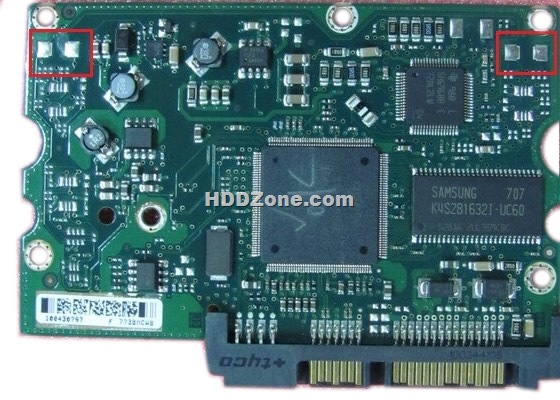
Seagate Barracuda 7200.10 PCB Circuit Board 100435196

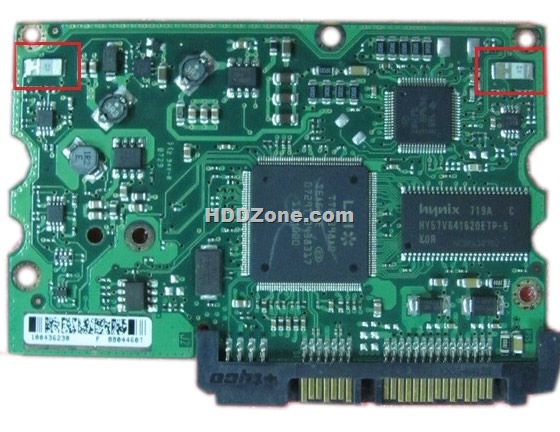
Swap Seagate Barracuda 7200.10 PCB Circuit Board 100435196 to recover your data from damaged HDD due to PCB failure. 20100435196 is the board number on this PCB. If your HDD’s PCB has problems, the drive usually cannot boot up or there may be an inaccurate display in the BIOS of the hard drive’s information. Also power may not get to the hard drive and as a result it will not spin up.

100435196 Seagate Barracuda 7200.10 PCB Circuit Board Details:

Board Number: 100435196
Main Controller IC: TTB4398A0/V520AA
HDD Motor Combo IC: SH6960BE/100369972

This circuit board has 2 different types:

1. Barracuda 7200.10 PCB Circuit Board 100435196 has no small chips:

Seagate Barracuda 7200.10 PCB Circuit Board 100435196

2. Barracuda 7200.10 PCB Circuit Board 100435196 has smaller chips:

Seagate Barracuda 7200.10 PCB Circuit Board 100435196

If you need this pcb board you can order it online on HDDZone.com

Seagate Barracuda 7200.10 PCB Circuit Board 100435196

More Seagate Barracuda 7200.10 PCB on HDDZone.com

Seagate Barracuda 7200.10 PCB Circuit Board 100435196 Read More »

Using a Portable Hard Drive for Business Security

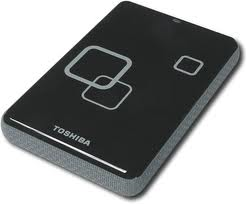
USB 2.0 portable hard driveWhile data recovery plans are a big deal to large businesses, small business owners to often do not even consider the concept until the worst happens. For a small business, making use of an inexpensive USB 2.0 portable hard drive to backup crucial business files can be the difference between a theft, fire, or computer failure being a minor inconvenience or a business destroying catastrophe. Having a backup plan, following it religiously, and securing the drive can be an absolute lifeline for a company.

Establishing a Plan
First, consider the files necessary to do business. These files will include accounting files, employee records and payroll information, and customer information. Additionally, if the company does computer oriented work, backing up all works in progress is a good idea as well. Once it has been decided which files to back up, how frequently to perform the backup should be determined. For most small businesses, once a week is adequate.

Follow the Plan
Backing up essential company data is only truly effective if it is regularly done. It is important to ensure that someone reliable is responsible for performing the backup. Establish protocol to confirm that the backup was successfully completed and establish a routine to deal with situations where the primary person performing the backup is unavailable. Keeping a current backup of the business’s important information is like buying insurance – you hope you never need it, but if you do, not having it can be devastating. Avoiding this devastation is as easy as sticking to the backup routine.

Secure the Hard Drive
The strength of using a portable hard drive for a small business’s important data is that it is small and can be quickly put in a safe. Securing the drive after the backup is complete is as important as performing the backup in the first place. While fire is the big catastrophe that enters people’s minds when considering the danger to company information, data stored on a computer is also at risk of theft, vandalism, or simple computer failure.

A large company with branch offices can get away with the creation of redundant files by exchanging data between locations. As the number of locations and distance between them increase, the chance of a single event wiping out every copy of crucial information is virtually nonexistent. For a small business with one location, things are different. The single location (and sometimes single computer) represents the risk that anything that harms the location could destroy the data. Establishing and following a sensible backup routine can eliminate this risk.

Using a Portable Hard Drive for Business Security Read More »

Scroll to Top