
Autopsy – The Open-Source Digital Forensics Platform. In the world of digital forensics, commercial tools like EnCase, X-Ways Forensics, and Magnet AXIOM often dominate the conversation. Their polished interfaces, extensive support, and court-ready outputs make them the default choice for law enforcement and large corporate security teams. However, these tools come with significant licensing costs that can be prohibitive for independent practitioners, small agencies, academic institutions, and even some mid-sized organizations. This is where Autopsy steps in. Autopsy is a free, open-source digital forensics platform built on The Sleuth Kit (TSK). It provides a graphical interface that makes powerful command-line forensic utilities accessible to a broader audience. This post explores Autopsy’s capabilities, its role in the forensic ecosystem, and where it excels as a practical alternative to commercial tools.
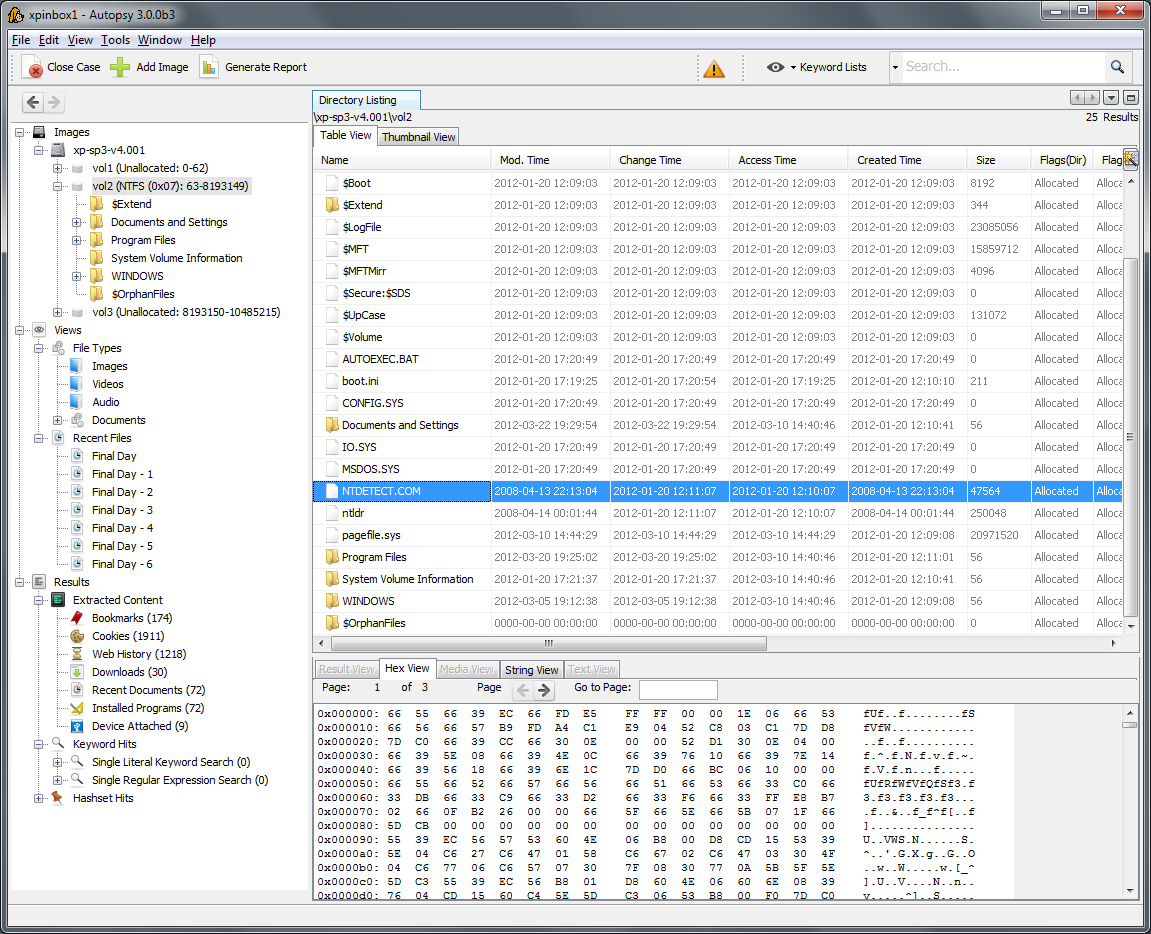
What is Autopsy?
Autopsy is a digital forensics platform that provides a user-friendly graphical interface for The Sleuth Kit (TSK), a collection of Unix- and Windows-based command-line tools for file system analysis. Developed and maintained by Basis Technology, Autopsy is designed to help investigators analyze disk images, recover deleted files, and extract artifacts from Windows, macOS, and Linux file systems. The platform is entirely open-source and free to use, which has made it a popular choice for training, academic research, and cases where budget constraints are a primary concern.
Autopsy’s architecture is modular, meaning that its functionality can be extended through plugins. The core platform handles the heavy lifting of file system parsing, while modules add specific capabilities such as keyword search, hash filtering, timeline generation, and artifact extraction. This modularity allows the tool to evolve and adapt to new forensic challenges without requiring a complete rewrite.
Core Capabilities and Features
File System Analysis
At its core, Autopsy provides comprehensive file system analysis. It supports a wide range of file systems, including NTFS, FAT, exFAT, HFS+, EXT, and others. The platform can parse directory structures, recover deleted files from unallocated space, and identify file signatures to detect mismatched extensions. This makes it a capable tool for a wide variety of forensic examinations, from simple file recovery to complex investigations involving multiple file systems.
Timeline Analysis
Timeline analysis is a critical feature in modern forensic investigations. Autopsy includes a timeline view that aggregates file system events, system logs, and other artifacts into a chronological sequence. This allows investigators to reconstruct a sequence of events, identify patterns, and isolate suspicious activity around the time of an incident. The timeline can be filtered and sorted based on various criteria, making it easier to focus on specific time periods or event types.
Keyword Search
Autopsy includes a robust keyword search engine that can scan through file content, metadata, and unallocated space. Investigators can use literal terms, regular expressions, and indexed searches to locate relevant evidence across the entire disk image. The search functionality is integrated with the rest of the platform, allowing examiners to bookmark search results and incorporate them into reports.
Artifact Extraction
Autopsy includes modules for extracting common artifacts from Windows systems. This includes browser history, recent documents, USB device history, prefetch files, event logs, and registry hives. The platform also supports parsing of email files such as PST and MBOX, making it useful for investigations involving communications. While not as extensive as commercial tools like EnCase or AXIOM, Autopsy’s artifact coverage is substantial and continues to grow through community contributions.
Reporting
Autopsy includes a built-in reporting module that generates detailed reports in HTML and PDF formats. The reports can include all bookmarked items, search results, case notes, and file system metadata. While the reporting output is not as polished as commercial counterparts, it provides a solid foundation for documentation and court submission.
Strengths and Limitations
Strengths
- Cost-Free: Autopsy is completely free, making it accessible to anyone regardless of budget.
- Open-Source: The source code is available for inspection and modification, which can be important for organizations requiring full transparency.
- User-Friendly Interface: The graphical interface makes complex command-line tools accessible to examiners with varying levels of expertise.
- Modular Architecture: Community-developed plugins extend functionality for specific file types and applications.
- Cross-Platform Support: Autopsy can analyze images from Windows, macOS, and Linux systems, providing flexibility in multi-platform cases.
Limitations
- Performance: Autopsy can struggle with very large disk images (multi-terabyte) compared to commercial tools.
- Encryption Support: The platform lacks robust built-in handling for encrypted containers, BitLocker volumes, or FileVault protected drives.
- Mobile Support: Autopsy does not natively support mobile device extraction or analysis.
- Formal Support and Certification: There is no formal certification program or dedicated enterprise support, which can be a deterrent for organizations requiring guaranteed response times.
- Polish and UX: The interface, while functional, lacks the polish and refinement of commercial alternatives like AXIOM or EnCase.
Practical Use Cases
Training and Education
Autopsy is widely used in academic and training environments. Its cost-free nature allows students to gain hands-on experience with forensic workflows without the financial burden of commercial licenses. Many forensic training courses use Autopsy as an entry-level tool, giving students a foundational understanding of file system analysis before moving on to more complex platforms.
Small-Scale Investigations
For independent consultants, small law enforcement agencies, and nonprofit organizations, Autopsy provides a viable solution for routine investigations. Cases that do not involve encrypted volumes, mobile data, or extremely large drives can be handled effectively with Autopsy’s capabilities.
Initial Triage and Screening
In larger labs, Autopsy is often used as a triage tool. Investigators can quickly process disk images to identify areas of interest before committing to more resource-intensive analysis with commercial platforms. This workflow reduces the time and cost associated with processing every image at full depth.
Community-Driven Research
The open-source nature of Autopsy makes it a valuable tool for researchers developing new forensic techniques. Because the source code is available, researchers can experiment with modifications, test new parsing methods, and contribute their findings back to the community. This fosters innovation and helps drive the entire field forward.
Comparing Autopsy to Other Forensic Tools
In the broader forensic ecosystem, Autopsy occupies a distinct niche as the most capable free alternative to commercial solutions. Compared to EnCase or X-Ways Forensics, Autopsy offers a similar feature set for basic analysis but lacks the performance, polish, and enterprise support of those platforms. It also does not include the advanced scripting capabilities of EnScript or the speed of X-Ways.
When compared to KAPE, Autopsy and KAPE serve different purposes. KAPE is a triage and collection tool focused on rapid artifact extraction from live systems or mounted images. Autopsy is a full-file-system analysis platform designed for deep examination of disk images. The two tools are complementary: an investigator might use KAPE for initial triage and then use Autopsy for more detailed analysis when needed.
Compared to Magnet AXIOM, Autopsy lacks the unified mobile, computer, and cloud analysis capabilities. AXIOM is a more comprehensive platform, but comes with a significant cost. For labs that primarily examine computer media and have budget constraints, Autopsy provides a practical alternative.
Getting Started with Autopsy
Autopsy is available for free download from the official website. The installation process is straightforward and includes all necessary components, including The Sleuth Kit and Java Runtime Environment. New users are encouraged to start with sample images available through various forensic training resources to familiarize themselves with the interface and workflow.
The Autopsy community is active, with forums, user groups, and documentation available online. Many community-contributed plugins are available to extend the platform’s capabilities, and the official documentation provides detailed guidance on installation, configuration, and usage.
Conclusion
Autopsy has earned its place as the most capable open-source digital forensics platform available. Its cost-free nature, user-friendly interface, and extensive feature set make it an invaluable tool for training, small-scale investigations, and as a triage component in larger labs. While it cannot match the performance, polish, or enterprise features of commercial platforms, it provides a solid foundation for file system analysis and artifact extraction. In a field where budget constraints are a reality for many organizations, Autopsy delivers professional-grade functionality without the professional-grade price tag.
Official website: https://www.autopsy.com

